Freedom251 › AI Image Expanders
YouArt AI Image Extender
What YouArt AI Image Extender is
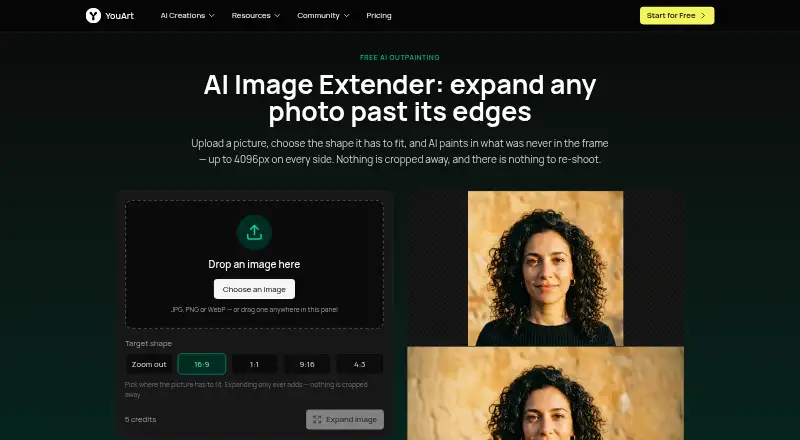
YouArt AI Image Extender is a web tool that generates new picture content beyond the edges of an existing image, a process also called outpainting or uncropping. It can expand each of the image’s four sides by up to 4096 pixels in one run. Choose a 16:9, 1:1, 9:16 or 4:3 target shape, or use zoom-out to keep the original proportions. The original image stays at full size and detail while the tool generates new margins around it.
The extender accepts JPG, PNG and WebP files, but transparency is not preserved. Each expansion costs 5 credits, and batch expansion is available. A result can be taken into YouArt’s workflow editor to chain steps or process a batch of images. YouArt’s workflow page says its MCP server connects with Codex, Claude and Cursor. Uploads go to the user’s YouArt account, and a result opens in a session visible only to that user unless shared. A free trial is available. Listed plans are Basic at $7.99 a year, Pro at $23.99 a year, Max at $119.99 a year and Team at $263.99 a year, all billed annually; the pricing note describes plans from $7.99/mo (annual). YouArt’s privacy policy lists encryption in transit and at rest, access controls, authentication systems, security audits and monitoring. It says data may be shared with AI service providers to process creative requests; users may request account and associated-data deletion, subject to legal retention requirements.
Who it suits
This tool suits people who want to extend images into new aspect ratios or add generated margins while keeping the original image at full size and detail. Its batch option and workflow editor also fit users who want to process multiple images or chain steps.
What it does well
- Extends all four sides by up to 4096 pixels in one run.
- Offers four target aspect ratios and an original-proportion zoom-out option.
- Keeps the uploaded image at full size and detail.
- Supports batch expansion and continued work in a workflow editor.
- Results are visible only to the user unless shared.
What to know first
- Transparency is not preserved in uploaded images.
- Each expansion uses 5 credits.
- Uploads go to a YouArt account.
Limits
Each image expansion costs 5 credits. The Basic plan lists 1000 credits and up to ~200 images/month; the other plans list 3300, 18000 and 36300 credits respectively.
Plans
| Plan | Billed and limits | Price |
|---|---|---|
| Max | Annually · 18000 credits · Up to ~6000 images/month · Up to ~6000s video/month | $119.99 a year |
| Max | Monthly · 18000 credits · Up to ~6000 images/month · Up to ~6000s video/month | $149.99 a month |
| Pro | Annually · 3300 credits · Up to ~1000 images/month · Up to ~1100s video/month | $23.99 a year |
| Team | Annually · 36300 credits · Up to ~12000 images/month · Up to ~12100s video/month · Up to 10 members per team · Up to 5 teams | $263.99 a year |
| Pro | Monthly · 3300 credits · Up to ~1000 images/month · Up to ~1100s video/month | $29.99 a month |
| Team | Monthly · 36300 credits · Up to ~12000 images/month · Up to ~12100s video/month · Up to 10 members per team · Up to 5 teams | $329.99 a month |
| Basic | Annually · 1000 credits · Up to ~200 images/month · Up to ~332s video/month | $7.99 a year |
| Basic | Monthly · 1000 credits · Up to ~200 images/month · Up to ~332s video/month | $9.99 a month |
As youart.ai lists them, read 8 Oct 2026. The maker's own page has the final word.
Getting started
- Open https://www.youart.ai/tool/image-extender in a web browser.
- Start the available free trial or choose a listed plan.
- Upload a JPG, PNG or WebP image to your YouArt account.
- Choose a target aspect ratio or use zoom-out to retain the original proportions.
- Expand the image, then continue in the workflow editor if needed.
Verdict
Choose YouArt AI Image Extender if you need web-based outpainting with adjustable aspect ratios, batch expansion or workflow-editor follow-up. Consider another tool if preserving image transparency is essential; each expansion also consumes 5 credits.
Questions
Is a free trial available?
Yes, YouArt lists a free trial.
What does the tool cost?
The pricing note says From $7.99/mo (annual). The Basic plan is $7.99 a year, billed annually.
What image formats can I upload?
The tool accepts JPG, PNG and WebP, but transparency is not preserved.
How many credits does an expansion use?
One image expansion costs 5 credits.
Which plans are listed?
Basic is $7.99 a year, Pro $23.99 a year, Max $119.99 a year and Team $263.99 a year, all billed annually.
Does YouArt connect with other tools?
YouArt’s workflow page says its MCP server connects with Codex, Claude and Cursor.
Facts from YouArt AI Image Extender's own pages
- Aspect ratios
- The tool offers 16:9, 1:1, 9:16 and 4:3 target shapes, plus a zoom-out option that keeps the original proportions. · youart.ai, 8 Oct 2026
- Credit cost
- One image expansion costs 5 credits. · youart.ai, 8 Oct 2026
- Data handling
- The privacy policy says YouArt may share data with AI service providers to process creative requests and that users may request account and associated-data deletion, subject to legal retention requirements. · youart.ai, 8 Oct 2026
- Expansion
- It can expand an image by up to 4096 pixels on each of its four sides in one run. · youart.ai, 8 Oct 2026
- Free trial
- A YouArt tool page says new accounts start with free trial credits; it does not state a trial duration there. · youart.ai, 8 Oct 2026
- Image preservation
- The page says the uploaded image stays unchanged at full size and detail while the tool generates margins around it. · youart.ai, 8 Oct 2026
- Input formats
- The tool accepts JPG, PNG and WebP images, and the page says transparency is not preserved. · youart.ai, 8 Oct 2026
- Integrations
- YouArt’s workflow page says its MCP server connects with Codex, Claude and Cursor. · youart.ai, 8 Oct 2026
- Purpose
- The image extender generates new picture beyond a photo’s edges, a process the page calls outpainting or uncropping. · youart.ai, 8 Oct 2026
- Security
- YouArt’s privacy policy lists encryption in transit and at rest, access controls, authentication systems, security audits and monitoring. · youart.ai, 8 Oct 2026
- Session privacy
- Uploads go to the user’s YouArt account, and the result opens in a session only that user can see unless they share it. · youart.ai, 8 Oct 2026
- Support
- YouArt lists [email protected] as its support contact. · youart.ai, 8 Oct 2026
- Workflow use
- Users can take the result into YouArt’s workflow editor to chain steps or process a batch of images. · youart.ai, 8 Oct 2026
Where YouArt AI Image Extender stands on Freedom251
- AI Image Expanders#25 of 26