Freedom251 › Malware Removal Software
Xcitium Cleaning Essentials
What Xcitium Cleaning Essentials is
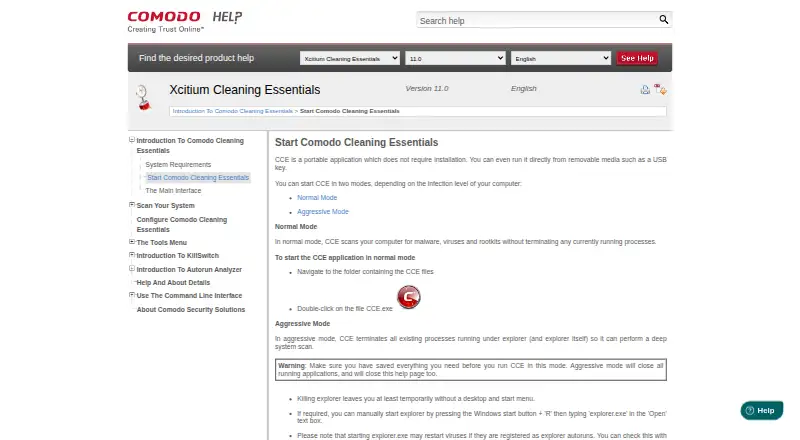
Xcitium Cleaning Essentials is a free Windows toolkit for finding and removing malware and unsafe processes from infected computers. Its main tools are KillSwitch, which displays running processes and can help stop unsafe ones, and Autorun Analyzer, which reviews startup items, assigns trust ratings, and lets users handle suspicious or unknown entries. Smart, Full, and Custom scans are available. Smart Scan checks memory, autorun entries, hidden services, registry keys, and boot sectors, while Custom Scan targets selected files, folders, or drives. CCE runs without installation and can launch from removable media such as a USB key. A command-line interface can run scans and update the virus database. Normal mode leaves running processes active. Aggressive mode terminates processes, including Explorer, and closes applications, temporarily removing the desktop and Start menu. Listed requirements include Windows XP, Vista, 7, or 10, 128 MB RAM, and 210 MB disk space.
Who it suits
It suits Windows users and administrators needing portable malware scans or process analysis. Comodo also identifies MSPs, enterprises, and consumers as audiences.
What it does well
- Free Windows security toolkit
- Runs without installation
- Offers Smart, Full, and Custom scans
- Includes process and startup analysis
- Command line supports scans and updates
What to know first
- Aggressive mode closes applications
- Desktop and Start menu may disappear temporarily
- Supports listed Windows versions through Windows 10
- Requires 210 MB disk space
Verdict
CCE provides portable malware scanning, process control, startup analysis, and command-line operation at no cost. Aggressive scanning can disrupt the desktop, so users should understand that behavior before choosing it.
Facts from Xcitium Cleaning Essentials's own pages
- Aggressive mode
- In aggressive mode, CCE terminates processes running under Explorer, including Explorer itself, to perform a deep system scan. · help.comodo.com, 4 Oct 2026
- Aggressive mode limitation
- Aggressive mode closes all running applications and can temporarily leave the user without a desktop and Start menu. · help.comodo.com, 5 Oct 2026
- Autorun Analyzer
- Autorun Analyzer checks startup items, assigns each a trust rating, and lets users decide which programs and services may run or delete malicious and unknown items. · help.comodo.com, 5 Oct 2026
- CLI
- The help contents include command-line procedures for running Smart and Custom scans and updating the virus database. · help.comodo.com, 5 Oct 2026
- Command line
- The Windows command line interface can run scans and virus database updates. · help.comodo.com, 4 Oct 2026
- Console distribution
- Comodo One administrators can download CCE from the console and transfer it to endpoints for scans on-site or through remote desktop. · help.comodo.com, 4 Oct 2026
- Custom scans
- Custom Scan lets users select specific files, folders, or drives to scan. · help.comodo.com, 4 Oct 2026
- Headquarters
- Bloomfield, New Jersey, United States · help.comodo.com, 28 Sept 2026
- KillSwitch
- KillSwitch shows running processes, helps identify and terminate unsafe ones, and can trace a process back to the malware that generated it. · help.comodo.com, 5 Oct 2026
- Main tools
- Its main tools are KillSwitch, a malware scanner, and Autorun Analyzer. · help.comodo.com, 4 Oct 2026
- Maker audience
- Comodo says its security product suite serves MSPs, enterprises, and consumers. · help.comodo.com, 5 Oct 2026
- Maker location
- The Comodo Cybersecurity page says the company is based in Clifton, New Jersey. · help.comodo.com, 4 Oct 2026
- Maker scale
- Comodo states that its threat prevention products have over 80 million installations. · help.comodo.com, 5 Oct 2026
- Minimum resources
- The listed minimum requirements include 128 MB available RAM and 210 MB of hard disk space. · help.comodo.com, 5 Oct 2026
- Operating system
- The listed system requirements are Windows 10, Windows 7, Windows Vista, or Windows XP, each in 32-bit or 64-bit versions. · help.comodo.com, 5 Oct 2026
- Portable
- CCE does not require installation and can run from removable media such as a USB key. · help.comodo.com, 5 Oct 2026
- Portable use
- CCE does not require installation and can run from removable media such as a USB key. · help.comodo.com, 4 Oct 2026
- Purpose
- CCE scans computers for malware, viruses, and rootkits. · help.comodo.com, 5 Oct 2026
- Scan modes
- Normal mode scans without terminating running processes; aggressive mode terminates processes so CCE can perform a deep system scan. · help.comodo.com, 5 Oct 2026
- Scan types
- The product offers Smart Scan, Full Scan, and Custom Scan. · help.comodo.com, 4 Oct 2026
- Smart Scan
- Smart Scan targets critical areas including system memory, autorun entries, hidden services, registry keys, and boot sectors. · help.comodo.com, 4 Oct 2026
- System requirements
- The listed minimum requirements include Windows XP, Vista, 7, or 10 in 32-bit or 64-bit versions, 128 MB available RAM, and 210 MB of disk space. · help.comodo.com, 4 Oct 2026
Where Xcitium Cleaning Essentials stands on Freedom251
- Malware Removal Software#22 of 30
- Malware removal tools#25 of 31