x64dbg
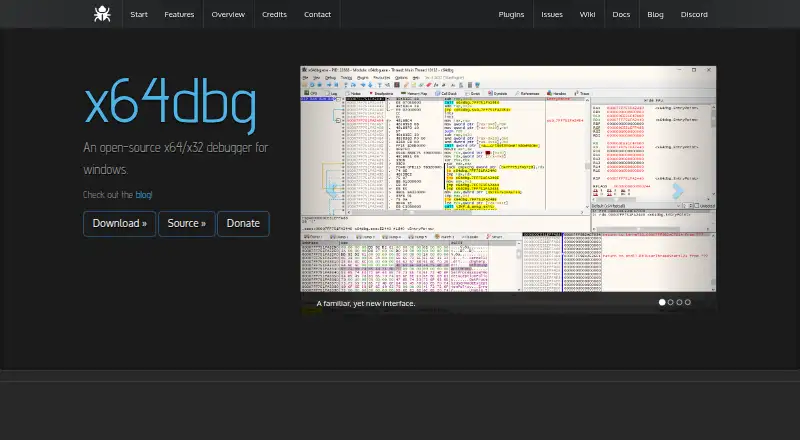
What x64dbg is
x64dbg is a free, open-source debugger for Windows, designed for reverse engineering and malware analysis of executables that have no source code available. It can debug x64 and x32 applications through one interface, including DLL and EXE files. Its analysis views cover memory, symbols, threads, source code, graphs, and the dynamic stack, while a fast disassembler and built-in assembler support examining and editing code. The debugger also supports executable patching and includes an import reconstructor powered by Scylla.
For automation, x64dbg has an integrated ASM-like scripting language that can itself be debugged. Users can write C++ plugins to add script commands or connect tools, and can adjust color schemes and preferences. Conditional and exception breakpoints are supported. The project provides its executable and source under GPLv3 and lists open-source libraries including TitanEngine, Zydis, Yara, Scylla, Jansson, lz4, XEDParse, asmjit, and snowman. To start, download a repository snapshot, extract it to a location where you have write access, then run the x32 or x64 debugger executable. The project accepts pull requests and directs questions to its contact channels or an issue.
Who it suits
x64dbg suits Windows users who need to inspect or debug x64 and x32 executables, particularly for reverse engineering or malware analysis without source code. Its scripting, plugin, and customization options also fit users who want to extend or tailor their debugging workflow.
What it does well
- Free, open-source debugger provided under GPLv3.
- Debugs x64 and x32 applications through one interface.
- Supports DLL and EXE debugging targets.
- Includes memory, symbol, thread, source, graph, and stack views.
- Offers scripting, C++ plugins, and executable patching.
What to know first
- Available for Windows only.
- Requires downloading and extracting a repository snapshot before running.
Plans
| Plan | Billed and limits | Price |
|---|---|---|
| Free | Open-source debugger; supports x64 and x32 Windows applications | Free |
As x64dbg.com lists them, read 8 Oct 2026. The maker's own page has the final word.
Getting started
- Open the x64dbg website.
- Download a repository snapshot.
- Extract it to a location where you have write access.
- Run the x32 or x64 debugger executable.
Verdict
Choose x64dbg if you need a free Windows debugger for reverse engineering or malware analysis, with support for both x64 and x32 targets. Look elsewhere if you need a debugger for a platform other than Windows.
Questions
Is x64dbg free?
Yes. Its listed plan costs nothing, and the project describes it as open source.
Which operating systems does x64dbg support?
The listed platform is Windows.
Can it debug both 32-bit and 64-bit applications?
Yes. It can debug x32 and x64 applications through one interface.
What kinds of files can it debug?
It provides debugging for DLL and EXE files.
What license does it use?
The project says both the executable and source are provided under GPLv3.
How do I get started?
Download a repository snapshot, extract it to a location where you have write access, then run the x32 or x64 debugger executable.
Facts from x64dbg's own pages
- Analysis views
- Features include memory, symbol, thread, source code, graph, and dynamic stack views. · x64dbg.com, 8 Oct 2026
- Architecture support
- It can debug both x64 and x32 applications through one interface. · x64dbg.com, 8 Oct 2026
- Customization
- Users can customize color schemes and preferences. · x64dbg.com, 8 Oct 2026
- Debug targets
- It provides debugging for DLL and EXE files. · x64dbg.com, 8 Oct 2026
- Disassembly and assembly
- The product includes a fast disassembler and a built-in assembler. · x64dbg.com, 8 Oct 2026
- Distribution
- The repository instructions say to download a snapshot, extract it to a location where the user has write access, and run the x32 or x64 debugger executable. · github.com, 8 Oct 2026
- Integrations
- The maker lists TitanEngine, Zydis, Yara, Scylla, Jansson, lz4, XEDParse, asmjit, and snowman among its open-source libraries. · x64dbg.com, 8 Oct 2026
- License
- The maker says it provides both the executable and source under GPLv3. · x64dbg.com, 8 Oct 2026
- Patching
- Features include executable patching and an integrated import reconstructor powered by Scylla. · x64dbg.com, 8 Oct 2026
- Plugins
- Users can write plugins in C++ to add script commands or integrate tools. · x64dbg.com, 8 Oct 2026
- Purpose
- x64dbg is an open-source debugger for Windows, optimized for reverse engineering and malware analysis. · x64dbg.com, 8 Oct 2026
- Scripting
- It includes an integrated, debuggable ASM-like scripting language for automation. · x64dbg.com, 8 Oct 2026
- Security focus
- The project describes itself as aimed at malware analysis and reverse engineering of executables without source code. · github.com, 8 Oct 2026
- Support and contributions
- The project accepts pull requests and directs users to contact the project or open an issue with questions. · github.com, 8 Oct 2026
Where x64dbg stands on Freedom251
- Debuggers#20 of 27