Freedom251 › Color Management Software
X-Rite i1Profiler
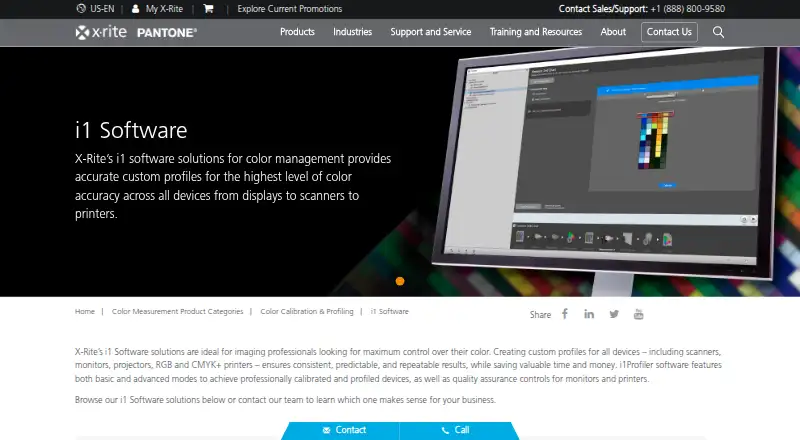
What X-Rite i1Profiler is
X-Rite i1Profiler creates monitor and printer profiles for creative color workflows on Windows and macOS. For displays, it provides a Basic mode with guided steps and an Advanced mode with user-defined settings. Users can adjust gamma, white point, and luminance, optimize gray balance, match displays using reference profiles, and run display quality assurance workflows. For printers, the software supports high patch count charts, linearization, flash and ambient light measurements, and Optical Brightener Compensation for paper containing optical brighteners. Advanced profile controls include black separation and white point editing. i1Profiler supports ICC profile export, LUT calibration, and multi-monitor calibration, and PANTONE Color Manager libraries or palettes can be used for printer-profile spot color optimization. The software is paid, with pricing available on request. Listed requirements include 4 GB RAM, 2 GB of available disk space, a powered USB port, and high speed internet for installation, downloads, and automatic updates. Installation instructions call for connecting measurement instruments or a dongle after installing the software. The maker lists Windows 11 and macOS 14.x through 26.x among supported systems. X-Rite says support for i1Pro 2 and iO2 ended on January 31, 2025, and their drivers and software will no longer be maintained.
Who it suits
i1Profiler suits creative professionals who need to build monitor and printer profiles, adjust profile settings, or match multiple displays. It also fits workgroups that use reference profiles and users who need printer linearization or Optical Brightener Compensation.
What it does well
- Creates profiles for monitors and printers.
- Offers guided and user-defined display profiling modes.
- Supports ICC profile export, LUT calibration, and multi-monitor calibration.
- Printer tools include linearization and Optical Brightener Compensation.
- Supports workgroup matching with reference profiles.
What to know first
- Pricing is available on request.
- Installation requires a powered USB port and high speed internet.
- i1Pro 2 and iO2 drivers and software will no longer be maintained.
Limits
The facts list no free plan or trial. The software requires a license stored on an i1Pro 2 device or a separately purchased HASP4 USB dongle, according to the maker’s i1Pro 2 self-service guide.
Getting started
- Visit the X-Rite software page and choose the Mac or PC download.
- Check that your system meets the listed requirements, including RAM, disk space, USB, and internet.
- Install the software and choose whether to include ColorChecker Passport or PANTONE Color Manager in the Windows installer.
- After installation, connect the measurement instrument or dongle.
- Use Basic guided mode or Advanced user-defined mode to create display profiles.
Verdict
Choose i1Profiler for monitor and printer profiling with adjustable display controls and detailed printer workflows. It is a fit for teams that need profile matching or multiple-display calibration. Check hardware compatibility carefully if your workflow depends on i1Pro 2 or iO2, whose drivers and software are no longer maintained.
Questions
How much does i1Profiler cost?
Pricing is available on request.
Which platforms does it support?
The listed platforms are Windows 11 and macOS 14.x through 26.x.
What does i1Profiler do?
It creates monitor and printer profiles, with display adjustment and matching workflows and printer profiling tools.
Does it need additional hardware?
Installation instructions say to connect measurement instruments or a dongle after installing the software. A license is stored on an i1Pro 2 device or a separately purchased HASP4 USB dongle, according to the maker’s guide.
Can it work with PANTONE Color Manager?
PANTONE Color Manager libraries or palettes can be used for spot color optimization of printer profiles.
What are the listed system requirements?
The requirements include 4 GB RAM, 2 GB available disk space, a powered USB port, and high speed internet for installation, downloads, and automatic updates.
Facts from X-Rite i1Profiler's own pages
- Company
- X-Rite says it was founded in 1958 and is headquartered in Grand Rapids, Michigan. · xrite.com, 7 Oct 2026
- Display workflows
- X-Rite describes Basic wizard driven and Advanced user defined modes for display profiling, with multiple display matching and display quality assurance workflows. · xrite.com, 7 Oct 2026
- Downloads
- The maker’s support page lists i1Profiler versions for PC and Mac. · xrite.com, 7 Oct 2026
- Founded
- 1958 · xrite.com, 28 Sept 2026
- Hardware dependency
- X-Rite's installation instructions say to connect measurement instruments and/or a dongle after installing the software. · xrite.com, 7 Oct 2026
- Headquarters
- Grand Rapids, Michigan, United States · xrite.com, 28 Sept 2026
- Included software options
- The Windows installer lets users choose whether to install ColorChecker Passport and PANTONE Color Manager. · xrite.com, 7 Oct 2026
- License requirement
- The maker’s i1Pro 2 self-service guide says i1Profiler requires a license stored on an i1Pro 2 device or a separately purchased HASP4 USB dongle. · xrite.com, 7 Oct 2026
- Monitor controls
- The monitor features include unlimited gamma, white point, and luminance settings, plus gray balance optimization. · xrite.com, 7 Oct 2026
- Monitor profiling
- Monitor features include adjustable gamma, white point and luminance settings, reference profiles for workgroup matching, and gray balance optimization. · xrite.com, 7 Oct 2026
- Notable hardware limit
- X-Rite says i1Pro 2 and iO2 service and technical support ended January 31, 2025, and their drivers and software will no longer be maintained. · xrite.com, 7 Oct 2026
- Optical brighteners
- Optical Brightener Compensation accounts for optical brighteners in paper. · xrite.com, 7 Oct 2026
- Printer linearization
- Its linearization feature helps keep color correct over time and between print runs. · xrite.com, 7 Oct 2026
- Printer profiling
- The printer features include high patch count charts, linearization, flash and ambient light measurements, and Optical Brightener Compensation. · xrite.com, 7 Oct 2026
- Profile controls
- The software offers advanced black separation controls and white point editing for fine tuning profiles. · xrite.com, 7 Oct 2026
- Profile editing
- Advanced capabilities include black separation controls and white point editing. · xrite.com, 7 Oct 2026
- Profile matching
- Reference profiles support workgroup matching, and a chromatic adaptation formula helps visually match monitors. · xrite.com, 7 Oct 2026
- Purpose
- i1Profiler creates monitor and printer profiles for creative color control. · xrite.com, 7 Oct 2026
- Security
- X-Rite's technical and organisational security measures document says its application development approach includes security gates and practices. · xrite.com, 7 Oct 2026
- Support
- The product page lists support articles on color measurement and conversion, USB 3.0 connectivity, and Windows 11 compatibility. · xrite.com, 7 Oct 2026
- Supported operating systems
- The i1Profiler download page lists Windows 10 and Windows 11 requirements; X-Rite provides separate Mac and PC Device Services downloads for i1Publish Pro 3. · xrite.com, 7 Oct 2026
- System requirements
- The listed i1Profiler requirements include 4 GB RAM, 2 GB available disk space, a powered USB port, and a high speed internet connection for installation, downloads, and automatic updates. · xrite.com, 7 Oct 2026
- Third party compatibility
- X-Rite says PANTONE Color Manager libraries or palettes can be used for i1Profiler spot color optimization of printer profiles. · xrite.com, 7 Oct 2026
Where X-Rite i1Profiler stands on Freedom251
- Color Management Software#19 of 23
- Display Calibration Software#23 of 24