Freedom251 › Web Design Software
Wireframe.cc
What Wireframe.cc is
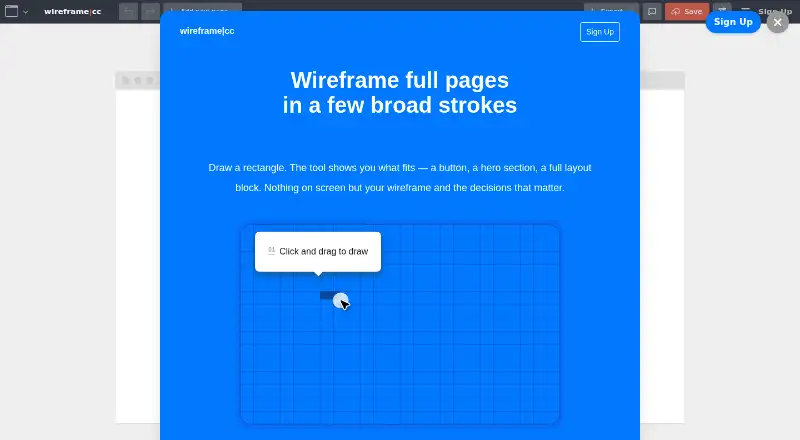
Wireframe.cc is a web-based wireframing tool for turning page and interface ideas into structured screens. On its canvas, you draw a rectangle and select a suitable stencil to make an element. A library of pre-built page sections can be added to a full-width area, while smart guides, rectangular grids, and columns help position objects. Wireframes can target web pages, mobile devices, or custom screen dimensions. You can connect pages to form clickable prototypes for exploring user flows. Master pages keep recurring components, including headers, sidebars, and footnotes, consistent across screens. Finished wireframes can be exported to PDF or PNG, with optional device templates in the exported files. The free plan works without a user account and saves single-page public wireframes under a unique shareable URL. Paid plans add unlimited projects, reusable master pages, PDF and PNG export, and clickable links. Solo is listed at $12 a year, billed per month and annually; Trio is $33 a year; Enterprise is $83 a year, with each billed per month and annually. Premium supports current Chrome, Safari, and Firefox versions.
Who it suits
Wireframe.cc suits people sketching layouts for websites, mobile screens, or custom displays. It also fits teams that need linked prototypes, reusable page elements, exports, or multiple users.
What it does well
- Works for web, mobile, and custom screen sizes
- Clickable links support user-flow prototypes
- Master pages reuse recurring layout elements
- Exports wireframes as PDF or PNG
- Free plan needs no user account
What to know first
- Free plan limits work to single-page public wireframes
- Free wireframes use a unique shareable URL
- Paid access starts at $12 per user monthly, billed annually
Limits
The free plan provides single-page public wireframes, saves them with a unique shareable URL, and requires no account. Solo, Trio, and Enterprise add unlimited projects and other listed features.
Plans
| Plan | Billed and limits | Price |
|---|---|---|
| Free | No user accounts · public wireframes · single-page wireframes | Free |
| Solo | per month, billed annualy · 1 user · unlimited projects · reusable master pages · PDF and PNG export · clickable links | $12 |
| Trio | per month, billed annualy · 3 users · unlimited projects · reusable master pages · PDF and PNG export · clickable links | $33 |
| Enterprise | per month, billed annualy · Unlimited users · unlimited projects · reusable master pages · PDF and PNG export · clickable links | $83 |
As wireframe.cc lists them, read 9 Oct 2026. The maker's own page has the final word.
Getting started
- Open https://wireframe.cc/ in a web browser
- Draw a rectangle on the canvas
- Choose a stencil for the element
- Add page sections or position objects with guides, grids, and columns
- Create linked pages for a clickable prototype
- Use the free plan without an account or select a paid plan
Verdict
Choose Wireframe.cc when you need browser-based layout sketches with prototypes, reusable master pages, and file exports. The free plan is suitable for a single public page; teams needing more than a single-page project must choose a paid plan.
Questions
Is Wireframe.cc free?
Yes. The Free plan costs nothing and has no user accounts, public wireframes, and single-page wireframes.
What do paid plans cost?
Solo is $12 a year, Trio is $33 a year, and Enterprise is $83 a year. Each is billed per month and annually.
Which platforms does it support?
Wireframe.cc is available on the web. Premium supports the latest versions of Chrome, Safari, and Firefox.
Can it make interactive prototypes?
Yes. Pages can be linked into clickable prototypes, and paid plans list clickable links.
Can wireframes be exported?
Yes. Wireframes can be exported to PDF or PNG, with optional device templates.
How can I contact the maker?
Questions about premium features, pricing, and signup can be sent to [email protected].
Facts from Wireframe.cc's own pages
- Browser support
- Premium supports the latest versions of Chrome, Safari, and Firefox. · wireframe.cc, 9 Oct 2026
- Drawing
- Users draw a rectangle on the canvas and choose a fitting stencil to create an element. · wireframe.cc, 9 Oct 2026
- Export
- Wireframes can be exported to PDF or PNG, with device templates optionally included in exported files. · wireframe.cc, 9 Oct 2026
- Free tier limit
- The free version provides single-page public wireframes saved with a unique shareable URL and does not require an account. · wireframe.cc, 9 Oct 2026
- Integrations
- The homepage credits Material Design and Font Awesome as sources for icons. · wireframe.cc, 9 Oct 2026
- Layout tools
- The editor supports smart guides, rectangular grids, and columns for positioning objects. · wireframe.cc, 9 Oct 2026
- Page sections
- The tool offers a pre-built library of page sections that users can add to a full-width area. · wireframe.cc, 9 Oct 2026
- Payment and cancellation
- Subscriptions are billed in advance monthly or annually, and customers can cancel at any time with access through the end of the billing period. · wireframe.cc, 9 Oct 2026
- Privacy and security
- The pricing page says data is backed up daily, stored in multiple locations, and protected by SSL encryption on all plans. · wireframe.cc, 9 Oct 2026
- Prototyping
- Users can link pages together to create clickable prototypes and test user flows. · wireframe.cc, 9 Oct 2026
- Purpose
- Wireframe.cc is an online wireframing tool for sketching page layouts and interface ideas. · wireframe.cc, 9 Oct 2026
- Reusable layouts
- Master pages can hold recurring elements such as headers, sidebars, or footnotes across pages. · wireframe.cc, 9 Oct 2026
- Screen sizes
- Wireframes can be created for web, mobile devices, or custom screens. · wireframe.cc, 9 Oct 2026
- Support
- The maker lists [email protected] for questions about premium features, pricing, and signup. · wireframe.cc, 9 Oct 2026
Where Wireframe.cc stands on Freedom251
- Web Design Software#26 of 41
- Wireframing Software#21 of 29
- Interface Design Tools#20 of 26
- Game UI Design Software#25 of 32
- UI design tools#29 of 37
- Ui Ux Designing Software#18 of 22
- Wireframe Tools#18 of 22