Freedom251 › Start Menu Customization Software
Win9xplorer
What Win9xplorer is
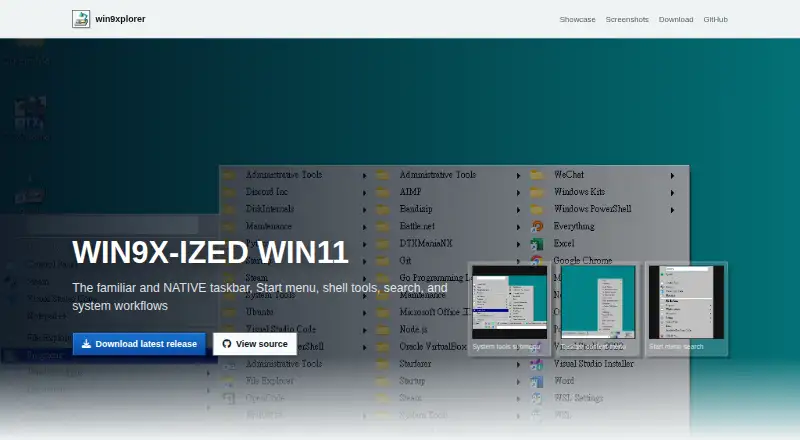
Win9xplorer is a free shell replacement that recreates the Windows 95/98 experience on Windows 10 and 11. Its retro taskbar includes open windows, a system tray, Quick Launch, a clock, context actions, a Spotify toolbar, and an address bar for web URLs or local paths. The Start menu provides a recent list, WIN APPS, search, system tools, and common folders. A classic Task Manager window offers process and performance monitoring. Users can toggle features and adjust visual settings. The maker describes the software as a native Windows binary built with WinForms, not an Electron or web shell. The project uses a GNU General Public License and lists the .NET 10.0 Windows SDK as a requirement. Spotify is the identified integration. Abby is credited as maker, and the repository lists Windows 10 and Windows 11 requirements.
Who it suits
Win9xplorer suits Windows 10 or 11 users who want a retro shell, classic navigation, and customizable taskbar controls.
What it does well
- Free and GPL-licensed
- Retro taskbar and Start menu
- Native WinForms application
- Includes classic Task Manager
- Spotify taskbar toolbar
What to know first
- Requires Windows 10 or 11
- Requires .NET 10.0 Windows SDK
- Retro interface may not suit modern workflows
Verdict
Win9xplorer offers a focused Windows 95/98-style shell with familiar utilities and customization. Its requirements and retro design make it most relevant to users seeking that specific interface.
Facts from Win9xplorer's own pages
- Address bar
- The taskbar address bar can navigate web URLs and local paths. · win9xplorer.abby.md, 8 Oct 2026
- Customization
- Options let users toggle features and adjust visuals. · win9xplorer.abby.md, 8 Oct 2026
- Development requirements
- The README lists .NET 10.0 Windows SDK and Visual Studio 2022 or later for development. · github.com, 8 Oct 2026
- Implementation
- The README says the UI uses WinForms and does not use a web UI. · github.com, 8 Oct 2026
- Integrations
- The maker identifies Spotify as an integration through its taskbar toolbar. · win9xplorer.abby.md, 8 Oct 2026
- License
- The project is GPL-licensed; the repository identifies the license as GNU General Public License. · github.com, 8 Oct 2026
- Maker
- The official site says Win9xplorer was made by Abby. · win9xplorer.abby.md, 8 Oct 2026
- Maker attribution
- The product site credits Abby as its maker. · win9xplorer.abby.md, 8 Oct 2026
- Native app
- The maker describes it as a native Windows binary without an Electron or web shell. · win9xplorer.abby.md, 8 Oct 2026
- Purpose
- Win9xplorer recreates the classic Windows 9x experience for modern Windows with a retro file explorer and taskbar. · github.com, 8 Oct 2026
- Runtime requirement
- The repository lists the .NET 10.0 Windows SDK as a requirement. · github.com, 8 Oct 2026
- Spotify
- A Spotify toolbar is available in the taskbar. · win9xplorer.abby.md, 8 Oct 2026
- Start menu
- The Windows 95/98-style Start menu includes a recent list, WIN APPS, and search. · win9xplorer.abby.md, 8 Oct 2026
- Supported Windows versions
- The repository lists Windows 10 or Windows 11 as requirements. · github.com, 8 Oct 2026
- System tools
- System tools and common folders are accessible from the Start menu. · win9xplorer.abby.md, 8 Oct 2026
- Taskbar
- The taskbar includes windows, a system tray, Quick Launch, a clock, and context actions. · win9xplorer.abby.md, 8 Oct 2026
- Task Manager
- It includes a classic utility window for process and performance monitoring. · win9xplorer.abby.md, 8 Oct 2026
Where Win9xplorer stands on Freedom251
- Start Menu Customization Software#28 of 39