Freedom251 › Restaurant Billing Software
Waiterio
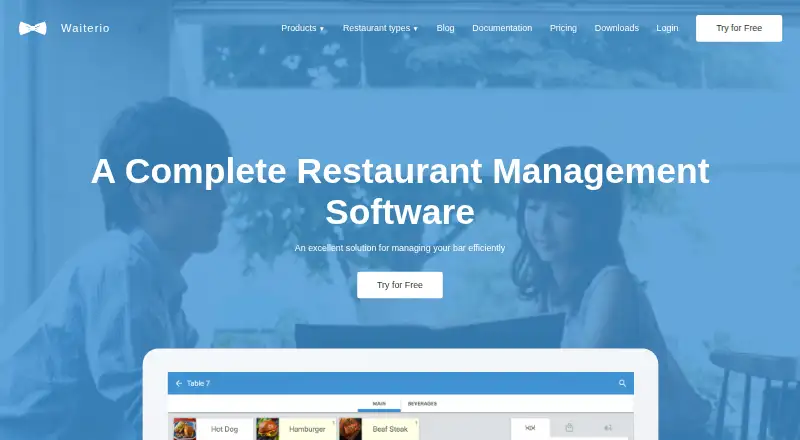
What Waiterio is
Waiterio is a point-of-sale system for restaurants and bars that manages orders, tables, menus, staff, payments, discounts, and sales reports. It can send orders to the kitchen and generate invoices. Its restaurant website builder accepts online orders and combines them with in-person orders on the same dashboard. Restaurant websites can support pickup and delivery scheduling, advance ordering, multiple locations, contactless delivery requests, and Google Maps integration. Customers can scan table QR codes to view the menu and place orders that go to the restaurant. Waiterio supports cash, vouchers, and card payments; cards can be accepted using an external terminal or supported phones. Card transactions are handled by an external PCI-compliant payment gateway and are not stored or processed on Waiterio's servers. It supports thermal printers using the ESC POS protocol; the documentation recommends Wi-Fi printers and says parallel and serial connections are unsupported. The free plan allows up to 100 orders per month, counting each table served as one order. Paid plans begin at $39/mo for 600 monthly orders.
Who it suits
Waiterio suits restaurants and bars that need POS tools for orders, tables, payments, and staff, along with online ordering. Restaurants offering delivery or takeaway may use its website builder and scheduling options.
What it does well
- Combines online and in-person orders on one dashboard.
- QR codes let customers order from their tables.
- Supports cash, vouchers, and card payments.
- Free plan includes up to 100 monthly orders.
What to know first
- New orders cannot be created while offline.
- Free plan is limited to 100 monthly orders.
- Parallel and serial printer connections are unsupported.
Limits
The free plan allows up to 100 orders per month, with each table served counted as one order. Small costs $39 per month and allows 600 orders per month; Medium costs $59 per month for 1,200 orders, and Large costs $79 per month for unlimited orders.
Plans
| Plan | Billed and limits | Price |
|---|---|---|
| Small | Billed monthly; $39 per month · 600 orders per month | $39 a month |
| Medium | Billed monthly; $59 per month · 1200 orders per month | $59 a month |
| Large | Billed monthly; $79 per month · Unlimited orders per month | $79 a month |
As waiterio.com lists them, read 30 Sept 2026. The maker's own page has the final word.
Getting started
- Open the Waiterio website.
- Choose the free plan or a paid plan: Small, Medium, or Large.
- Use Waiterio on Android, iOS, Linux, macOS, web, or Windows.
- For printing, use a thermal printer with ESC POS protocol; Wi-Fi is recommended.
Waiterio is restaurant and bar POS software for operators combining table service with online ordering. It suits restaurants that want a website and QR ordering tied to the same order workflow, but the free plan’s table-based quota and inability to create orders offline are important constraints.
Overview
Waiterio brings table and order management, menus, staff, payments, discounts, and sales reports into a restaurant-focused POS. It can send orders to the kitchen and generate invoices, with a kitchen display and employee permissions among its listed capabilities. Its restaurant website builder also routes online orders to the POS dashboard, giving dine-in and takeaway teams a shared view of orders.
Key features
Service and kitchen workflow
Table management and kitchen routing suit restaurants coordinating service across front and back of house. The free plan counts each table served as one order, rather than counting items, and stops at 100 orders per month. That cap may be restrictive for a busy dining room even when its menu has relatively few items per table.
Online ordering and restaurant websites
The website builder supports pickup and delivery scheduling, advance ordering, contactless delivery requests, and multiple locations. Google Maps integration can show the restaurant’s location on its site. Because online orders join offline orders on the same dashboard, Waiterio is a stronger fit for restaurants coordinating dine-in and takeaway than for operators seeking only a standalone website.
QR ordering, payments, and printing
Table QR codes let customers view a menu and place orders that reach the restaurant. Waiterio supports cash, vouchers, and credit card payments; cards can be handled through an external terminal or supported phones. Card transactions go through an external PCI-compliant payment gateway and are not stored or processed on Waiterio’s servers.
For printing, Waiterio works with thermal printers using the ESC POS protocol. Its documentation recommends Wi-Fi printers and does not support parallel or serial connections, so restaurants relying on those connections should check their hardware before choosing it. Users also cannot create new orders while offline, a significant limitation for venues that need ordering to continue through an internet disruption.
Pricing
Waiterio is freemium, with a free plan, a free trial, and paid plans billed monthly. The free plan allows up to 100 orders (tables served) per month; each table served counts as one order. It is a practical way for a low-volume venue to start, but the quota is based on service volume and may be reached quickly by a busy restaurant.
- Small: $39 a month, billed monthly, for 600 orders per month. A fit for a venue whose volume exceeds the free cap but remains within this allowance.
- Medium: $59 a month, billed monthly, for 1,200 orders per month. It doubles Small’s quota for a higher-volume operation.
- Large: $79 a month, billed monthly, with unlimited orders per month. It removes the listed order ceiling, which matters to operators whose service volume would strain a fixed allowance.
The paid tiers are distinguished by monthly order allowance; the listed plans do not state seat limits or trial length. The free plan’s 100-order ceiling is the key trade-off for a small operator, while businesses above it must move to a paid monthly plan.
Platforms
Waiterio is available on Android, iOS, Linux, macOS, web, and Windows. Its documented printer support favors Wi-Fi thermal printers using ESC POS, rather than parallel or serial connections.
Who it's for
Waiterio is aimed at restaurants and bars, particularly those that want table service, kitchen workflow, QR ordering, and a restaurant website with pickup or delivery in one system. It is less suitable for venues that must keep taking new orders offline, or for operators whose table volume makes the free allowance too small.
Pros and cons
- Pro: Online and in-person orders appear on the same dashboard, helping restaurants coordinate service across channels.
- Pro: QR ordering, scheduling, and multi-location website support cover several common restaurant ordering needs.
- Pro: Card transactions are handled by an external PCI-compliant gateway rather than stored or processed on Waiterio’s servers.
- Con: New orders cannot be created offline, so an internet interruption can stop order entry.
- Con: The free plan caps service at 100 tables per month, a limit that can be reached quickly in a busy restaurant.
- Con: Printer support excludes parallel and serial connections, narrowing hardware options.
Alternatives
For a broader comparison, see Restaurant POS Software.
- Loyverse is worth considering if Android, iOS, web, or API access and a free POS plan fit better; its listed paid sales-history option is $5 a month per store.
- Floreant POS is a free, open-source POS for readers who prefer a Windows or Linux download or self-hosted option.
- Heartland Retail starts at $89 a month for its listed POS plan and is an option for readers comparing a retail-focused system.
- HungerRush offers a qualifying free Starter plan for one location and one POS terminal, which may suit a restaurant that meets those criteria.
- LOOP POS has a free plan for one outlet and two staff accounts, or a Growth plan at $29 a month.
- Slant Loyalty is another freemium option.
- TablePort Sites offers a free Sites plan and a £99 a month Sites Advanced plan, for readers comparing website-focused options.
- NCR Voyix POS is a paid POS alternative for grocery, convenience, fuel, department, and specialty retail.
Verdict
Choose Waiterio if you run a restaurant or bar and want table service, QR ordering, and online orders connected to one dashboard. Its restaurant-specific ordering workflow is the main reason to choose it; the inability to enter orders offline is the clearest reason to look elsewhere, while the free plan makes sense only if 100 tables served per month is enough.
Verdict
Waiterio combines restaurant POS functions with online ordering, QR self-ordering, and a website builder. Consider the offline order restriction and the free plan's 100-order monthly limit when assessing fit.
Questions
Is Waiterio free?
Yes. Its free plan allows up to 100 orders per month, counting each table served as one order.
How much do the paid plans cost?
Small is $39 per month for 600 orders, Medium is $59 per month for 1,200 orders, and Large is $79 per month for unlimited orders.
Which platforms does Waiterio support?
It supports Android, iOS, Linux, macOS, web, and Windows.
Can customers place orders online?
Yes. The restaurant website builder accepts online orders, which appear on the same dashboard as in-person orders.
Can Waiterio take orders offline?
No. New orders cannot be created while offline.
How are card payments handled?
Cards can be accepted using an external terminal or supported phones. An external PCI-compliant payment gateway handles card transactions, which are not stored or processed on Waiterio's servers.
Facts from Waiterio's own pages
- Free plan limit
- The free plan allows up to 100 orders (tables served) per month, and each table served counts as one order. · waiterio.com, 30 Sept 2026
- Google Maps
- The restaurant website builder includes Google Maps integration to show a restaurant's location on its website. · waiterio.com, 30 Sept 2026
- Headquarters
- Sheridan, Wyoming, USA · waiterio.com, 28 Sept 2026
- Intended users
- Waiterio describes its POS as designed for restaurants and bars, and its website builder is built for restaurants offering delivery and takeaway. · waiterio.com, 30 Sept 2026
- Offline limitation
- The product documentation says users cannot create new orders while offline. · waiterio.com, 30 Sept 2026
- Online ordering
- Waiterio's restaurant website builder accepts online orders and integrates with its POS so online and offline orders appear on the same dashboard. · waiterio.com, 30 Sept 2026
- Order handling
- The system can send orders to the kitchen and generate invoices. · waiterio.com, 30 Sept 2026
- Payments
- Waiterio supports cash, vouchers, and credit card payments; card payments can be accepted using an external terminal or supported phones. · waiterio.com, 30 Sept 2026
- Printing
- Waiterio works with thermal printers that use the ESC POS protocol; its documentation recommends Wi-Fi printers and says parallel and serial connections are unsupported. · waiterio.com, 30 Sept 2026
- Product
- Waiterio is a point-of-sale system for restaurants and bars that manages orders, tables, menus, staff, payments, discounts, and sales reports. · waiterio.com, 30 Sept 2026
- QR self-ordering
- Customers can scan table QR codes to view the menu and place orders that are sent to the restaurant. · waiterio.com, 30 Sept 2026
- Security and payments
- The privacy policy says an external PCI-compliant payment gateway handles card transactions, which are not stored or processed on Waiterio's servers. · waiterio.com, 30 Sept 2026
- Support
- Waiterio offers support through its team, tutorials, documentation, and in-app screenshot sharing. · waiterio.com, 30 Sept 2026
- Website features
- Restaurant websites support pickup and delivery scheduling, multiple locations, advance ordering, and contactless delivery requests. · waiterio.com, 30 Sept 2026
Where Waiterio stands on Freedom251
- Restaurant Billing Software#3 of 26
- Restaurant POS Software#8 of 44
- iPad POS#4 of 21