Freedom251 › AI Song Cover Generators

VoiceDub AI Cover Generator
What VoiceDub AI Cover Generator is
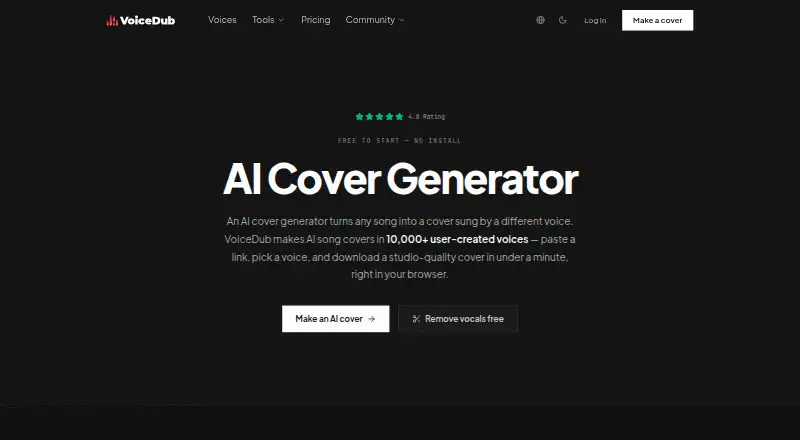
VoiceDub AI Cover Generator creates song covers sung by AI voices. It separates a song’s vocals from its instrumental, converts the vocals to a different voice, and combines the tracks into a mix. You can supply music through YouTube, TikTok, or SoundCloud links, upload audio, record live, or type lyrics for text-to-speech. Its library contains more than 10,000 user-created voices, searchable by genre, language, or style. Covers can be previewed, pitch-adjusted, and downloaded as a full mix or isolated stems. VoiceDub says each cover receives automatic EQ matching, de-essing, and leveling.
The generator runs in a browser without installation, a GPU, or RVC setup. You can clone your own voice from a 30-second sample or import an RVC/.pth model. AI duets combine two to four voices, with automatic verse alternation, layered choruses, and a section-level mix editor. Instant dub converts a voice without model training and accepts audio or video files up to 50 MB. Cover rendering requires an account and credits; the vocal remover and vocoder are free forever, and the vocal remover offers stem downloads without sign-up. VoiceDub asks users to convert only voices they own or have permission to use, and not to deceive or impersonate others. Commercial use is not allowed.
Who it suits
It suits people who want to make AI voice covers in a browser, using links, audio uploads, live recording, or typed lyrics. Its voice library, voice cloning, and duet tools may suit creators seeking different voices or multi-voice mixes; commercial use is not allowed.
What it does well
- More than 10,000 searchable user-created voices
- Accepts links, uploaded audio, live recordings, and typed lyrics
- Downloads full mixes or isolated stems
- Supports duets with two to four voices
- Free vocal remover and vocoder require no sign-up
What to know first
- Cover rendering requires an account and credits
- Commercial use is not allowed
- Influencer plan limits users to 100 dubs per month
Limits
The free tools plan covers the vocal remover and vocoder; it does not include cover rendering, which requires an account and credits. The Influencer plan is $4.99 a month and allows up to 100 dubs per month and up to 20 cloned voices per month.
Plans
| Plan | Billed and limits | Price |
|---|---|---|
| Free tools | Vocal remover and vocoder free forever · no sign-up · no watermark | Free |
| Influencer | Billed monthly · Up to 100 dubs per month · up to 20 cloned voices per month · v2 instant voice cloning · faster processing · premium email support · $25.00 intro offer | $4.99 a month |
| PRO | Billed monthly · Up to 1000 dubs per month · up to 200 cloned voices per month · priority AI voice-model access · custom AI voice training · faster processing · < 1 day support response · $100.00 intro offer | $49.99 a month |
| 25 extra credits | One-time · 25 extra credits · available after Basic | $9.99, paid once |
As voicedub.ai lists them, read 1 Oct 2026. The maker's own page has the final word.
Getting started
- Open the VoiceDub AI Cover Generator website in a browser
- Choose a voice or provide your own voice sample or RVC/.pth model
- Add music using a supported link, an audio upload, live recording, or typed lyrics
- Create an account and use credits to render a cover
- Preview the result, adjust pitch, and download a mix or stems
Verdict
Choose VoiceDub if you want browser-based AI covers, a large searchable voice library, or duet tools. The free vocal remover and vocoder offer a way to use some tools without an account. Cover generation requires an account and credits, and commercial use is not allowed.
Questions
Is VoiceDub AI Cover Generator free?
The vocal remover and vocoder are free forever without sign-up. Rendering a cover requires an account and credits.
How much do the plans cost?
Free tools cost nothing. Influencer costs $4.99 a month, and PRO costs $49.99 a month. The 25 extra credits plan costs $9.99, paid once and is available after Basic.
What platforms does it support?
VoiceDub runs in a web browser and requires no installation.
Can I use the covers commercially?
Commercial use is not allowed.
Can I make a cover with my own voice?
Yes. You can clone your own voice from a 30-second sample or import an RVC/.pth model.
Who makes VoiceDub?
VoiceDub AI Cover Generator is the product described here.
Facts from VoiceDub AI Cover Generator's own pages
- AI duets
- AI duets support two to four voices, with automatic verse alternation, layered choruses, and a section-level mix editor. · voicedub.ai, 1 Oct 2026
- Browser delivery
- The generator runs in a browser with no installation, GPU, or RVC setup required. · voicedub.ai, 1 Oct 2026
- Core function
- VoiceDub turns a song into a cover sung by a different AI voice by separating vocals, converting them, and remixing them over the instrumental. · voicedub.ai, 1 Oct 2026
- Free tools
- The vocal remover and vocoder are free forever, with the vocal remover offering stem downloads without sign-up. · voicedub.ai, 1 Oct 2026
- Input sources
- Users can add music through YouTube, TikTok, or SoundCloud links, uploaded audio, live recording, or typed lyrics for text-to-speech. · voicedub.ai, 1 Oct 2026
- Instant dub
- Instant dub performs zero-shot conversion without model training and accepts source and reference audio or video files up to 50 MB. · voicedub.ai, 1 Oct 2026
- Mastering
- VoiceDub says every cover is automatically EQ-matched, de-essed, and leveled. · voicedub.ai, 1 Oct 2026
- Output
- Users can preview covers, adjust pitch, and download a studio-quality full mix or isolated stems. · voicedub.ai, 1 Oct 2026
- Rendering limits
- Rendering a cover requires an account and credits, while the free vocal remover and vocoder do not require sign-up. · voicedub.ai, 1 Oct 2026
- Responsible use
- VoiceDub instructs users to clone or convert only voices they own or have permission to use and not to deceive or impersonate. · voicedub.ai, 1 Oct 2026
- Security
- VoiceDub says it uses reasonable administrative, logical, physical, and managerial safeguards but cannot guarantee 100% security. · voicedub.ai, 1 Oct 2026
- Support
- Support handles billing, account access, failed renders, and other issues by email, and the company also provides a Discord community. · voicedub.ai, 1 Oct 2026
- Voice cloning
- Users can clone their own voice from a 30-second sample or import an RVC/.pth model. · voicedub.ai, 1 Oct 2026
- Voice library
- The service offers more than 10,000 user-created AI voices searchable by genre, language, or style. · voicedub.ai, 1 Oct 2026
Where VoiceDub AI Cover Generator stands on Freedom251
- AI Song Cover Generators#44 of 56