Freedom251 › AI Voice Conversion Software
Voice Replacer
What Voice Replacer is
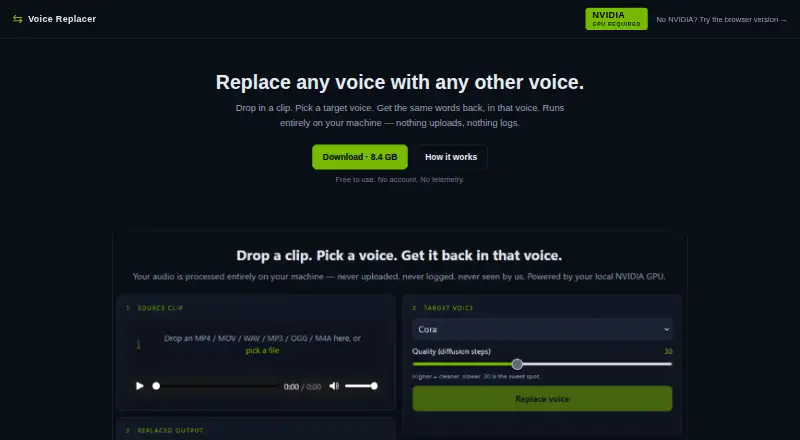
Voice Replacer changes the voice heard in an audio or video clip while retaining its words, timing, inflection pattern, and emotional delivery. It accepts MP3, MP4, WAV, OGG, and M4A files; clips are described as up to a few minutes long. You can select from six included voices or supply a WAV or MP3 reference recording. Five or more seconds of clean speech is described as ideal for a reference.
The tool has a browser-based DSP version and a downloadable neural version. The browser studio runs in a tab on any device and includes pitch and formant controls, EQ and tone settings, dynamics, reverb, presets, preview, and render and download. Its quality ceiling is lower than the neural version. The downloadable v0.1.1 bundle supports Windows 10/11 and requires a compatible NVIDIA GPU with at least 6 GB VRAM. It includes its model weights and runtime and is configured to work offline after download. Neural output is WAV and stays in the bundle’s app/outputs/ folder until deleted. The maker says audio is never uploaded and the tool makes no network calls apart from an optional update check, which can be disabled. Voice Replacer is free to use without an account. The current interface processes one file at a time.
Who it suits
Voice Replacer suits people who want to change a clip’s vocal identity while preserving its words and delivery. The browser version can suit users on any device who need pitch and formant controls; the neural version is for Windows users with a compatible NVIDIA GPU and at least 6 GB VRAM.
What it does well
- Free to use without an account.
- Accepts audio and video in five listed formats.
- Offers six bundled voices and user-provided voice references.
- Browser studio includes EQ, dynamics, reverb, presets, and preview.
- Downloaded neural bundle is configured for offline use.
- Maker says audio is never uploaded.
What to know first
- Neural version requires Windows 10/11 and a compatible NVIDIA GPU.
- Neural version requires at least 6 GB VRAM.
- Browser version has a lower quality ceiling than the neural tool.
- Current interface processes one file at a time.
Limits
The free tool processes one file at a time. The neural version requires Windows 10/11 and a compatible NVIDIA GPU with at least 6 GB VRAM; the browser DSP version has a lower quality ceiling than the neural tool.
Plans
| Plan | Billed and limits | Price |
|---|---|---|
| Free | Free to use; no account | Free |
As shift.ai-ministries.com lists them, read 7 Oct 2026. The maker's own page has the final word.
Getting started
- Open the Voice Replacer website for the browser version.
- Use the browser studio on a device with a web browser.
- For the neural version, download the v0.1.1 bundle for Windows 10/11.
- Use a compatible NVIDIA GPU with at least 6 GB VRAM for the neural version.
- Choose one of the six bundled voices or provide a WAV or MP3 reference clip.
- Load an MP3, MP4, WAV, OGG, or M4A clip and render the result.
Verdict
Choose Voice Replacer if you want a free voice-changing tool with a browser option or an offline-configured Windows neural bundle. The neural version requires compatible NVIDIA hardware, while the browser version has a lower quality ceiling and the interface handles one file at a time.
Questions
How much does Voice Replacer cost?
The Free plan costs nothing. The tool is free to use and does not require an account.
Which platforms does it support?
The browser DSP version runs in a tab on any device. The downloadable neural bundle is for Windows 10/11.
What file formats can I use?
It accepts MP3, MP4, WAV, OGG, and M4A files. Neural output is WAV.
Can I provide a voice to use as a reference?
Yes. You can add a WAV or MP3 reference clip; five or more seconds of clean speech is described as ideal.
Does the tool upload audio?
The maker says audio is never uploaded and that the tool makes no network calls except an optional update check, which can be disabled.
Can I process multiple files at once?
The current v0.1 interface processes one file at a time. The included inference CLI also accepts one file per call.
Facts from Voice Replacer's own pages
- Batch limit
- The v0.1 interface processes one file at a time; batch mode is listed as on the roadmap. · shift.ai-ministries.com, 7 Oct 2026
- Browser controls
- The browser studio includes pitch and formant controls, EQ and tone settings, dynamics controls, reverb, presets, preview, and render and download. · shift.ai-ministries.com, 7 Oct 2026
- Browser version
- A browser based DSP version runs in the tab on any device and provides slider based pitch and formant shifting, with a lower quality ceiling than the neural tool. · shift.ai-ministries.com, 7 Oct 2026
- CLI
- The maker says the included inference CLI accepts a single file per call and can be scripted from PowerShell or bash. · shift.ai-ministries.com, 7 Oct 2026
- Inputs
- It accepts audio or video files in MP3, MP4, WAV, OGG, and M4A formats, with clips described as up to a few minutes. · shift.ai-ministries.com, 7 Oct 2026
- Neural version
- The downloadable v0.1.1 bundle is for Windows 10/11 and requires a compatible NVIDIA GPU with at least 6 GB VRAM. · shift.ai-ministries.com, 7 Oct 2026
- Offline use
- The downloaded bundle includes its model weights and runtime and is configured for offline use after download. · shift.ai-ministries.com, 7 Oct 2026
- Output
- The neural version saves WAV output in the bundle’s app/outputs/ folder until the user deletes it. · shift.ai-ministries.com, 7 Oct 2026
- Privacy
- The maker says audio is never uploaded, inference is not hosted, and the tool makes no network calls except an optional update check that can be disabled. · shift.ai-ministries.com, 7 Oct 2026
- Purpose
- Voice Replacer changes a clip’s vocal identity to a target voice while preserving its words, timing, inflection contour, and emotional delivery. · shift.ai-ministries.com, 7 Oct 2026
- Responsible use
- The maker advises against cloning voices without permission or using the tool to deceive, harass, defame, or impersonate. · shift.ai-ministries.com, 7 Oct 2026
- Support
- The product page provides troubleshooting guidance for CUDA errors, a busy port, antivirus quarantines, and out of memory errors. · shift.ai-ministries.com, 7 Oct 2026
- Target voices
- Users can choose from six bundled voices or add a WAV or MP3 reference clip, with five or more seconds of clean speech described as ideal. · shift.ai-ministries.com, 7 Oct 2026
Where Voice Replacer stands on Freedom251
- AI Voice Conversion Software#20 of 29