Freedom251 › Game Coaching Software
VODsense
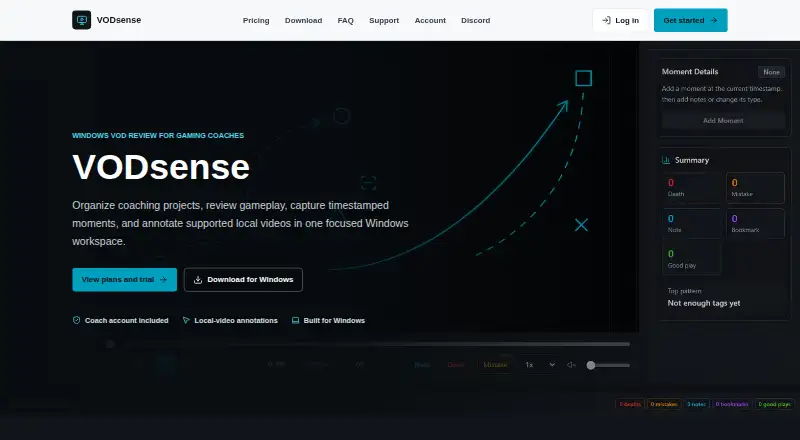
What VODsense is
VODsense is a Windows VOD review tool for gaming coaches. It organizes projects, reviews gameplay, records notes and timestamped moments, annotates supported local video, and lets coaches request gameplay links from clients. On local files, coaches can draw, label, move, resize, and rotate feedback over footage. Timestamped markers can identify mistakes, deaths, and notes at exact points. A Request VOD link lets a client submit a shareable source link without a VODsense account, subscription, or desktop app. Sources include local files and selected YouTube and Twitch VODs where available. External providers may support playback and timestamped moments, but their restrictions limit the complete local-video drawing and playback tools. Local videos, projects, and review data stay on the coach’s Windows device and local workspace. VODsense says it does not host, proxy, cache, or permanently store gameplay videos. Compatible x64 Windows 10 and Windows 11 systems are supported. Monthly pricing is $3.99 a month; yearly pricing is $39.99 a year, each with a 7-day trial for eligible coaches.
Who it suits
It suits gaming coaches who review client gameplay asynchronously and want timestamped notes or visual feedback. Coaches working with local Windows footage and shareable external links are the clearest audience.
What it does well
- Draws and transforms feedback on local videos
- Marks mistakes and notes at exact timestamps
- Clients can submit links without an account
- Local footage and review data stay on-device
- Supports YouTube and Twitch sources where available
What to know first
- External sources have fewer annotation tools
- The app supports Windows, not mobile
- Microsoft Store listing is marked Coming Soon
- Subscription access ends with the paid period
Limits
External YouTube and Twitch sources may support playback and timestamped moments but do not provide the complete local-video drawing and playback tools. The Coach plans include a 7-day trial for eligible coaches; there is no free plan.
Plans
| Plan | Billed and limits | Price |
|---|---|---|
| VODsense Coach (Monthly) | $3.99 USD / month · Windows coach application access · Same account on web and desktop · 7-day free trial for eligible coaches · Cancel anytime | $3.99 a month |
| VODsense Coach (Yearly) | $39.99 USD / year · Windows coach application access · Same account on web and desktop · 7-day free trial for eligible coaches · Cancel anytime | $39.99 a year |
As vodsense.com lists them, read 8 Oct 2026. The maker's own page has the final word.
Getting started
- Open the VODsense website
- Use a compatible x64 Windows 10 or Windows 11 system
- Install or access the Windows coach application
- Choose the monthly Coach plan at $3.99 a month or yearly plan at $39.99 a year
- Use the 7-day free trial if eligible
- Import local video or work with a supported YouTube or Twitch VOD
- Send a Request VOD link for clients to submit a shareable source link
Verdict
VODsense focuses on coach-led gameplay review with local annotations, timestamped moments, and client link requests. Its strongest tools apply to local Windows video, while external sources have provider-imposed limits.
Questions
How much does VODsense cost?
The Coach plan costs $3.99 a month or $39.99 a year. Both plans include a 7-day free trial for eligible coaches.
Which platforms does it support?
VODsense supports compatible x64 Windows 10 and Windows 11 systems. It has no mobile app.
Can clients submit videos without an account?
Yes. A Request VOD link lets a client submit a shareable source link without a VODsense account, subscription, or desktop app.
What video sources are supported?
It supports local video files and selected external sources, including YouTube and Twitch VODs where available.
Does VODsense store gameplay videos?
Local videos remain on the coach’s Windows device. VODsense says it does not host, proxy, cache, or permanently store customer gameplay videos.
What happens after cancellation?
Access continues through the paid period, and cancellation does not automatically delete locally stored projects or review data.
Facts from VODsense's own pages
- Cancellation
- Access continues through the paid period after cancellation, and cancellation does not automatically delete locally stored projects or review data. · vodsense.com, 8 Oct 2026
- External source limits
- YouTube and Twitch may support playback and timestamped moments, but provider restrictions prevent the complete local-video drawing and playback toolset. · vodsense.com, 8 Oct 2026
- Integrations
- The maker lists YouTube, Twitch, Google Drive, Dropbox, and OneDrive as external video or file services that users may choose to use. · vodsense.com, 8 Oct 2026
- Local storage
- Local videos remain on the coach’s Windows device, and projects and review data are stored locally in a coach-specific workspace. · vodsense.com, 8 Oct 2026
- Local video annotations
- Coaches can draw, label, move, resize, and rotate feedback over supported local video files. · vodsense.com, 8 Oct 2026
- Purpose
- VODsense is a Windows VOD review tool designed for gaming coaches to organize projects, review gameplay, add notes and timestamped moments, annotate supported video, and request gameplay links from clients. · vodsense.com, 8 Oct 2026
- Request VOD
- A client can submit a shareable source link through a Request VOD link without a VODsense account, subscription, or desktop app. · vodsense.com, 8 Oct 2026
- Security and payments
- The privacy policy says VODsense uses reasonable technical safeguards, Supabase for authentication and backend services, and Stripe for subscription and payment processing; it does not directly store complete card numbers. · vodsense.com, 8 Oct 2026
- Support
- VODsense lists [email protected] and says it aims to respond to support requests within 2 business days. · vodsense.com, 8 Oct 2026
- Timestamped moments
- Coaches can tag mistakes, deaths, and notes at exact timestamps. · vodsense.com, 8 Oct 2026
- Video hosting
- VODsense says it does not host, proxy, cache, or permanently store customer gameplay videos; Request VOD stores an external share link instead. · vodsense.com, 8 Oct 2026
- Video sources
- VODsense supports local video files and selected external sources, including YouTube and Twitch VODs where available. · vodsense.com, 8 Oct 2026
- Windows requirements
- VODsense supports compatible x64 Windows 10 and Windows 11 systems, and its Microsoft Store listing is marked “Coming Soon.” · vodsense.com, 8 Oct 2026
Where VODsense stands on Freedom251
- Game Coaching Software#19 of 25