Freedom251 › Game Coaching Software
VOD Review
What VOD Review is
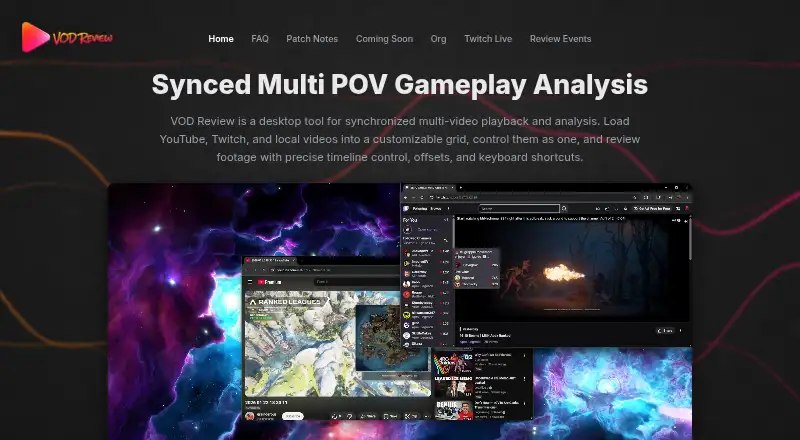
VOD Review is a paid Windows desktop application for synchronized, side-by-side gameplay video review. It is aimed at competitive players, coaches, and teams, and can use YouTube VODs, Twitch VODs, and local MP4 files. Reviewers can control several videos together with synchronized playback, timeline controls, per-video offsets, and keyboard shortcuts. Drawing and annotation tools, screenshots, and saved review sessions support documenting footage, while drawings can be shared in session files on Discord. The application can load up to 60 POVs at once and display up to 6 POVs at once. Version 1.4.7 adds automatic syncing for Twitch and VOD Downloader VODs, continuation VOD support, and negative start times. A paid license is a one-time purchase, though its price is not shown, and one license can be active on one device at a time. VOD Review Arena is available to organizations by request for free for LANs and esports arenas with shared PCs.
Who it suits
It suits competitive players, coaches, and teams reviewing multiple gameplay perspectives. Organizations running LANs or esports arenas can request the Arena edition.
What it does well
- Supports YouTube, Twitch, and local MP4 files
- Synchronized playback with offsets and keyboard shortcuts
- Loads up to 60 POVs and displays 6
- Includes annotations, screenshots, and saved sessions
- Supports English, Spanish, French, and Japanese
What to know first
- Windows only
- No free plan for the main license
- One active device per license
Plans
| Plan | Billed and limits | Price |
|---|---|---|
| VOD Review license | One-time purchase; price not shown on the opened pages. · One active device per license · two-week grace period between device switches | On request |
As vodreview.app lists them, read 9 Oct 2026. The maker's own page has the final word.
Verdict
VOD Review focuses on synchronized multi-POV gameplay analysis with tools for documenting review sessions. Its Windows-only availability, paid model, and one-device license rule are important considerations.
Facts from VOD Review's own pages
- Annotations and sessions
- The app supports drawing and annotation tools, saved review sessions, and screenshots. · vodreview.app, 9 Oct 2026
- Integrations
- The app works with Twitch and YouTube video sources, and review drawings can be shared in session files on Discord. · vodreview.app, 9 Oct 2026
- Languages
- The app currently supports English, Spanish, French, and Japanese. · vodreview.app, 9 Oct 2026
- License limit
- Each license can be active on one device at a time, with a two-week grace period between device switches. · vodreview.app, 9 Oct 2026
- Lobby scale
- The patch notes say users can load up to 60 POVs at once and view up to 6 POVs at once. · vodreview.app, 9 Oct 2026
- Maker
- The site identifies Kaden Gibbs as the maker; the opened pages do not state a headquarters or founding date. · vodreview.app, 9 Oct 2026
- Organization edition
- VOD Review Arena is available to organizations by request for free and is designed for LANs and esports arenas with shared PCs. · vodreview.app, 9 Oct 2026
- Playback
- Users can control multiple videos together with synchronized playback, precise timeline controls, per-video offsets, and keyboard shortcuts. · vodreview.app, 9 Oct 2026
- Privacy and payment
- The privacy policy says VOD Review does not store full card numbers; Stripe handles payment processing, while the app may collect device identifiers, activation and validation timestamps, playtime, and license status for licensing and fraud prevention. · vodreview.app, 9 Oct 2026
- Recent feature
- Version 1.4.7 adds automatic syncing for Twitch and VOD Downloader VODs, plus support for continuation VODs and negative start times. · vodreview.app, 9 Oct 2026
- Refund limit
- Refund requests must be made within 7 days, total usage must be under 2 hours, and the license must not have been transferred between devices. · vodreview.app, 9 Oct 2026
- Security disclosure
- The FAQ says Windows may show a SmartScreen warning because the app does not yet have a paid code signing certificate. · vodreview.app, 9 Oct 2026
- Support
- Users can get help by creating a Discord ticket or contacting support by email. · vodreview.app, 9 Oct 2026
- Video sources
- It supports YouTube VODs, Twitch VODs, and local MP4 files. · vodreview.app, 9 Oct 2026
- What it does
- VOD Review is a desktop application for synchronized, side-by-side gameplay video review aimed at competitive players, coaches, and teams. · vodreview.app, 9 Oct 2026
Where VOD Review stands on Freedom251
- Game Coaching Software#24 of 25