Freedom251 › Video Downloaders
Video Downloader by blackdown
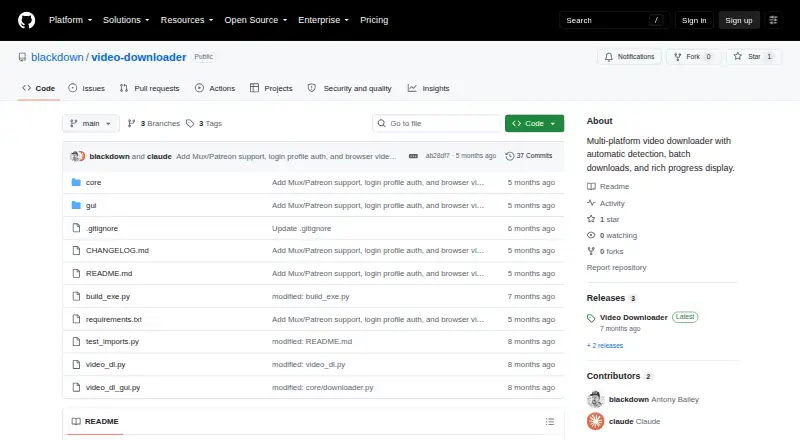
What Video Downloader by blackdown is
Video Downloader by blackdown is a free, MIT-licensed, open-source downloader for Windows, macOS, and Linux. Its graphical interface detects supported platforms, supports download queues and batch files, and outputs MP4. Listed sources include YouTube, Vimeo, Kinescope, GetCourse, Skillshare, Patreon, Mux, and direct HLS streams. Detect Videos can open Chrome and inspect network requests for streams that may not appear in page source. Setup Profile lets users sign in through Chrome so downloads can use saved session cookies between sessions. The command-line interface supports batch files, browser-cookie selection, output and filename settings, format listings, and optional aria2c mode. Its fast option uses 32 concurrent fragments instead of 16. The Windows release is a standalone executable; its detection feature needs Playwright, which is not bundled. The macOS app bundle includes yt-dlp and ffmpeg, while other setups require separate installations. Queue downloads run one at a time.
Who it suits
This downloader suits users wanting an open-source desktop tool on Windows, macOS, or Linux with batch handling, browser scanning, and authenticated-site support. It also serves command-line users who need cookie, format, and output controls.
What it does well
- Free and MIT-licensed
- Supports Windows, macOS, and Linux
- Batch files and download queue
- Browser network scanning
- Authenticated-site session cookies
What to know first
- Queue processes one download at a time
- Windows detection needs unbundled Playwright
- Other setups require yt-dlp and ffmpeg
- Output format listed as MP4
Verdict
Video Downloader by blackdown offers GUI and CLI workflows across three desktop platforms, with browser-assisted detection and saved sessions. Check the external dependency requirements and sequential queue behavior before using it.
Facts from Video Downloader by blackdown's own pages
- Authenticated sites
- Users can log in through a Chrome window opened by Setup Profile, after which downloads use saved session cookies. · github.com, 12 Oct 2026
- Batch downloads
- The GUI can load a text file containing one URL per line, with lines starting with # ignored. · github.com, 12 Oct 2026
- Browser scanning
- The Detect Videos feature opens Chrome to scan network requests for video streams that may not be visible in the page source. · github.com, 12 Oct 2026
- CLI options
- The CLI supports batch files, browser-cookie selection, output and filename options, format listing, and an optional aria2c mode. · github.com, 12 Oct 2026
- Cookie profile storage
- The README says the login profile is stored at %LOCALAPPDATA%\VideoDownloader\detection-profile and persists between sessions. · github.com, 12 Oct 2026
- Device platforms
- Windows,macOS,Linux · github.com, 22 Sept 2026
- Download limitation
- The v1.0.0 release notes state that the download queue processes one download at a time. · github.com, 12 Oct 2026
- Download limits
- The release notes list one download at a time, with queued downloads processed sequentially. · github.com, 12 Oct 2026
- Download speed
- The CLI fast option uses 32 concurrent fragments instead of 16. · github.com, 12 Oct 2026
- External tools
- The README instructs users to install yt-dlp and ffmpeg separately, and to install Playwright with Chromium for source-based setup. · github.com, 12 Oct 2026
- License
- The repository README identifies the project license as MIT. · github.com, 12 Oct 2026
- Linux usage
- The README gives macOS/Linux source-run instructions using a virtual environment and Python dependencies. · github.com, 12 Oct 2026
- macOS release
- The release notes describe a macOS app bundle with yt-dlp and ffmpeg bundled. · github.com, 12 Oct 2026
- Maker details
- The repository is published by the GitHub account blackdown; the opened project pages do not state a company name, headquarters, or founding date. · github.com, 12 Oct 2026
- Optional dependency
- The Detect Videos feature requires Playwright and Chromium, which the release notes say are not bundled in the Windows executable. · github.com, 12 Oct 2026
- Other platform release
- The releases page describes a macOS .app bundle with yt-dlp and ffmpeg bundled. · github.com, 12 Oct 2026
- Output formats
- MP4 · github.com, 22 Sept 2026
- Purpose
- Video Downloader is a multi-platform downloader with a GUI, automatic platform detection, browser-based video scanning, and authenticated-site support. · github.com, 12 Oct 2026
- Queue and batch downloads
- The GUI supports a download queue and batch files containing one URL per line, with lines starting with # ignored. · github.com, 12 Oct 2026
- Supported sources
- The README lists YouTube, Vimeo, Kinescope, GetCourse, Skillshare, Patreon/Mux, and direct HLS streams as supported sources, with source-specific limitations. · github.com, 12 Oct 2026
- Video detection
- The optional browser scanner opens a page in Chrome and scans network requests for video streams. · github.com, 12 Oct 2026
- Windows release
- The releases page describes a standalone Windows executable that requires no installation; its Detect Videos feature requires Playwright, which is not bundled. · github.com, 12 Oct 2026
Where Video Downloader by blackdown stands on Freedom251
- Video Downloaders#85 of 135