Freedom251 › Live TV streaming services

Upstream
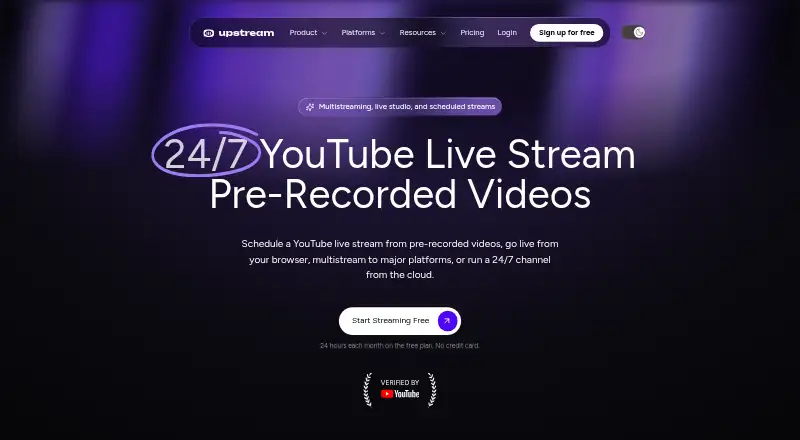
What Upstream is
Upstream is cloud live streaming software for browser-based broadcasts, multistreaming, and channels that run continuously from uploaded videos. Its Live Studio works in a browser and includes guest invitations, screen sharing, scenes, and branded overlays. A single stream can reach up to 10 destinations at once from a list of more than 30 supported platforms. Destinations named by the maker include YouTube, Twitch, Kick, Facebook, Instagram, TikTok, Rumble, and Mixcloud, as well as custom RTMP or SRT destinations. Users can schedule prerecorded videos to go live at a chosen time, either once or repeatedly. For 24/7 streaming, Upstream loops video and audio playlists on its servers, so the stream can continue while the user’s computer is off. The service also provides setup guides for OBS, vMix, cameras, and other streaming workflows. Its Live Streaming API and MCP server come with every plan, subject to each plan’s streaming allowances and API rate limits. The free plan allows one concurrent stream for 24 hours per month at 1080p and 30 FPS, with capacity potentially limited during unusual demand. Paid plans start at $30 a month for one stream; one-stream annual billing is $24 a year.
Who it suits
Upstream suits creators, music labels, radio stations, churches, podcasters, and media companies that need browser-based streaming or broadcasts to multiple destinations. Its scheduled video streams and server-hosted looping playlists also suit users who want broadcasts to continue without keeping their computer on.
What it does well
- Sends one stream to up to 10 destinations at once.
- Browser Live Studio supports guests, screen sharing, scenes, and branded overlays.
- Server-hosted playlists can keep a stream running with the computer off.
- Schedules prerecorded videos once or on repeat.
- API and MCP server are included with every plan.
- Support is available through live chat, helpdesk, and email.
What to know first
- Free plan is limited to one concurrent stream and 24 hours monthly.
- Free capacity may be limited during unusual demand.
- Streaming allowances and API rate limits apply on every plan.
- Paid monthly plans start at $30 a month.
Limits
The free plan permits one concurrent stream and 24 hours of streaming per month at 1080p and 30 FPS; capacity may be limited during unusual demand. The $30 a month one-stream plan specifies 1080p at 30 FPS and removes the 24-hour monthly streaming limit. Streaming allowances and API rate limits apply to the API and MCP server on every plan.
Plans
| Plan | Billed and limits | Price |
|---|---|---|
| Free | $0 / forever · 1 concurrent stream · 24 hr/month · 1080p at 30 FPS · no credit card | Free |
| 1 stream | billed monthly · 1 stream · 1080p at 30 FPS | $30 a month |
| 2 streams | billed monthly · 2 streams | $50 a month |
| 3 streams | billed monthly · 3 streams | $70 a month |
| 4+ streams | 4+ volume rate is $20 per stream · 4+ streams | $80 a month |
| 10 streams | billed monthly · 10 streams | $200 a month |
| 1 stream annual | Yearly billing is 20% less; $24/mo equivalent · 1 stream · 1080p at 30 FPS | $24 a month |
| Paid — 1 stream, yearly | $24/mo equivalent when billed yearly · 1 stream · 1080p at 30 FPS · paid annually | $24 a month |
The first 8 of 9 plans, as upstream.so lists them, read 8 Oct 2026. The maker's own page has the final word. Every plan
Getting started
- Open https://upstream.so/ in a browser.
- Choose the free plan or a paid stream plan.
- Use the browser-based Live Studio for a broadcast, or follow the setup guides for OBS, vMix, cameras, and other workflows.
- Invite guests, share a screen, arrange scenes, or add branded overlays as needed.
- Select supported destinations, schedule prerecorded video, or set up looping playlists for a continuous stream.
Verdict
Choose Upstream if you need browser-based production, multistreaming, scheduled broadcasts, or looping cloud streams. The free plan is constrained to one concurrent stream and 24 hours per month, while paid plans start at $30 a month for one stream.
Questions
Is there a free plan?
Yes. The Free plan costs nothing, requires no credit card, and allows one concurrent stream for 24 hours per month at 1080p and 30 FPS.
What does the one-stream paid plan cost?
The listed monthly one-stream plan is $30 a month. Annual billing for one stream is listed at $24 a year, described as equivalent to $24/mo.
Which platforms can I stream to?
The maker lists YouTube, Twitch, Kick, Facebook, Instagram, TikTok, Rumble, and Mixcloud, plus custom RTMP or SRT destinations. One stream can go to up to 10 destinations at once.
Can I use Upstream in a browser?
Yes. Upstream has a browser-based Live Studio and lists web and API as platforms.
Does every plan include the API and MCP server?
Yes. The Live Streaming API and Upstream MCP server are included with every plan, subject to plan streaming allowances and API rate limits.
How does Upstream describe its data security and privacy controls?
Its privacy policy says it uses commercially acceptable measures to protect personal data but cannot guarantee absolute security. Users can request stored-data deletion by deleting their account or contacting Upstream, and can revoke Google data access through Google Security Settings.
Facts from Upstream's own pages
- 24/7 streaming
- Upstream plays looping video and audio playlists from its servers, so a stream can continue with the user’s computer off. · upstream.so, 8 Oct 2026
- API and MCP
- The Live Streaming API and Upstream MCP server are included with every plan, subject to plan streaming allowances and API rate limits. · upstream.so, 8 Oct 2026
- Audience
- Upstream identifies creators, music labels, radio stations, churches, podcasters, and media companies as users. · upstream.so, 8 Oct 2026
- Browser-based studio
- Yes · upstream.so, 20 Sept 2026
- Destinations
- The maker lists YouTube, Twitch, Kick, Facebook, Instagram, TikTok, Rumble, and Mixcloud, plus custom RTMP or SRT destinations. · upstream.so, 8 Oct 2026
- Free plan
- Yes · upstream.so, 20 Sept 2026
- Integrations
- Upstream provides setup guides for OBS, vMix, cameras, and other streaming workflows. · upstream.so, 8 Oct 2026
- Live Studio
- The browser-based Live Studio supports guest invitations, screen sharing, scenes, and branded overlays. · upstream.so, 8 Oct 2026
- Multistreaming
- A single stream can be sent to up to 10 of its 30+ supported platforms at once. · upstream.so, 8 Oct 2026
- Notable limit
- The free plan allows one concurrent stream and 24 hours of streaming per month; its capacity may be limited during unusual demand. · upstream.so, 8 Oct 2026
- Privacy controls
- Users can request stored-data deletion by deleting their account or contacting Upstream, and can revoke its Google data access through Google Security Settings. · upstream.so, 8 Oct 2026
- Scheduling
- Users can schedule pre-recorded videos to stream at a set time, once or on repeat. · upstream.so, 8 Oct 2026
- Security and privacy
- The privacy policy says Upstream uses commercially acceptable measures to protect personal data but cannot guarantee absolute security. · upstream.so, 8 Oct 2026
- Paid from
- 30 · upstream.so, 20 Sept 2026
- Support
- Support is available through live chat, the helpdesk, and email, and the company says its team members answer requests. · upstream.so, 8 Oct 2026
- What it does
- Upstream is cloud live streaming software for browser-based broadcasts, multistreaming, and 24/7 channels made from uploaded videos. · upstream.so, 8 Oct 2026
Where Upstream stands on Freedom251
- Live TV streaming services#26 of 169
- Live Streaming Software#24 of 137
- Live streaming software#24 of 134
- Music Live Stream Software#7 of 26
- Live Stream Scheduling Software#8 of 28
- Pre-Recorded Live Stream Software#10 of 31
- RTMP Streaming Services#13 of 32
- Live Streaming Encoders#29 of 69
- Facebook Live Streaming Tools#11 of 26
- Multistreaming Software#24 of 43
- YouTube Live Streaming Tools#17 of 26
- Game Streaming Software#31 of 45