Up Next
What Up Next is
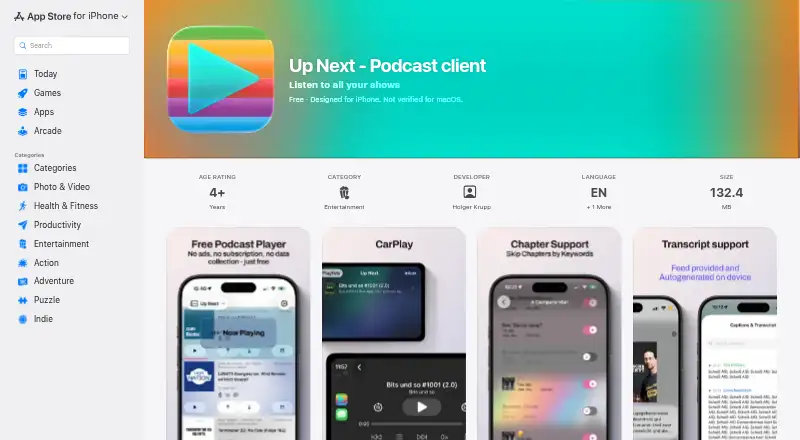
Up Next is a podcast client for Apple devices, centered on queue control, podcast feeds, and listening privacy. Listeners can reorder episodes manually, import subscriptions through OPML, or add shows by feed URL. Keyword rules can skip recurring advertisements and segments, with separate settings for each podcast. The app creates episode transcripts on-device without uploading audio. Playback includes bookmarks, a sleep timer, variable speed, and controls that follow chapters. Episodes can be downloaded for offline listening, with automatic refresh and cleanup. Up Next also supports video podcasts, private feeds using tokenised URLs or HTTP Basic Authentication, CarPlay, and Siri Shortcuts. The maker says no account or central server is required and that there is no tracking; Apple’s listing reports that the developer says no data is collected. The Free plan costs nothing and has no locked features, ads, subscriptions, in-app purchases, or paywalls. The listing covers iPhone and Apple Watch, with compatibility also named for Mac and Apple Vision devices. It requires iOS 26.0 or later.
Who it suits
Up Next suits listeners using Apple devices who want detailed queue management, offline playback, transcripts, and private-feed support. It is also aimed at people who prefer a podcast app without accounts, tracking, ads, or paid feature gates.
What it does well
- Free plan has no locked features or ads
- On-device transcripts avoid audio uploads
- Keyword rules skip recurring segments
- Supports offline downloads and automatic cleanup
- Includes CarPlay and Siri Shortcuts
What to know first
- Requires iOS 26.0 or later
- Platform support is limited to Apple devices
- No free trial is listed
Limits
The free plan is listed as free and has no locked features, ads, subscriptions, in-app purchases, or paywalls. Compatibility requires iOS 26.0 or later.
Plans
| Plan | Billed and limits | Price |
|---|---|---|
| Free | 100% free · no locked features · no ads, subscriptions, in-app purchases, or paywalls | Free |
As apps.apple.com lists them, read 9 Oct 2026. The maker's own page has the final word.
Getting started
- Open the Up Next page in the App Store
- Install it on a compatible iPhone or Apple device
- Import subscriptions with OPML or add a podcast feed URL
- Configure queue order and podcast-specific keyword rules
- Download episodes for offline listening
Verdict
Up Next offers a privacy-focused Apple podcast experience with queue tools, local transcripts, offline listening, and flexible feed support.
Questions
How much does Up Next cost?
Its Free plan is listed as free. It has no ads, subscriptions, in-app purchases, or paywalls.
Which devices does Up Next support?
The listing covers iPhone and Apple Watch, and also names Mac with Apple silicon and Apple Vision compatibility. iOS 26.0 or later is required.
Can Up Next work offline?
Yes. Episodes can be downloaded for offline listening, with automatic refresh and cleanup.
Does Up Next require an account?
The maker says it requires no account or central server and has no tracking. Apple’s listing says the developer reports that no data is collected.
Can I import existing podcast subscriptions?
Yes. Subscriptions can be imported with OPML, and podcasts can also be added by feed URL.
Does it support private feeds and car playback?
It supports private feeds using tokenised URLs or HTTP Basic Authentication, plus CarPlay and Siri Shortcuts.
Facts from Up Next's own pages
- Compatibility
- The App Store listing requires iOS 26.0 or later and lists Apple Watch, Mac with Apple silicon, and Apple Vision compatibility requirements. · apps.apple.com, 9 Oct 2026
- Cross-device sync
- Yes · apps.apple.com, 23 Sept 2026
- Free plan
- Yes · apps.apple.com, 23 Sept 2026
- Integrations
- The app supports CarPlay and Siri Shortcuts. · apps.apple.com, 9 Oct 2026
- Library import
- Listeners can import subscriptions using OPML and add podcasts by feed URL. · apps.apple.com, 9 Oct 2026
- Maker
- Holger says he has built apps since 2009 and released his first App Store app in 2010. · extremelysuccessfulapps.com, 9 Oct 2026
- Offline downloads
- Yes · apps.apple.com, 23 Sept 2026
- Offline listening
- Episodes can be downloaded for offline listening, with automatic refresh and cleanup. · apps.apple.com, 9 Oct 2026
- Playback
- Playback features include bookmarks, a sleep timer, variable speed, and chapter-aware controls. · apps.apple.com, 9 Oct 2026
- Privacy
- The maker says the app requires no account or central server and has no tracking; Apple’s listing says the developer reports that no data is collected. · apps.apple.com, 9 Oct 2026
- Private feeds
- The app supports private podcast feeds using tokenised URLs and HTTP Basic Authentication. · extremelysuccessfulapps.com, 9 Oct 2026
- Purpose
- Up Next is a podcast client built around its queue, feeds, and listening privacy. · extremelysuccessfulapps.com, 9 Oct 2026
- Queue
- The app supports manual queue reordering and queue management. · apps.apple.com, 9 Oct 2026
- Smart chapters
- Keyword rules can skip recurring ads and segments, with customization per podcast. · extremelysuccessfulapps.com, 9 Oct 2026
- Support
- The product page lists iPhone, Apple Watch, and CarPlay support. · extremelysuccessfulapps.com, 9 Oct 2026
- Supported platforms
- iPhone, Apple Watch; App Store also lists compatibility with Mac, Apple Vision and Apple Watch operating systems · apps.apple.com, 23 Sept 2026
- Transcripts
- The app can generate transcripts on-device without uploading audio. · extremelysuccessfulapps.com, 9 Oct 2026
- Video podcasts
- Yes · apps.apple.com, 23 Sept 2026
Where Up Next stands on Freedom251
- Podcast apps#32 of 55