Freedom251 › ISO Creation Software
UltraISO
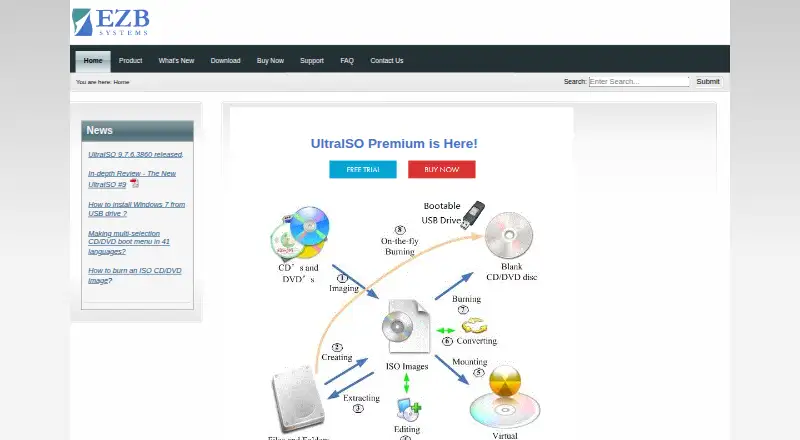
What UltraISO is
UltraISO is a Windows utility for creating and working with CD, DVD, and other disc-image files. It can create, edit, convert, burn, and emulate images, and make bootable CD, DVD, and USB media. Inside ISO contents, users can add, delete, or rename items and create directories. The software handles formats including ISO, BIN, IMG, NRG, MDS, CCD, ISZ, DMG, DAA, UIF, and HFS, with conversion to ISO available. Boot-image controls add, remove, or extract boot information and preserve it when creating a disc image. Audio CD images can also be created and edited. Windows shell integration opens image files from double-clicks or the right-click menu, and command-line parameters are supported. The FAQ gives a 2TB (2000GB) ISO processing limit. UltraISO is paid at $29.95, paid once, with a free trial and registration benefits.
Who it suits
UltraISO suits Windows users who create, edit, convert, burn, emulate, or inspect disc images and bootable media. It also fits users needing shell integration, command-line parameters, or Audio CD image tools.
What it does well
- Supports many disc-image formats
- Creates bootable CD, DVD, and USB media
- Edits files and directories inside ISO images
- Handles ISO images up to 2TB
- Includes a free trial
What to know first
- No free plan
- Windows-only platform
- Paid from $29.95, paid once
- Registration is needed to remove the 300MB document limit
Plans
| Plan | Billed and limits | Price |
|---|---|---|
| UltraISO | Not stated · Single listed product; registration removes the 300MB document limit; lifetime free software updates | $29.95, paid once |
As ultraiso.com lists them, read 11 Oct 2026. The maker's own page has the final word.
Verdict
UltraISO covers image editing, conversion, burning, emulation, and boot-media creation in one Windows application. Its broad format support and command-line access are useful, but it requires a paid purchase after the trial.
Facts from UltraISO's own pages
- Audio CD images
- The product page lists creating and editing Audio CD images as a feature. · ultraiso.com, 11 Oct 2026
- Boot information
- It can add, remove, or extract an ISO boot image and preserve boot information when creating a disc image. · ultraiso.com, 11 Oct 2026
- Command line
- The FAQ states that UltraISO supports command-line parameters. · ultraiso.com, 11 Oct 2026
- Free trial
- The maker offers a free download to try the software before purchase; the order page says the unregistered version has a 300MB document limit and a startup dialogue box. · ultraiso.com, 11 Oct 2026
- Image editing
- It can add, delete, rename, and create directories in ISO image contents. · ultraiso.com, 11 Oct 2026
- Image formats
- It supports formats including ISO, BIN, IMG, NRG, MDS, CCD, ISZ, DMG, DAA, UIF, and HFS, and can convert images to ISO. · ultraiso.com, 11 Oct 2026
- ISO size limit
- The FAQ states that UltraISO can process ISO images up to 2TB (2000GB). · ultraiso.com, 11 Oct 2026
- Maker
- The product site identifies EZB Systems, Inc. in its copyright notice. · ultraiso.com, 11 Oct 2026
- Payment
- The order page says payments are accepted in euros, US dollars, British pounds, Japanese yen, Canadian dollars, and Australian dollars. · ultraiso.com, 11 Oct 2026
- Purpose
- UltraISO creates, edits, converts, burns, and emulates CD/DVD image files, and makes bootable CD, DVD, and USB media. · ultraiso.com, 11 Oct 2026
- Registration benefits
- Registration includes lifetime free software updates and unlimited email technical support. · ultraiso.com, 11 Oct 2026
- Support
- The maker offers technical support by email and asks users to include reproduction steps, operating system, product version, and any error details. · ultraiso.com, 11 Oct 2026
- Supported Windows versions
- The download page lists Windows 10, 8.1, 8, 7, Vista, XP, and 2000 as system requirements. · ultraiso.com, 11 Oct 2026
- Windows integration
- It supports opening image files through Windows shell integration, including double-clicking or using the right-click menu. · ultraiso.com, 11 Oct 2026
Where UltraISO stands on Freedom251
- ISO Creation Software#29 of 33