Freedom251 › PC Optimization Software
Ultimate Windows Tweaker
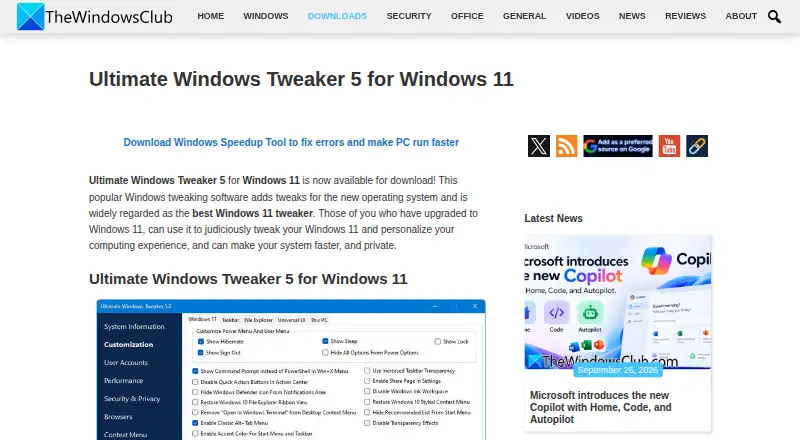
What Ultimate Windows Tweaker is
Ultimate Windows Tweaker is free portable software for changing Windows settings and personalizing a PC. The Windows 11 release includes more than 200 tweaks for the taskbar, File Explorer, context menus, privacy and performance. It provides controls to create a System Restore Point, run DISM or System File Checker, and calculate the Windows Experience Index. The program does not require installation; the maker says deleting its program folder removes it. The download is described as around 219 KB and as clean freeware without third-party offers or bundleware. Users are instructed to run the executable as administrator. The maker recommends creating a restore point first and applying changes gradually, one category at a time. Security software may flag the program, and Windows SmartScreen may block it because it changes system settings. This release supports Windows 11; Windows 10 users are directed to Ultimate Windows Tweaker 4.8. The About tab links to support, bug reporting and update checking.
Who it suits
This utility suits Windows 11 users who want many system-setting tweaks and portable operation. Windows 10 users are directed to a different release.
What it does well
- Free portable utility
- Over 200 Windows 11 tweaks
- Creates System Restore Points
- Runs DISM and System File Checker
- No installation or bundled offers
What to know first
- Windows 11 release only
- Requires administrator access
- Security software or SmartScreen may block it
- No junk cleanup or startup manager
Plans
| Plan | Billed and limits | Price |
|---|---|---|
| Freeware | Free to download · Windows 11; portable; over 200 tweaks | Free |
As thewindowsclub.com lists them, read 11 Oct 2026. The maker's own page has the final word.
Verdict
Ultimate Windows Tweaker offers a broad set of Windows 11 personalization controls in a small portable package. Create a restore point first and apply changes gradually, as the maker advises.
Facts from Ultimate Windows Tweaker's own pages
- Administrator access
- The maker instructs users to run the executable as administrator to use the tweaker. · thewindowsclub.com, 11 Oct 2026
- Company identity
- TheWindowsClub’s About page identifies the site owner as Khanse Webmedia Pvt Ltd. · thewindowsclub.com, 11 Oct 2026
- Developer
- The maker identifies Paras Sidhu as the developer of Ultimate Windows Tweaker 5.2 for TheWindowsClub.com. · thewindowsclub.com, 11 Oct 2026
- Download size
- The maker describes the tool as around 219 KB in size. · thewindowsclub.com, 11 Oct 2026
- Driver updates
- No · thewindowsclub.com, 22 Sept 2026
- Features
- The Windows 11 version includes over 200 tweaks, with options for the taskbar, File Explorer, context menus, privacy, and performance. · thewindowsclub.com, 11 Oct 2026
- Free plan
- Yes · thewindowsclub.com, 22 Sept 2026
- Junk cleanup
- No · thewindowsclub.com, 22 Sept 2026
- No bundled offers
- The maker describes UWT5 as clean freeware with no third-party offers or bundleware. · thewindowsclub.com, 11 Oct 2026
- Portable
- The program is portable and does not require installation; the maker says it can be removed by deleting its program folder. · thewindowsclub.com, 11 Oct 2026
- Publisher background
- TheWindowsClub says it was created by Anand Khanse and launched on April 20, 2009. · thewindowsclub.com, 11 Oct 2026
- Purpose
- Ultimate Windows Tweaker provides Windows tweaks to help users personalize their computing experience and change system settings. · thewindowsclub.com, 11 Oct 2026
- Restore-point tools
- Yes · thewindowsclub.com, 22 Sept 2026
- Scheduled maintenance
- No · thewindowsclub.com, 22 Sept 2026
- Security notice
- The maker says some security software may flag the program and that Windows SmartScreen may block it because it changes Windows system settings. · thewindowsclub.com, 11 Oct 2026
- Startup manager
- No · thewindowsclub.com, 22 Sept 2026
- Support
- The app’s About tab links to support, bug reporting, and update checking. · thewindowsclub.com, 11 Oct 2026
- System tools
- It provides buttons to create a System Restore Point and run DISM or System File Checker, and it can calculate the Windows Experience Index. · thewindowsclub.com, 11 Oct 2026
- Usage guidance
- The maker recommends creating a restore point first and applying tweaks gradually, one category at a time. · thewindowsclub.com, 11 Oct 2026
- Windows support
- windows 11 · thewindowsclub.com, 22 Sept 2026
- Windows version
- The maker directs Windows 10 users to Ultimate Windows Tweaker 4.8 and identifies this release as the Windows 11 version. · thewindowsclub.com, 11 Oct 2026
Where Ultimate Windows Tweaker stands on Freedom251
- PC Optimization Software#53 of 103