Freedom251 › Design System Software

UI Vault
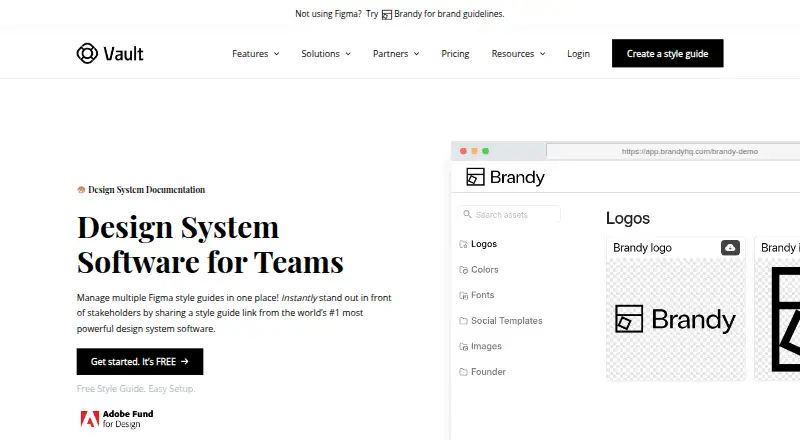
What UI Vault is
UI Vault is a web-based platform for organizing design systems and maintaining design assets. It syncs Figma frames, components, colors, and text styles into style guides, where teams can add documentation, usage notes, and previews. Teams can edit guides in real time, leave comments and mentions, and use shared checklists. Bento-inspired blocks provide a grid-based way to arrange guide content, while search can locate assets by name, file type, or custom tags. Guides can be branded with custom logos, favicons, domains, login portals, and white-label presentation. Private guides can be locked and access limited to selected users; the site marks this as a Pro feature. UI Vault identifies design teams, developers, product managers, agencies, freelancers, enterprises, and product designers among its users. Its listed capabilities include token management, component documentation, design tool sync, versioning, and cloud hosting. The Free plan costs nothing and includes the core platform, style guides, and Figma-powered living guides. Paid access starts at 35 USD per user per month.
Who it suits
It suits teams and individuals maintaining design systems, including designers, developers, product managers, agencies, and freelancers. It may also fit enterprises seeking shared, branded style guides with controlled access.
What it does well
- Syncs Figma frames, components, colors, and text styles.
- Guides can include documentation, notes, and previews.
- Search supports names, file types, and custom tags.
- Collaboration includes editing, comments, mentions, and checklists.
- Free plan includes style guides and Figma-powered living guides.
What to know first
- Private guides are marked as a Pro feature.
- The listed platform is web-based.
- Paid access starts at 35 USD per user per month.
Limits
The free plan includes the core platform, style guides, and Figma-powered living guides. Private guides are marked Pro.
Plans
| Plan | Billed and limits | Price |
|---|---|---|
| Free | Core platform · style guides · Figma-powered living guides | Free |
As uivault.com lists them, read 4 Oct 2026. The maker's own page has the final word.
Getting started
- Open the UI Vault website.
- Create style guides on the free plan or choose paid access starting at $35/user/mo.
- Connect Figma to sync components, text styles, color tokens, and logos.
- Organize guide content and add documentation, usage notes, or previews.
- Customize guide branding or enable private access with a Pro feature.
Verdict
UI Vault combines synced Figma assets with documentation, search, collaboration, and guide customization. The free plan covers style guides, while private guides are identified as Pro and paid access starts at 35 USD per user per month.
Questions
Is UI Vault free?
Yes. Its Free plan is listed as free and includes the core platform, style guides, and Figma-powered living guides.
How much does paid UI Vault cost?
Paid access starts at $35/user/mo.
What does UI Vault sync from Figma?
It syncs frames, components, colors, and text styles into guides. The maker also describes syncing components, text styles, color tokens, and logos.
Can teams restrict access to a style guide?
Yes. Private guides can be locked and access granted to specific users. The homepage marks this feature Pro.
Who makes UI Vault?
The site identifies UI Vault as being by Stylebase Inc.
Where is UI Vault hosted?
UI Vault is cloud hosted and available on the web.
Facts from UI Vault's own pages
- Bento layouts
- Bento-inspired blocks can be used to create structured, grid-based guide layouts. · uivault.com, 4 Oct 2026
- Collaboration
- The site describes real-time editing, comments, mentions, and shared checklists. · uivault.com, 4 Oct 2026
- Company
- The site footer identifies UI Vault as being by Stylebase Inc. · uivault.com, 4 Oct 2026
- Customization
- The site describes custom logos, favicons, domains, login portals, and branding for white-labeled guides. · uivault.com, 4 Oct 2026
- Figma sync
- UI Vault syncs Figma frames, components, colors, and text styles into organized style guides. · uivault.com, 4 Oct 2026
- Headquarters
- The contact page lists an address at 140 NE 39th St., Miami, FL, 33137. · uivault.com, 4 Oct 2026
- Integrations
- The maker describes direct integration with Figma to sync components, text styles, color tokens, and logos. · uivault.com, 4 Oct 2026
- Intended users
- The about page names design teams, developers, product managers, agencies and freelancers, enterprises, and product designers as users it serves. · uivault.com, 4 Oct 2026
- Private guides
- Private style guides can be locked and access can be granted to specific users; the homepage marks this feature Pro. · uivault.com, 4 Oct 2026
- Purpose
- UI Vault is a design system management platform for organizing, maintaining, and scaling design assets. · uivault.com, 4 Oct 2026
- Search
- Assets can be searched by name, file type, or custom tags. · uivault.com, 4 Oct 2026
- Shared documentation
- Style guides can include documentation, usage notes, and previews alongside synced Figma components and styles. · uivault.com, 4 Oct 2026
- Support
- The contact page lists [email protected] for questions and inquiries and says meetings can be booked by contacting that address. · uivault.com, 4 Oct 2026
Where UI Vault stands on Freedom251
- Design System Software#18 of 22