Freedom251 › JavaScript Build Tools
UglifyJS
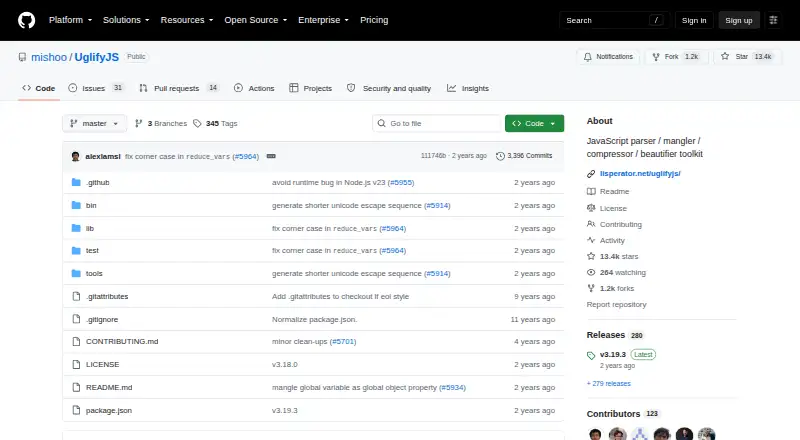
What UglifyJS is
UglifyJS is a JavaScript toolkit for parsing, minifying, compressing and beautifying code. Developers can install it from npm and use it from the command line or in applications. The command-line interface accepts multiple input files and can read from standard input when no file is supplied. For programmatic use, its configurable `minify()` function processes JavaScript and can return minified code, warnings or errors.
The toolkit can generate source maps and compose mappings from compiled JavaScript back to original source files. It also includes AST utilities, can import SpiderMonkey AST input and can use Acorn as an optional parser. UglifyJS supports JavaScript and most ECMAScript features; its documentation recommends transpiling more exotic syntax with tools such as Babel first. Compatibility options are available for projects that need behavior beyond the defaults. The project also describes compiler assumptions and cautions that some transformations can change behavior in particular cases.
UglifyJS is free, BSD-licensed software for API, Linux and self-hosted use. Its command-line and programmatic interfaces are intended for developers incorporating it into build workflows or applications.
Who it suits
UglifyJS suits developers who need JavaScript parsing, minification, compression or beautification in a command-line workflow or application. Its API, source-map generation and AST utilities also support projects that need programmatic processing or mappings back to original source files.
What it does well
- Free, BSD-licensed software.
- Offers both command-line and programmatic interfaces.
- Can generate source maps and compose mappings to original files.
- Includes AST utilities and optional Acorn parsing.
- Supports JavaScript and most ECMAScript features.
What to know first
- More exotic syntax may need transpiling before use.
- Default behavior does not target certain browser and runtime compatibility guarantees.
- Some documented compiler transformations can change behavior in particular cases.
Limits
The free plan is listed as free. The project recommends transpiling more exotic syntax first, and default compatibility behavior does not target Internet Explorer, Chrome/Node.js V8 or Safari/WebKit proofing.
Plans
| Plan | Billed and limits | Price |
|---|---|---|
| UglifyJS | BSD-licensed software · install via npm | Free |
As github.com lists them, read 4 Oct 2026. The maker's own page has the final word.
Getting started
- Install UglifyJS from npm.
- Use the command-line tool with one or more input files, or provide input through standard input.
- For programmatic use, call the configurable `minify()` function.
- Use Acorn as an optional parser if needed.
- Transpile more exotic syntax with a tool such as Babel before processing it.
Verdict
Choose UglifyJS if you need a free JavaScript toolkit with command-line and API options, source maps and AST utilities. Look elsewhere if your syntax needs exceed its supported features without transpilation, or if you need the defaults to target the compatibility environments it excludes.
Questions
How much does UglifyJS cost?
The listed UglifyJS plan costs nothing. It is BSD-licensed software.
Is there a free plan or trial?
A free plan is listed. There is no free trial.
How can I use UglifyJS?
The project documents npm installation for command-line or programmatic use. It is listed for API, Linux and self-hosted platforms.
What does UglifyJS do?
It parses, minifies, compresses and beautifies JavaScript. Its API can also return warnings or errors, and it can generate source maps.
What license does UglifyJS use?
UglifyJS is released under a BSD license.
Does UglifyJS support all JavaScript syntax and compatibility needs?
It supports JavaScript and most ECMAScript features, while recommending transpilation for more exotic syntax. Compatibility options are available, but the defaults do not aim to provide the listed browser and runtime proofing.
Facts from UglifyJS's own pages
- API
- The API provides a configurable minify() function that can process JavaScript and return minified code, warnings or errors. · github.com, 4 Oct 2026
- AST tools
- The toolkit includes its own AST utilities and can import SpiderMonkey AST input; Acorn can be used for parsing. · github.com, 4 Oct 2026
- CLI
- The command-line tool accepts multiple input files and reads from standard input when no input file is specified. · github.com, 4 Oct 2026
- Compatibility limit
- The project says it does not try to be Internet Explorer, Chrome/Node.js V8, or Safari/WebKit proof by default; corresponding compatibility options are available. · github.com, 4 Oct 2026
- Install
- The project documents installing UglifyJS from npm for command-line or programmatic use. · github.com, 4 Oct 2026
- Integration
- The README documents npm and Node.js usage and describes using Acorn as an optional parser. · github.com, 4 Oct 2026
- Intended users
- The documented command-line and programmatic interfaces support developers using UglifyJS in build workflows or applications. · github.com, 4 Oct 2026
- Language support
- UglifyJS supports JavaScript and most ECMAScript features, and the README recommends transpiling more exotic syntax with tools such as Babel first. · github.com, 4 Oct 2026
- License
- UglifyJS is released under a BSD license. · github.com, 4 Oct 2026
- Optimization caveat
- The README documents compiler assumptions and warns that some transformations can alter behavior in particular cases. · github.com, 4 Oct 2026
- Purpose
- UglifyJS is a JavaScript parser, minifier, compressor and beautifier toolkit. · github.com, 4 Oct 2026
- Security
- The repository has a Security tab, but the opened security page does not state a security policy or compliance certification. · github.com, 4 Oct 2026
- Source maps
- UglifyJS can generate source maps and compose mappings from compiled JavaScript back to original source files. · github.com, 4 Oct 2026
Where UglifyJS stands on Freedom251
- JavaScript Build Tools#21 of 27
- Code Formatting Tools#28 of 34