Freedom251 › Data Preparation Software
Turbo Excel Cleaner
What Turbo Excel Cleaner is
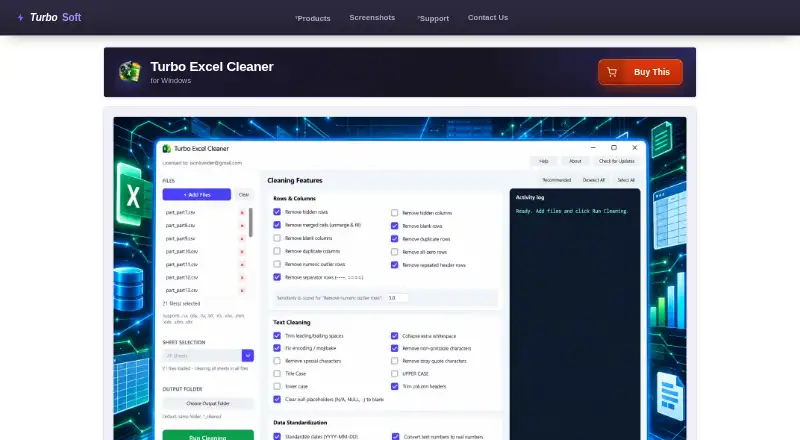
Turbo Excel Cleaner is a Windows desktop application for batch-cleaning spreadsheets. It offers 43 selectable features covering rows and columns, text cleaning, data standardization, and workbook structure and formatting. Users can queue unlimited workbooks and apply the same selections across the batch. With one workbook loaded, they can clean a chosen sheet or all sheets; with multiple files, every sheet in each file is processed. Supported formats include XLSX, XLSM, XLTX, XLTM, XLS, XLSB, ODS, CSV, TSV, and TXT. Legacy XLS, XLSB, and ODS files are saved as XLSX. The Recommended preset enables 19 curated features and excludes options such as case rewriting and outlier removal. Cleaned files receive a _cleaned suffix or go to a selected folder, while a live Activity Log records processing steps. Files stay local and cleaning works offline after activation. The one-time price is 14.99 USD.
Who it suits
It suits bookkeepers, accountants, analysts, inventory and e-commerce teams, researchers, marketers managing contact lists, and IT migration teams. It is designed for Windows users handling batches of spreadsheet files.
What it does well
- Offers 43 selectable cleaning features
- Queues unlimited workbooks without per-file size limits
- Supports many spreadsheet and text formats
- Keeps source files unchanged by default
- Processes files locally
What to know first
- Windows desktop application only
- Native formatting features skip CSV, TSV, and TXT
- Internet required for initial license validation
- No free plan listed
Plans
| Plan | Billed and limits | Price |
|---|---|---|
| Turbo Excel Cleaner | One-time purchase; no recurring subscription · Windows desktop · unlimited queued workbooks · no per-file size limits | $14.99, paid once |
As turbo-soft.com lists them, read 4 Oct 2026. The maker's own page has the final word.
Verdict
Turbo Excel Cleaner focuses on repeatable spreadsheet cleanup across batches while keeping processing local. Its broad format support and one-time license suit Windows users who regularly standardize workbook data.
Facts from Turbo Excel Cleaner's own pages
- Activity log
- A live Activity Log records steps such as files opened, features applied, rows removed, and files saved. · turbo-soft.com, 4 Oct 2026
- Batch processing
- Users can queue as many workbooks as they need and apply the same selected features across the batch. · turbo-soft.com, 4 Oct 2026
- Cleaning features
- It offers 43 selectable cleaning features across Rows & Columns, Text Cleaning, Data Standardization, and Structure & Formatting. · turbo-soft.com, 4 Oct 2026
- File formats
- It reads XLSX, XLSM, XLTX, XLTM, XLS, XLSB, ODS, CSV, TSV, and TXT; legacy XLS, XLSB, and ODS files are saved as XLSX. · turbo-soft.com, 4 Oct 2026
- Format limitation
- Workbook structure and formatting features apply only to native Excel formats; features that do not apply to CSV, TSV, and TXT are skipped. · turbo-soft.com, 4 Oct 2026
- Integrations
- The product page describes Gumroad license activation using the purchase email and license key; it does not list spreadsheet service integrations. · turbo-soft.com, 4 Oct 2026
- Intended users
- The maker identifies bookkeepers and accountants, operations and data analysts, e-commerce and inventory teams, researchers, marketing contact-list owners, and IT migration teams as use cases. · turbo-soft.com, 4 Oct 2026
- License support
- The page says a license can be moved to a new computer using the same purchase email and key, and that the cached license can be deleted to reopen activation. · turbo-soft.com, 4 Oct 2026
- Local processing and privacy
- File reading, cleaning, and saving happen locally; the page says spreadsheet data is not uploaded or shared, and internet access is used for license validation without spreadsheet content. · turbo-soft.com, 4 Oct 2026
- Offline use
- Cleaning does not require an internet connection after activation; initial license validation uses the internet. · turbo-soft.com, 4 Oct 2026
- Output safety
- Cleaned files are saved with a _cleaned suffix or to a chosen output folder, so source files are not overwritten by default. · turbo-soft.com, 4 Oct 2026
- Platform and requirements
- The product is a Windows application; minimum listed requirements include 64-bit Windows 8, 1–2 CPU cores, 2 GB RAM, and 500 MB free disk space. · turbo-soft.com, 4 Oct 2026
- Purpose
- Turbo Excel Cleaner batch-cleans spreadsheets by removing blank or duplicate rows, trimming text, standardizing data, and tidying workbook structure. · turbo-soft.com, 4 Oct 2026
- Recommended preset
- The Recommended preset enables a curated set of 19 safe features and excludes options such as case rewriting and outlier removal. · turbo-soft.com, 4 Oct 2026
- Sheet targeting
- With one workbook loaded, users can clean a selected sheet or all sheets; with multiple files loaded, it cleans every sheet in each file. · turbo-soft.com, 4 Oct 2026
Where Turbo Excel Cleaner stands on Freedom251
- Data Preparation Software#25 of 28