Freedom251 › Image Compression Software
Turbo Batch Image Converter Pro
What Turbo Batch Image Converter Pro is
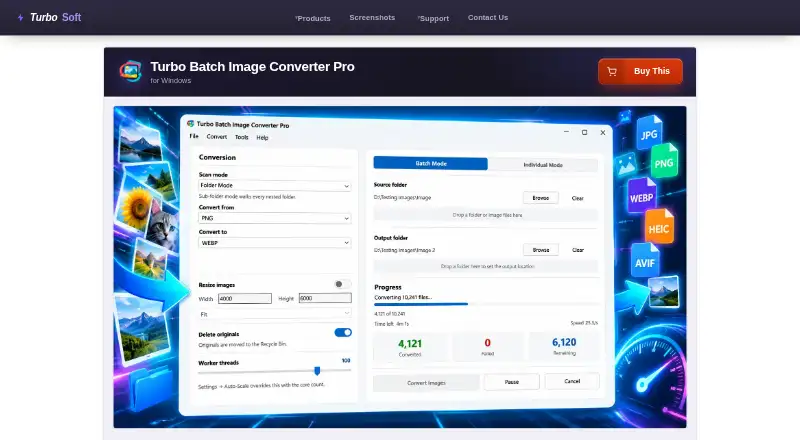
Turbo Batch Image Converter Pro is a paid Windows application for converting and resizing images in bulk. It processes folders and nested folders, with a separate mode for single files. The software reads 22 input format families, including 47 RAW camera formats, and writes 21 output formats. Listed formats include JPEG, PNG, HEIC, HEIF, AVIF, WEBP, GIF, BMP, TIFF, SVG, ICO, PSD, TGA, DDS, JPEG2000, EXR, HDR, WBMP, PCX, PPM, PGM, PBM, and RAW. Resizing occurs during conversion with Fit, Fill, and Stretch modes, up to 8,000 pixels per side. Its multithreaded engine supports up to 128 workers and Auto-Scale based on CPU cores. The maker says batches have no built-in size limit and can handle sessions of 100,000 or more files. Jobs can pause, resume, or cancel, while processing stays local and images are not uploaded.
Who it suits
This app suits Windows users handling large image batches, including photographers and web-image workflows. The maker also describes it for confidential medical, legal, corporate, or air-gapped work.
What it does well
- Batch processing for folders and nested folders
- Reads 22 input format families
- Resizing up to 8,000 pixels per side
- Up to 128 processing workers
- Local processing without image uploads
What to know first
- No free plan
- Requires 64-bit Windows 10 or 11
- Internet required once for license activation
- One-time price listed as $29.99 a month
Plans
| Plan | Billed and limits | Price |
|---|---|---|
| Turbo Batch Image Converter Pro | One-time purchase; no subscription · No cap on files per batch · no watermark · lifetime updates | On request |
As turbo-soft.com lists them, read 11 Oct 2026. The maker's own page has the final word.
Verdict
Turbo Batch Image Converter Pro focuses on high-volume conversion, resizing, and format controls on Windows. Its local processing and broad format support address workflows where batch size or data handling matters.
Facts from Turbo Batch Image Converter Pro's own pages
- Batch processing
- Yes · turbo-soft.com, 24 Sept 2026
- Batch size
- The maker states there is no built-in batch-size limit and says the app is designed for sessions of 100,000 or more files. · turbo-soft.com, 11 Oct 2026
- Compression modes
- both · turbo-soft.com, 24 Sept 2026
- File handling
- The app avoids overwriting existing files, can send originals to the Recycle Bin after successful conversion, and preserves EXIF data in supported output formats. · turbo-soft.com, 11 Oct 2026
- Formats
- Reads 22 input format families, including 47 RAW camera formats, and writes 21 output formats. · turbo-soft.com, 11 Oct 2026
- Free plan
- No · turbo-soft.com, 24 Sept 2026
- Intended users
- The maker describes the app as suitable for photographers, web image preparation, and confidential medical, legal, corporate, or air-gapped workflows. · turbo-soft.com, 11 Oct 2026
- License activation
- The app requires an internet connection once to activate the license and then works offline. · turbo-soft.com, 11 Oct 2026
- Metadata controls
- Yes · turbo-soft.com, 24 Sept 2026
- Performance
- The multithreaded engine supports up to 128 workers and an Auto-Scale option that uses CPU cores. · turbo-soft.com, 11 Oct 2026
- Privacy
- The maker says processing is local, images are not uploaded, and the app has no third-party analytics or background telemetry; internet is used for license activation. · turbo-soft.com, 11 Oct 2026
- Purpose
- Converts and resizes images in bulk from folders and nested folders, with an individual mode for single files. · turbo-soft.com, 11 Oct 2026
- Quality controls
- Per-format settings include quality controls for JPEG, WebP, AVIF, HEIC, and JPEG 2000, plus format-specific compression options. · turbo-soft.com, 11 Oct 2026
- Image resizing
- Yes · turbo-soft.com, 24 Sept 2026
- Resize modes
- Resizing runs in the same pass as conversion and offers Fit, Fill, and Stretch modes, with dimensions up to 8,000 pixels per side. · turbo-soft.com, 11 Oct 2026
- Support
- TurboSoft says support requests are typically answered within 24–48 hours on business days. · turbo-soft.com, 11 Oct 2026
- Supported formats
- JPEG,JPG,PNG,HEIC,HEIF,AVIF,WEBP,GIF,BMP,TIFF,TIF,SVG,ICO,PSD,TGA,DDS,JPEG2000,EXR,HDR,WBMP,PCX,PPM,PGM,PBM,RAW · turbo-soft.com, 24 Sept 2026
- Supported OS
- The product page specifies 64-bit Windows 10 and Windows 11. · turbo-soft.com, 11 Oct 2026
- Updates
- The maker says a one-time purchase includes lifetime updates for the same product at no extra cost. · turbo-soft.com, 11 Oct 2026
- Workflow controls
- Batches can be paused, resumed, or cancelled; corrupt, locked, or unsupported files are skipped while the rest continue. · turbo-soft.com, 11 Oct 2026
Where Turbo Batch Image Converter Pro stands on Freedom251
- Image Compression Software#84 of 85