Freedom251 › Explainer Video Software
Toonly
What Toonly is
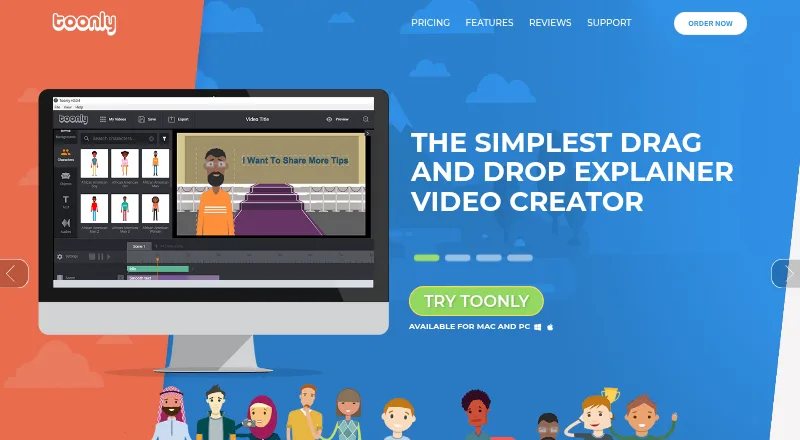
Toonly is desktop software for creating animated cartoon explainer videos on macOS and Windows. A scene starts with a background, then characters and props are placed and animated with mouse clicks or the Control key on Mac. The homepage describes 200 character images, 81 backgrounds and scenes, and hundreds of props, while plan listings specify different library counts. Standard includes 30 character images, 17 character animations, 1,058 prop images and 71 backgrounds; Enterprise includes 82 character images, 30 animations, 2,024 prop images and 139 backgrounds. Both plans allow unlimited videos. Exports are standard MP4 files, with settings from 360p to 1080p, 24 to 60 frames per second and 62% to 100% quality. PNG and JPEG images, voiceovers, music and imported TIFF or OTF fonts are supported, and Toonly says it accepts any language. The app needs an internet connection to retrieve cloud images and saved projects. Pricing starts at $49 a month, with a 14-day trial and no free plan.
Who it suits
Toonly suits individuals making cartoon explainer videos on Windows or macOS. It is a single-user desktop product for users who can work with an internet connection.
What it does well
- Exports standard MP4 video files
- Supports up to 1080p output
- Includes voiceover and music options
- Accepts PNG, JPEG, TIFF and OTF files
- Offers a 14-day trial
What to know first
- No free plan is available
- Requires an internet connection for cloud assets
- Single-user product
- Starts at $49 a month
Plans
| Plan | Billed and limits | Price |
|---|---|---|
| Standard | $49 per month · 30 character images · 17 character animations · 1,058 prop images · 71 backgrounds · unlimited videos | $49 a month |
| Enterprise | $79 per month · 82 character images · 30 character animations · 2,024 prop images · 139 backgrounds · unlimited videos | $79 a month |
| Standard | $490 per year, billed annually · 30 character images · 17 character animations · 1,058 prop images · 71 backgrounds · unlimited videos | $490 a year |
| Enterprise | $790 per year, billed annually · 82 character images · 30 character animations · 2,024 prop images · 139 backgrounds · unlimited videos | $790 a year |
As toonly.com lists them, read 29 Sept 2026. The maker's own page has the final word.
Verdict
Toonly focuses on drag-and-animate cartoon video creation with a large asset library and adjustable MP4 export settings. Its desktop, single-user setup and paid plans define the intended workflow.
Facts from Toonly's own pages
- Asset library
- The homepage says Toonly includes 200 character images, 81 backgrounds and scenes, and hundreds of props. · toonly.com, 29 Sept 2026
- Desktop app
- Toonly is a desktop application that requires an internet connection to fetch images and saved projects from the cloud. · toonly.com, 29 Sept 2026
- Export format
- Toonly creates standard MP4 video files for uploading to video sites such as YouTube. · toonly.com, 29 Sept 2026
- Fonts and languages
- Toonly says it accepts any language and allows importing TIFF or OTF fonts. · toonly.com, 29 Sept 2026
- Free plan
- No · toonly.com, 21 Sept 2026
- Media import
- Users can upload PNG and JPEG images and add a voiceover or music, including their own audio files. · toonly.com, 29 Sept 2026
- Operating systems
- The pricing FAQ says Toonly is compatible with Windows 7 or higher and Mac OS X 10.10 or higher, in 32-bit or 64-bit versions. · toonly.com, 29 Sept 2026
- Privacy
- Voomly says it does not sell or rent personal information to third-party data vendors or marketing companies. · voomly.com, 29 Sept 2026
- Purpose
- Toonly is software for creating animated cartoon explainer videos. · toonly.com, 29 Sept 2026
- Refund
- The pricing FAQ offers a refund within 30 days if the customer sends their receipt, after which they lose access to Toonly. · toonly.com, 29 Sept 2026
- Security
- Voomly says its security program includes technical, organizational, and administrative measures, and that it cannot guarantee information will be free from unauthorized access. · voomly.com, 29 Sept 2026
- Paid from
- 49 · toonly.com, 21 Sept 2026
- Support
- The pricing FAQ directs users to the online knowledge base or [email protected] and says replies arrive in less than 24 hours, typically faster. · toonly.com, 29 Sept 2026
- Video export
- Export options include 360p to 1080p resolution, 24 to 60 frames per second, and quality from 62% to 100%. · toonly.com, 29 Sept 2026
- Workflow
- Users choose a background, drag characters onto it, and animate them with mouse clicks or the Control key on Mac. · toonly.com, 29 Sept 2026
Where Toonly stands on Freedom251
- Explainer Video Software#38 of 40
- Cartoon Maker Software#30 of 31
- Animation Software#104 of 106