Freedom251 › AI Cartoon Generators

Toonizer
What Toonizer is
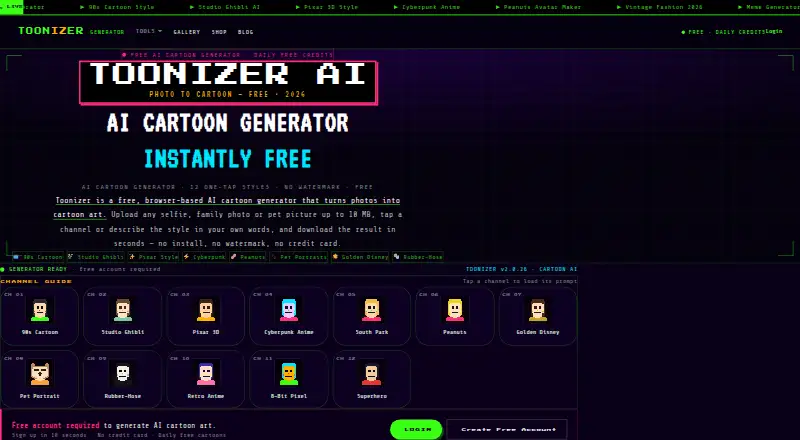
Toonizer is a web-based cartoon generator that transforms uploaded photos into cartoon art. Use it in a desktop or mobile browser: upload a photo, choose one of 12 built-in styles or describe a look in a prompt, and download the generated image. The style options include 90s cartoon, Studio Ghibli inspired, Pixar-style 3D, cyberpunk anime, pet portraits, retro anime, pixel art, and superhero comic. Toonizer supports both photo-to-cartoon and text-to-cartoon generation through its style and prompt options.
Uploads can be JPG, PNG, WEBP, or GIF files up to 10 MB. Downloaded cartoons have no watermark, and the service requires no app or software installation. The free account costs nothing, includes a daily generation allowance, and does not require a credit card; some generations require credits. Toonizer describes the service for selfies, family portraits, and pet photos. Its terms say users retain ownership of their original photos and may use generated cartoons for personal and limited commercial purposes. The maker is based in İzmir, Turkey.
Who it suits
Toonizer suits people who want to turn selfies, family portraits, or pet photos into cartoons using a browser on desktop or mobile. It also fits users who want to choose a preset look or describe a style in their own words.
What it does well
- Offers 12 one-tap cartoon styles.
- Accepts JPG, PNG, WEBP, and GIF uploads up to 10 MB.
- Generated cartoons can be downloaded without watermarks.
- Runs in a browser on desktop and mobile.
- Free account requires no credit card.
What to know first
- Free accounts have a daily generation allowance.
- Some generations require credits.
- Uploads are limited to 10 MB.
Limits
The free account includes a daily allowance of generations. Some generations require credits.
Plans
| Plan | Billed and limits | Price |
|---|---|---|
| Free | Free account · daily allowance of cartoon generations · no watermark · no credit card | Free |
As toonizer.com lists them, read 5 Oct 2026. The maker's own page has the final word.
Getting started
- Open the Toonizer website in a desktop or mobile browser.
- Create a free account; no credit card is required.
- Upload a JPG, PNG, WEBP, or GIF photo up to 10 MB, or enter a prompt.
- Choose a built-in style or describe the look you want.
- Download the generated cartoon.
Verdict
Choose Toonizer for browser-based cartoon generation with preset styles, custom prompts, and watermark-free downloads. Its free account has a daily allowance, and some generations require credits.
Questions
Is Toonizer free?
Yes. The Free plan costs nothing and includes a daily allowance of cartoon generations with no credit card required.
Which platforms does Toonizer support?
Toonizer runs on the web in desktop and mobile browsers. No app or software installation is required.
What image files can I upload?
Toonizer accepts JPG, PNG, WEBP, and GIF files up to 10 MB.
Can I use a custom style?
Yes. You can enter a plain-language prompt to describe a cartoon style.
Can I use the generated cartoons commercially?
The terms say users may use generated cartoons for personal and limited commercial purposes.
Who makes Toonizer?
Toonizer describes itself as based in İzmir, Turkey.
Facts from Toonizer's own pages
- Account eligibility
- Users must be at least 13 years old, according to the terms. · toonizer.com, 5 Oct 2026
- Audience
- The maker describes it for turning selfies, family portraits, and pet photos into cartoons, including pet portraits. · toonizer.com, 5 Oct 2026
- Built-in styles
- The generator offers 12 one-tap styles, including 90s cartoon, Studio Ghibli inspired, Pixar-style 3D, cyberpunk anime, pet portraits, retro anime, pixel art, and superhero comic. · toonizer.com, 5 Oct 2026
- Credits
- Free accounts include a daily allowance of generations, and the terms say some generations require credits. · toonizer.com, 5 Oct 2026
- Custom prompts
- Users can describe a cartoon style in plain language with their own prompt. · toonizer.com, 5 Oct 2026
- Devices
- The service runs in a browser on desktop and mobile, with no app or software installation required. · toonizer.com, 5 Oct 2026
- Headquarters
- İzmir, Turkey · toonizer.com, 28 Sept 2026
- How to use
- Users upload a photo, select a style channel or enter a prompt, then download the generated cartoon. · toonizer.com, 5 Oct 2026
- Image rights
- The terms say users retain ownership of their original photos and may use generated cartoons for personal and limited commercial purposes. · toonizer.com, 5 Oct 2026
- Location
- The maker describes Toonizer as based in Izmir, Turkey. · toonizer.com, 5 Oct 2026
- Output
- Generated cartoons can be downloaded without watermarks. · toonizer.com, 5 Oct 2026
- Support
- The terms list [email protected] for questions. · toonizer.com, 5 Oct 2026
- Upload limits
- Supported uploads are JPG, PNG, WEBP, and GIF files up to 10 MB. · toonizer.com, 5 Oct 2026
- Usage limits
- The terms prohibit illegal, harmful, hateful, pornographic, or defamatory content, reverse-engineering the AI, spam, and commercial resale of access. · toonizer.com, 5 Oct 2026
- What it does
- Toonizer is a browser-based AI cartoon generator that turns uploaded photos into cartoon art. · toonizer.com, 5 Oct 2026
Where Toonizer stands on Freedom251
- AI Cartoon Generators#21 of 26