Freedom251 › Electrical Design Software
TINA Design Suite
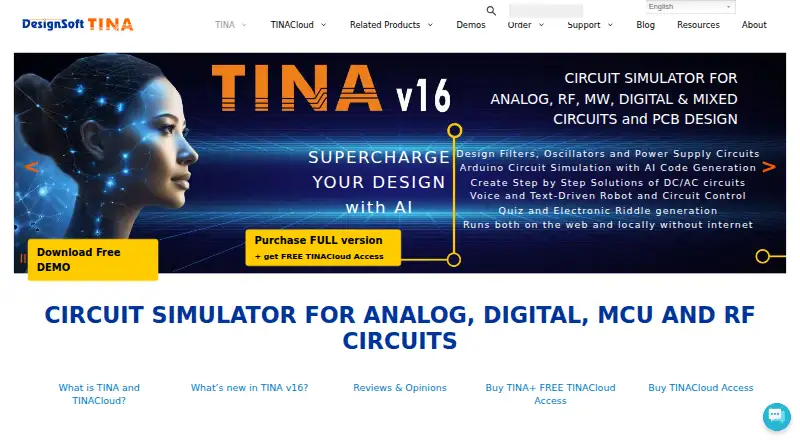
What TINA Design Suite is
TINA Design Suite is an offline circuit simulator, circuit designer, and PCB design package for analyzing and testing electronic circuits and board layouts. Simulation covers analog, digital, IBIS, HDL, MCU, and mixed circuits, including SMPS and RF. Its PCB module includes autoplacement, autorouting, design rule checking, multilayer boards, 3D viewing, and Gerber output. AI tools can assist with filters, oscillators, power supplies, Arduino code, step-by-step DC/AC solutions, quizzes, and riddles. The offline product can use local AI models without internet access and includes embedded Python for calculations and design procedures. TINACloud runs in a browser without installation on desktop and mobile device classes, opens TINA designs, and imports SPICE .CIR and .LIB files. It also provides online education tools for tests, troubleshooting, student progress monitoring, and result evaluation. Some editions list pad limits of 100, 200, or 800, and a 5,000-line VHDL maximum across listed editions. DesignSoft says cloud designs can be downloaded or deleted from users' My Circuits folders. The product has no free plan, and prices for listed editions and TINACloud are not shown.
Who it suits
It suits electronics designers and educators needing circuit simulation, PCB layout, or browser-based teaching tools. Buyers should identify the edition they need and confirm its price and limits before choosing.
What it does well
- Supports analog, digital, HDL, MCU, and mixed analysis.
- PCB tools include routing and design rule checking.
- Offline version can use local AI models.
- TINACloud imports SPICE .CIR and .LIB files.
- Includes online education tools.
What to know first
- No free plan is listed.
- Prices for listed editions and TINACloud are not shown.
- Some editions have pad limits.
- Listed editions have a 5,000-line VHDL maximum.
Limits
Some editions list pad limits of 100, 200 or 800. The listed editions set a maximum of 5,000 VHDL lines, and no free plan is offered.
Plans
| Plan | Billed and limits | Price |
|---|---|---|
| TINA Educational | Educational edition; exact price not shown on the opened order page | On request |
| TINA Industrial | Industrial edition; exact price not shown on the opened order page | On request |
| TINA Classic | Classic edition; exact price not shown on the opened order page | On request |
| TINA Basic | Basic edition; exact price not shown on the opened order page | On request |
| TINACloud | Online subscription; exact price and billing term not shown on the opened pages | On request |
| TINA Basic Plus | Basic Plus edition; exact price not shown on the opened order page | On request |
| TINA Student | Student edition; home use only | On request |
As tina.com lists them, read 9 Oct 2026. The maker's own page has the final word.
Getting started
- Open the TINA website
- Choose an edition or TINACloud subscription
- Install an offline edition, or open TINACloud in a browser
- Import a TINA design or SPICE .CIR or .LIB file when using TINACloud
- Use the simulator, PCB module, AI tools or embedded Python
Verdict
TINA Design Suite spans offline circuit work, PCB layout, and browser-based simulation and education. Edition-specific limits and unavailable prices make it important to confirm which version meets your needs.
Questions
Does TINA have a free plan?
No. TINA Design Suite is paid, and no free plan is listed.
Which platforms are supported?
The listed platforms are Android, iOS, Linux, macOS, web and Windows.
Can TINA run without internet access?
Offline TINA can use local AI models to design and simulate circuits without internet connectivity.
What can TINACloud import?
TINACloud opens TINA designs and imports SPICE .CIR and .LIB files from the web.
Which editions are available?
Listed options are TINA Educational, Industrial, Classic, Basic, Basic Plus, Student and TINACloud.
Facts from TINA Design Suite's own pages
- AI features
- TINA’s AI tools can help design filters, oscillators, and power supplies, generate Arduino code, produce step-by-step DC/AC solutions, and create quizzes and riddles. · tina.com, 9 Oct 2026
- Edition limits
- The comparison table lists 100, 200, or 800 pad limits for some editions and sets a 5,000-line VHDL maximum across the listed editions. · tina.com, 9 Oct 2026
- Education
- TINACloud includes online tools for tests, problem solving, troubleshooting, student progress monitoring, and result evaluation. · tina.com, 9 Oct 2026
- File import
- TINACloud can open TINA designs and import SPICE .CIR and .LIB files directly from the web. · tina.com, 9 Oct 2026
- Integrations
- TINACloud serves as the simulation engine for Infineon Designer, which the maker describes as an online analog and digital prototyping application. · tina.com, 9 Oct 2026
- Local AI
- The maker says offline TINA can use local AI models to design and simulate circuits without internet connectivity. · tina.com, 9 Oct 2026
- Payment security
- DesignSoft says sensitive payment information is transmitted using SSL and stored in payment gateway provider databases, and that it does not store private payment information on its servers after a transaction. · tina.com, 9 Oct 2026
- PCB design
- Its integrated PCB layout module offers autoplacement and autorouting, design rule checking, multilayer boards, 3D viewing, and Gerber output. · tina.com, 9 Oct 2026
- Product
- TINA Design Suite is an offline circuit simulator, circuit designer, and PCB design package for analyzing, designing, and testing electronic circuits and PCB layouts. · tina.com, 9 Oct 2026
- Python
- TINA includes an embedded Python programming language for calculations, circuit design, and design procedures. · tina.com, 9 Oct 2026
- Security and privacy
- DesignSoft says cloud circuit designs are stored in users’ My Circuits folders and can be downloaded or deleted from its servers at any time. · tina.com, 9 Oct 2026
- Simulation
- The product supports analog, digital, IBIS, HDL, MCU, and mixed circuit analysis, including SMPS and RF circuits. · tina.com, 9 Oct 2026
- Support
- DesignSoft provides a technical support page, manuals, video tutorials, a discussion forum, and distributor contacts. · tina.com, 9 Oct 2026
- Web version
- TINACloud runs in a browser without installation and supports desktop and mobile device classes, including PCs, Macs, tablets, and smartphones. · tina.com, 9 Oct 2026
Where TINA Design Suite stands on Freedom251
- Electrical Design Software#34 of 41