Freedom251 › Game Tier List Tools
Tiers
What Tiers is
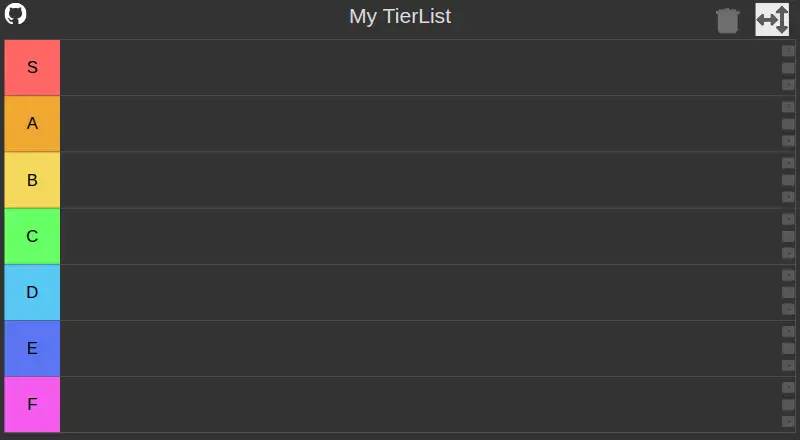
Tiers is a browser-based tool for building custom tier lists. Give a list a title, choose how many tiers it has, and rename the tiers to suit the subject. Add pictures from your computer or paste an image into the open page, then arrange them in the list. The maker says the app’s logic runs in your browser, images stay off its server, and you can use it without creating an account.
Save a finished list as a JSON file and import it again later, including on another computer; the image data travels inside that file. The README also describes loading a list from a remote JSON file through the `url` query parameter. Tiers is free to use on the web, and the maker says you can download the repository and open `index.html` in a browser. Lists may be used in videos, images, and memes, or placed on a website. The app does not resize or process images, so large pictures can produce larger save files and slow the app. It is designed for individual list-making: collaborative editing, voting, public publishing, embed code, and version history are not included.
Who it suits
Tiers suits people who want to make a custom picture-based ranking in a browser without an account. It also fits creators who want to use lists in videos or place them on a website, and users who want to keep or transfer lists as JSON files.
What it does well
- Free to use on the web.
- No account is required.
- Images can be imported from disk or pasted into the page.
- Tier titles, labels, and count can be customized.
- JSON exports include image data and can be reimported.
- The maker permits use in videos and on websites.
What to know first
- Large images can make save files large and slow the app.
- Collaborative editing, voting, and version history are not included.
- There is no public publishing or embed code feature.
Limits
There is no paid plan listed. Large images can make JSON saves larger and slow the app because images are not resized or processed.
Getting started
- Open the Tiers website in a web browser.
- Give the list a title and set the tier names and count.
- Import pictures from disk or paste an image into the page.
- Export the finished list as JSON to save it for later.
- To run a downloaded copy, open the repository’s `index.html` in a browser.
Verdict
Pick Tiers for a free, browser-based way to build and save custom image tier lists without an account. Look elsewhere if you need shared editing, voting, public publishing, or built-in embed code.
Questions
What does Tiers cost?
Tiers is free, with a free plan.
Does it require an account?
No. The maker says no account is required.
What platforms does it support?
The listed platform is web. The maker also says you can download the repository and open `index.html` in a browser.
Can I save a tier list and move it to another computer?
Yes. Export it as JSON; the image data is embedded in the save file, which can be imported again on another PC.
Can I put a list on a website?
The maker permits using lists on a website, but the product facts do not include an embed code feature.
Can I work on a list with other people?
Collaborative editing is not included.
Facts from Tiers's own pages
- Account
- The maker says the app does not require an account. · github.com, 7 Oct 2026
- Add images
- You can import pictures from your local disk and paste an image into the live page to add it to the image list. · silverweed.github.io, 7 Oct 2026
- Customization
- Users can customize tier names and the number of tiers. · github.com, 7 Oct 2026
- Customize
- You can set a tier list title and customize tier names and the number of tiers. · github.com, 7 Oct 2026
- Download
- The maker says you can download the repository and open `index.html` in a browser. · github.com, 7 Oct 2026
- Export
- Tier lists can be exported as JSON, with image data embedded in the save file, and reimported on another PC. · github.com, 7 Oct 2026
- Image limitation
- The app does not rescale or process images, so large input images can make save files large and may slow the app. · github.com, 7 Oct 2026
- Images
- Users can import any number of pictures from their local disk. · github.com, 7 Oct 2026
- Image size limit
- The app does not rescale or process images, so large images can make save files large and may slow the app. · github.com, 7 Oct 2026
- Local operation
- The maker says the app's logic runs locally in the browser and that images are not uploaded to a server. · github.com, 7 Oct 2026
- Purpose
- It is a simple webpage for creating custom tier lists. · github.com, 7 Oct 2026
- Remote import
- The README says a tier list can be imported from a remote JSON file using the `url` query parameter. · github.com, 7 Oct 2026
- Runs locally
- The maker says the app’s logic runs locally in the browser, without uploading images to a server or requiring an account. · github.com, 7 Oct 2026
- Save and import
- You can export a tier list as JSON and reimport it; image data is embedded in the save file. · github.com, 7 Oct 2026
- Support
- The maker invites feature proposals through pull requests and says they may not have time to follow issues closely or add many features. · github.com, 7 Oct 2026
- Titles
- Users can give a title to a tier list. · github.com, 7 Oct 2026
- Usage
- The maker allows using the tier list maker for videos, images, memes, and embedding it in a website. · github.com, 7 Oct 2026
- Use
- The maker says the tier list maker may be used however you wish, including in videos or embedded on a website. · github.com, 7 Oct 2026
Where Tiers stands on Freedom251
- Game Tier List Tools#20 of 20