Freedom251 › Game Playtime Trackers
Thusfar
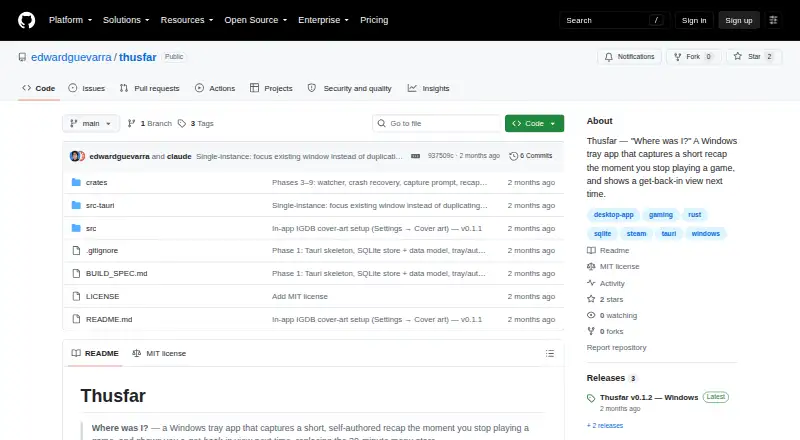
What Thusfar is
Thusfar is a free, open-source Windows tray app for leaving yourself a brief game recap when a session ends. It reads the local Steam library, detects installed Steam games across drives and watches for game exits. After sessions longer than 10 minutes, a prompt lets players skip, write one line, or answer questions about their location in the game, what was next and what to remember. Sessions under 10 minutes are recorded without a prompt. A library and per-game recap view bring together notes, playtime, last-played details and session history. Consoles, emulators and non-Steam games can be logged manually; automatic detection is for Steam games. The app stores data locally in SQLite. Optional IGDB cover art requires free Twitch developer credentials; without setup, placeholder art is used and the app remains functional. The portable release is a ZIP archive to unzip and run, not an installer. It requires Windows 10 or 11 x64 and Microsoft Edge WebView2 Runtime. The release is unsigned, so Windows SmartScreen may show a prompt. The repository displays an MIT license.
Who it suits
It suits players who take long breaks from games and want a personal reminder of where they left off. Steam sessions are detected automatically, while console, emulator and other non-Steam sessions require manual logging.
What it does well
- Automatically detects installed Steam games across drives.
- Recaps include notes, playtime and session history.
- Data is stored locally in SQLite.
- Manual logging supports consoles and emulators.
- Optional cover art can be left unconfigured.
What to know first
- Non-Steam games are not detected automatically.
- Sessions under 10 minutes get no capture prompt.
- Requires Windows 10 or 11 x64 and WebView2 Runtime.
- Unsigned release may prompt Windows SmartScreen.
Limits
Automatic game detection is for Steam; consoles, emulators, and non-Steam games use manual logging. Sessions shorter than 10 minutes are recorded without a capture prompt. IGDB cover art requires free Twitch developer credentials, though placeholder art remains available without setup.
Getting started
- Download the portable ZIP archive from the project website.
- Use a Windows 10 or 11 x64 PC with Microsoft Edge WebView2 Runtime.
- Unzip the archive and run the app; there is no installer.
- Allow for a possible Windows SmartScreen prompt because the release is unsigned.
- Use Steam for automatic game detection, or manually log console, emulator, and non-Steam sessions.
- Set up free Twitch developer credentials if you want optional IGDB cover art.
Verdict
Thusfar focuses on lightweight personal recaps rather than automatic tracking across every storefront. It offers automatic Steam detection and manual logging elsewhere, with optional cover art and a portable Windows release.
Questions
How much does Thusfar cost?
Thusfar is free and open source under the MIT license.
Which platforms does it support?
It is a Windows desktop app. The portable release requires Windows 10 or 11 x64 and Microsoft Edge WebView2 Runtime; there is no mobile app.
Does it automatically track every game?
Automatic detection is for installed Steam games. Console, emulator, and other non-Steam sessions must be logged manually.
How do session recaps work?
After sessions longer than 10 minutes, players can skip, write a one-line note, or fill in three prompts about their progress and what to remember. Shorter sessions are recorded without a capture prompt.
Is Thusfar open source?
Yes. The repository displays an MIT license.
Do I need credentials for cover art?
Only for optional IGDB cover-art enrichment, which requires free Twitch developer credentials. Without them, the app uses placeholder art and remains functional.
Facts from Thusfar's own pages
- Capture notes
- Players can skip, write a one-line note, or fill in three fields: where they were, what was next, and what not to forget. · github.com, 8 Oct 2026
- Capture prompt
- After a game session longer than 10 minutes, a prompt offers skip, one-line, or three-field note options. · github.com, 8 Oct 2026
- Cover art
- Optional IGDB cover-art enrichment requires free Twitch developer credentials, and the app remains functional with placeholder art if it is not configured. · github.com, 8 Oct 2026
- Credential handling
- The README says Twitch credentials are stored locally and sent only to Twitch/IGDB. · github.com, 8 Oct 2026
- Distribution
- The release is a ZIP archive that users unzip and run without an installer. · github.com, 8 Oct 2026
- Game tracking
- The app reads the local Steam library and detects Steam game sessions automatically. · github.com, 8 Oct 2026
- Intended user
- The product is aimed at players who pause games for weeks or months and want to remember where they left off. · github.com, 8 Oct 2026
- Known limits
- The README says non-Steam games are not auto-detected, and sessions shorter than 10 minutes are recorded without a capture prompt. · github.com, 8 Oct 2026
- License
- The repository displays an MIT license. · github.com, 8 Oct 2026
- Local data
- The build specification says the app stores data locally in SQLite and makes no network calls except for IGDB metadata. · github.com, 8 Oct 2026
- Manual logging
- Players can manually log sessions for console, emulator, and non-Steam games. · github.com, 8 Oct 2026
- Purpose
- Thusfar is a Windows tray app that captures a short, self-authored game recap when a session ends and shows it when the player returns. · github.com, 8 Oct 2026
- Recap and library
- The app provides a game library and a per-game recap view with notes, playtime, last-played information, and session history. · github.com, 8 Oct 2026
- Recaps
- Each game’s recap view shows the player's notes along with playtime and session history. · github.com, 8 Oct 2026
- Requirements
- The portable release requires Windows 10 or 11 x64 and Microsoft Edge WebView2 Runtime. · github.com, 8 Oct 2026
- Security detail
- The Windows release is unsigned, so Windows SmartScreen may display a prompt when it is run. · github.com, 8 Oct 2026
- Steam detection
- The app automatically detects installed Steam games across drives and watches for game exits. · github.com, 8 Oct 2026
- Storefront limits
- Automatic game detection is for Steam; Epic, GOG, and other storefronts use the manual logging fallback in v1. · github.com, 8 Oct 2026
Where Thusfar stands on Freedom251
- Game Playtime Trackers#20 of 20