Freedom251 › Risk Intelligence Software

ThreatWatch
What ThreatWatch is
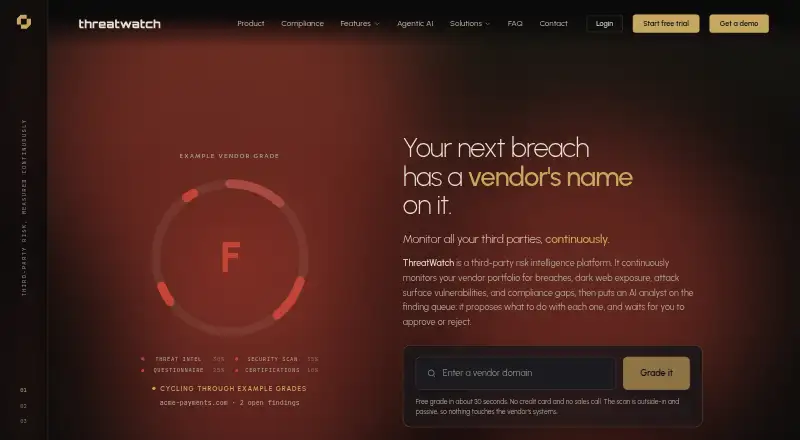
ThreatWatch is a web platform for continuously monitoring vendors as third-party risks. It tracks breaches, dark-web exposure, attack-surface vulnerabilities, and compliance gaps, then assigns each vendor an A-to-F grade using threat intelligence, security scans, questionnaire responses, and certifications. A passive outside-in scan is available without signup or a credit card and returns a grade in about 30 seconds. Its catalogue contains 280,770 companies searchable by name, domain, or alias. Staff devices are checked hourly for exposure, and leaked credentials are re-checked daily. Vulnerability matching is part of every plan, but ThreatWatch confirms a vulnerability only when it can read the exact software version. Alerts can be sent to services including Slack, Microsoft Teams, Jira, ServiceNow, PagerDuty, email, and webhooks. Professional and higher plans include AI Co-Pilot and Ask AI, with human approval required for proposed changes. A free plan is available; paid plan pricing is on request.
Who it suits
ThreatWatch suits organisations that need to monitor vendor security and compliance across a portfolio. Its free plan covers an organisation’s own vendors, while paid plans list options for larger and multi-entity programmes.
What it does well
- Free passive scan needs no signup or card.
- Catalogue contains 280,770 searchable companies.
- Vulnerability matching is included on every plan.
- Alerts can reach collaboration and service-management tools.
- Compliance AI supports listed and custom frameworks.
What to know first
- Free plan has no breach or dark-web intelligence.
- Free plan has no API, SSO, or AI agents.
- Vulnerabilities are confirmed only with an exact software version.
- Imported vendors wait for the plan’s first scheduled scan.
Limits
The free plan is for your own organisation, rescans weekly, and excludes breach and dark-web intelligence, OSINT enrichment, deep attack-surface scanning, AI agents, SSO, and API access. Paid plan prices are on request.
Plans
| Plan | Billed and limits | Price |
|---|---|---|
| Free | Your own organisation · Weekly rescans · No breach or dark-web intel · No OSINT enrichment · No deep attack-surface scan · No AI agents · No SSO · No API · Community support | Free |
| Starter | Small portfolio · Rescans every 2 days · Breach and dark-web intel · API access · Email support | On request |
| Enterprise | Enterprise programme · Rescans every 6 hours · Deep attack-surface scan · AI agents · SAML/OIDC SSO · API access · Custom branding · Dedicated support | On request |
| Professional | Growing portfolio · Rescans every 12 hours · Breach and dark-web intel · OSINT enrichment · AI Co-Pilot · Ask AI · SAML/OIDC SSO · API access · Priority support | On request |
| Enterprise Plus | Multi-entity programme · Rescans every 3 hours · Deep attack-surface scan · AI agents · SAML/OIDC SSO · API access · White-label branding · Dedicated support and account manager | On request |
As threat.watch lists them, read 1 Oct 2026. The maker's own page has the final word.
Getting started
- Visit https://threat.watch/ for the passive scan, which requires no signup or credit card.
- Use the company catalogue to search by name, domain, or alias.
- For ongoing monitoring, choose a plan for your portfolio and scan cadence.
- Add vendors to the platform; imported vendors are scanned on the plan’s first scheduled scan.
- Configure alerts for a supported destination such as email, Slack, or a generic webhook.
ThreatWatch is a third-party risk intelligence platform for organizations monitoring the security and compliance of vendors. It is best suited to risk teams that need recurring assessments across a supplier portfolio, rather than individuals seeking device protection. Its no-signup scan is a useful first look; sustained monitoring and richer intelligence require a paid plan with custom pricing.
Overview
ThreatWatch monitors vendor breaches, dark-web exposure, attack-surface vulnerabilities, and compliance gaps, then combines threat intelligence, security scans, questionnaire responses, and certifications into an A-to-F grade. Bringing those signals together can help teams prioritize reviews, although vulnerability matching is confirmed only when the exact software version is readable.
A passive, outside-in scan returns a grade in about 30 seconds without signup or a credit card. The searchable catalogue covers 280,770 companies by name, domain, or alias, making it practical to check a prospective supplier before adding it to a monitoring programme. That quick scan is not equivalent to scheduled oversight of a portfolio.
Key features
Rescan cadence ranges from weekly on Free to every three hours on Enterprise Plus. Free omits breach and dark-web intelligence, while Starter and higher include it. Vendor staff devices are re-checked hourly for dark-web exposure and leaked credentials daily, which provides a more frequent signal than the general plan rescan schedule.
Vulnerability matching appears on every plan, but confirmation depends on ThreatWatch being able to read the precise software version. This is a useful qualification for teams interpreting findings: an unconfirmed match is not the same as a verified vulnerability.
Outbound alerts can go to Slack, Microsoft Teams, Jira, ServiceNow, PagerDuty, email, the app, or a generic webhook. Compliance AI supports PCI-DSS, ISO 27001, SOC 2, HIPAA, GDPR, and NIST CSF questionnaires, as well as custom frameworks. The broader supported risk-framework set also includes NIST 800-53, CSA CCM, DORA, NIS2, ISO 42001, and the EU AI Act and Cyber Resilience Act.
AI Co-Pilot and Ask AI start at Professional; proposed changes still require human approval. Traffic uses TLS with one year of preloaded HSTS, and sensitive credentials such as API keys and SSO or integration secrets are encrypted at field level at rest. Vendor access uses a one-time email code rather than an account password. Imported vendors wait for the plan's first scheduled scan rather than being scanned at upload, so a large import does not produce immediate coverage.
Pricing
ThreatWatch is freemium, with custom pricing for paid plans and a free trial. The Free plan costs nothing and covers your own organisation, with weekly rescans and community support. It has no breach or dark-web intelligence, OSINT enrichment, deep attack-surface scan, AI agents, SSO, or API. It is a reasonable starting grade for a small, self-directed assessment, but its exclusions make it a poor fit for teams that need third-party intelligence or integrations.
Starter has custom pricing for a small portfolio, rescans every two days, breach and dark-web intelligence, API access, and email support. Its slower cadence and lack of listed OSINT enrichment or AI tools make it the leaner paid choice when core exposure signals and API access matter more than frequent refreshes.
Professional has custom pricing for a growing portfolio, with rescans every 12 hours, breach and dark-web intelligence, OSINT enrichment, AI Co-Pilot, Ask AI, SAML/OIDC SSO, API access, and priority support. It is the clearest fit for teams wanting AI-assisted workflow and identity controls without the deep attack-surface scanning offered by Enterprise tiers.
Enterprise is custom priced for an enterprise programme, with six-hour rescans, deep attack-surface scanning, AI agents, SAML/OIDC SSO, API access, custom branding, and dedicated support. Enterprise Plus is custom priced for multi-entity programmes and tightens rescans to every three hours, retaining deep scanning and AI agents while adding white-label branding and a dedicated account manager. Those higher tiers suit larger programmes that need more frequent checks and support; teams that do not need those capabilities can avoid that level of commitment.
Platforms
ThreatWatch is available on the web. API access is included from Starter upward, while Free has no API.
Who it's for
ThreatWatch makes most sense for organizations that need to grade, monitor, and route alerts about third-party vendors, especially where questionnaires and compliance frameworks are part of supplier oversight. The free scan also serves teams that only need an initial outside-in grade. It is less suitable for personal security needs or for buyers who require immediate scans at bulk import.
Pros and cons
- Pros: A fast passive scan needs no signup or payment details, and the large searchable company catalogue helps with initial vendor checks.
- Pros: Alerts cover common operational tools, and API access begins at Starter rather than being confined to the top tiers.
- Pros: Professional adds OSINT enrichment, AI assistance, and SSO; higher Enterprise tiers offer deep scanning and shorter rescan intervals.
- Cons: Free is limited to weekly rescans and excludes breach and dark-web intelligence, API, and SSO, limiting its usefulness for a managed portfolio.
- Cons: Paid plan prices are custom, so buyers cannot compare spend from a public rate; imported vendors also wait for the next scheduled scan.
- Cons: Vulnerability confirmation depends on exact software-version visibility, which can constrain certainty in matches.
Alternatives
Cybersecurityratings.com is worth considering when a free, limited snapshot is enough: its free tier includes one security snapshot, a basic A–F grade, and the top five risk factors. RiskRecon may suit a time-boxed evaluation of up to 50 vendors, with a 30-day portal and risk-prioritized findings. Scovery is another web-based freemium option.
SecurityScorecard Third-Party Risk Management is an alternative for teams seeking a free forever plan that includes a rating for their own domain, footprint management, issue prioritization and alerts, questionnaire response, and self-monitoring. ThreatNG Security offers a limited-time evaluation of its complete platform, which may be preferable when a short full-platform trial is the priority. Bitdefender Total Security is a different category of choice for personal device security, with a first-year individual plan covering five devices.
ImmuniWeb is an alternative for mobile application scanning; its listed monthly subscription is priced per app and allows unlimited scans of builds or versions of the same Android or iOS app. Infoblox Cloud Network Automation is a distinct option for cloud network automation, using token-based licensing.
Browse more options in Security Ratings Software.
Verdict
ThreatWatch is a strong fit for teams that need recurring vendor risk grades, breach and dark-web monitoring, compliance questionnaires, and alerts routed into their workflow. Its no-signup scan lowers the barrier to a first assessment, while the paid tiers add progressively faster rescans, integrations, AI, and enterprise controls. Look elsewhere if public paid pricing or an immediate scan on portfolio import is essential.
Verdict
ThreatWatch combines vendor monitoring, risk grading, and alert delivery, with scan cadence and capabilities varying by plan. The free scan offers a quick starting grade, while paid pricing requires an enquiry.
Questions
Does ThreatWatch have a free plan?
Yes. The Free plan costs nothing and covers your own organisation with weekly rescans. A passive outside-in scan also requires no signup or credit card.
What do paid plans cost?
Prices for Starter, Professional, Enterprise, and Enterprise Plus are available on request.
Which platforms does it support?
Web is the listed platform.
Which plans include AI features?
AI Co-Pilot and Ask AI are available from Professional and above. AI agents are listed for Enterprise and Enterprise Plus.
What integrations can receive alerts?
Alerts can go to Slack, Microsoft Teams, Jira, ServiceNow, PagerDuty, email, the app, or a generic webhook.
How are vulnerabilities matched?
Vulnerability matching is included on every plan. ThreatWatch confirms a vendor vulnerability only when it can read the exact software version.
Facts from ThreatWatch's own pages
- AI approval
- The AI Co-Pilot and Ask AI are available from Professional and above, and proposed changes require human approval. · threat.watch, 1 Oct 2026
- Compliance frameworks
- Compliance AI supports PCI-DSS, ISO 27001, SOC 2, HIPAA, GDPR, and NIST CSF questionnaires, plus custom frameworks. · threat.watch, 1 Oct 2026
- Dark-web cadence
- Vendor staff devices are re-checked hourly and leaked credentials are re-checked daily. · threat.watch, 1 Oct 2026
- Import limitation
- Imported vendors are not scanned when the file is uploaded; they wait for the first scan in the plan schedule. · threat.watch, 1 Oct 2026
- Integrations
- Outbound alerts can be delivered to Slack, Microsoft Teams, Jira, ServiceNow, PagerDuty, email, the app, or a generic webhook. · threat.watch, 1 Oct 2026
- Monitoring
- It monitors vendor breaches, dark-web exposure, attack-surface vulnerabilities, and compliance gaps. · threat.watch, 1 Oct 2026
- Passive scanning
- The free scan is outside-in and passive, requires no signup or credit card, and returns a grade in about 30 seconds. · threat.watch, 1 Oct 2026
- Product
- ThreatWatch is a third-party risk intelligence platform for continuously monitoring vendors. · threat.watch, 1 Oct 2026
- Risk grade
- Each vendor receives an A-to-F grade built from threat intelligence, security scanning, questionnaire responses, and certifications. · threat.watch, 1 Oct 2026
- Security controls
- Traffic uses TLS with one year of preloaded HSTS, while secrets such as API keys, SSO secrets, and integration credentials are encrypted at field level at rest. · threat.watch, 1 Oct 2026
- Vendor access
- Vendors use a one-time code sent to their email rather than creating an account or password. · threat.watch, 1 Oct 2026
- Vendor catalogue
- The platform includes a catalogue of 280,770 companies searchable by name, domain, or alias. · threat.watch, 1 Oct 2026
- Vulnerability matching
- ThreatWatch confirms vendor vulnerabilities only when it can read the exact software version, and vulnerability matching is included on every plan. · threat.watch, 1 Oct 2026
Where ThreatWatch stands on Freedom251
- Risk Intelligence Software#4 of 23
- Security Ratings Software#8 of 30