Freedom251 › RGB Lighting Software
Thermaltake iTAKE Engine
What Thermaltake iTAKE Engine is
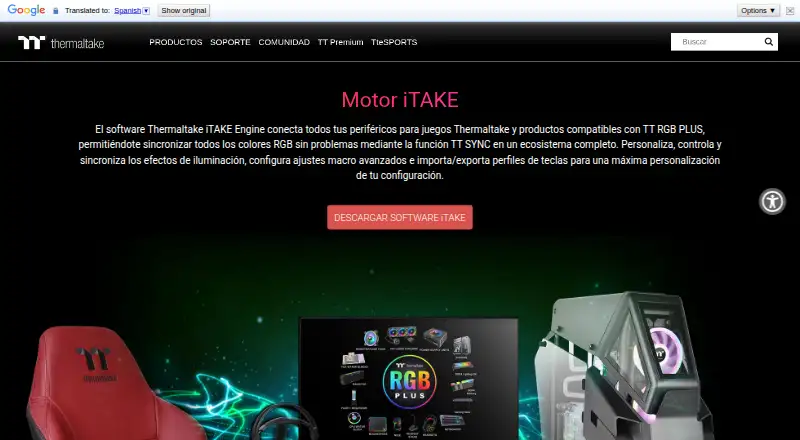
Thermaltake iTAKE Engine brings compatible Thermaltake gaming peripherals and TT RGB PLUS products together for lighting control and synchronization. It lets users adjust lighting effects, colors, speed, and brightness across supported devices, including keyboards, mice, headsets, headset stands, mouse pads, and gaming desks. The software also supports macro settings and importing or exporting key profiles. Thermaltake says custom key bindings are available for most of its keyboards, although some models can create them without iTAKE.
The software is available for Windows, Android, and iOS. Its mobile app adds voice commands for lighting settings, with 13 effects for the front side and 14 for the side face described in the app listing. A phone or tablet can also serve as a virtual controller or virtual keyboard for word processing; both features are limited to keyboards. Android pairing requires the computer and mobile device to use the same Wi-Fi network. The Windows installation guide calls for a .EXE installer and Microsoft Visual C++ 2015 Redistributable. Thermaltake also documents connecting iTAKE Engine with Razer Synapse for Razer Chroma effects. The software is free, with no free trial.
Who it suits
iTAKE Engine suits owners of compatible Thermaltake peripherals or TT RGB PLUS products who want to coordinate lighting and manage macros or key profiles. Its mobile controls may also suit users who want voice-operated lighting settings or keyboard-related virtual controller and keyboard functions.
What it does well
- Syncs RGB lighting across compatible Thermaltake products.
- Adjusts lighting effects, colors, speed, and brightness.
- Supports macros and key-profile import and export.
- Mobile app offers voice commands for lighting controls.
- Available for Windows, Android, and iOS.
What to know first
- Mobile controller and virtual keyboard features work with keyboards only.
- Android pairing requires the computer and mobile device to share Wi-Fi.
- Windows launch requires Microsoft Visual C++ 2015 Redistributable.
Limits
The software is free. The mobile controller and virtual keyboard are compatible with keyboards only, and Android setup requires the computer and mobile device to share a Wi-Fi network.
Getting started
- Download and install the Windows desktop software using the .EXE installer.
- Install Microsoft Visual C++ 2015 Redistributable for the desktop software to launch.
- Install the iTAKE app on an Android or iOS device for mobile controls.
- For Android pairing, connect the computer and mobile device to the same Wi-Fi network.
- Connect compatible Thermaltake devices and configure lighting or profiles.
- Use Thermaltake’s documented Razer Synapse connection if setting up Razer Chroma effects.
Verdict
Choose Thermaltake iTAKE Engine if you use compatible Thermaltake devices and want centralized lighting control, synchronization, and keyboard profile tools. Look elsewhere if your devices are outside its supported ecosystem or you need the mobile controller and virtual keyboard for anything other than keyboards.
Questions
How much does Thermaltake iTAKE Engine cost?
It is free, and there is no free trial.
Which platforms does iTAKE Engine support?
It is available for Windows, Android, and iOS.
What can it control?
It controls and syncs lighting across compatible Thermaltake peripherals and TT RGB PLUS products, with settings for effects, color, speed, and brightness.
Does iTAKE Engine support macros?
Yes. It supports macro settings and importing or exporting key profiles. Thermaltake says custom key bindings work on most of its keyboards.
What does the mobile app do?
It offers voice commands for lighting controls. A phone or tablet can also act as a virtual game controller or virtual keyboard, both compatible with keyboards only.
What is required to use the Windows software and Android app?
The Windows guide requires Microsoft Visual C++ 2015 Redistributable for launch. Android setup requires the computer and mobile device to be on the same Wi-Fi network.
Facts from Thermaltake iTAKE Engine's own pages
- Hardware compatibility
- The listed supported device categories include keyboards, mice, headsets, headset stands, mouse pads, and gaming desks. · br.thermaltake.com, 5 Oct 2026
- iOS requirement
- The page states compatibility with iOS 10 or above and lists supported iPhone and iPad models. · br.thermaltake.com, 5 Oct 2026
- Lighting control
- Users can customize lighting effects, colors, speed, and brightness across compatible products. · br.thermaltake.com, 5 Oct 2026
- Lighting controls
- The software lets users customize, control, and sync lighting effects, including color, speed, and brightness. · br.thermaltake.com, 5 Oct 2026
- Macro limits
- Thermaltake support says custom key bindings are available for most Thermaltake keyboards, though some keyboards can create them without software. · help.thermaltakeusa.com, 5 Oct 2026
- Macros and profiles
- The software supports advanced macro settings and importing and exporting key profiles. · br.thermaltake.com, 5 Oct 2026
- Macro support guide
- Thermaltake’s support guide says iTake software is required for custom key bindings on most of its keyboards. · help.thermaltakeusa.com, 5 Oct 2026
- Mobile app
- The iTAKE app for iOS and Android provides lighting controls and voice recognition commands. · br.thermaltake.com, 5 Oct 2026
- Mobile app features
- The app listing describes 13 lighting effects for the front side, 14 for the side face, and a four-key macro function. · play.google.com, 5 Oct 2026
- Mobile compatibility
- The page lists the mobile app as compatible with keyboards, headsets, headset stands, mouse pads, and gaming desks. · br.thermaltake.com, 5 Oct 2026
- Mobile controller
- The app can use a smartphone or tablet as a virtual game controller, a feature the page says is compatible with keyboards only. · br.thermaltake.com, 5 Oct 2026
- Mobile requirements
- The maker page specifies iOS 10 or later and lists compatibility with iPhone and iPad models. · br.thermaltake.com, 5 Oct 2026
- Mobile voice control
- The iOS and Android app offers voice commands for lighting color, effects, speed, and brightness. · br.thermaltake.com, 5 Oct 2026
- Pairing requirement
- The Android app setup instructions require the computer and mobile device to be connected to the same Wi-Fi network. · play.google.com, 5 Oct 2026
- Privacy disclosure
- Google Play displays the developer-provided declaration that the app collects no data and shares no data with third parties. · play.google.com, 5 Oct 2026
- Purpose
- iTAKE Engine connects Thermaltake gaming peripherals and TT RGB PLUS compatible products into an RGB lighting ecosystem using TT SYNC. · br.thermaltake.com, 5 Oct 2026
- Razer Chroma
- Thermaltake’s setup document describes enabling a Thermaltake connection in Razer Synapse for iTAKE Engine and Razer Chroma effects. · file.thermaltake.com, 5 Oct 2026
- Software support
- Thermaltake support says iTake is required for RGB control on most Thermaltake peripherals and provides an RGB control guide. · help.thermaltakeusa.com, 5 Oct 2026
- Supported devices
- The listed supported devices include keyboards, mice, headset stands, mouse pads, and gaming desks. · br.thermaltake.com, 5 Oct 2026
- TT RGB PLUS integration
- The page says users can sync RGB lighting across compatible Thermaltake TT RGB PLUS products. · br.thermaltake.com, 5 Oct 2026
- Virtual game controller
- A smartphone or tablet can act as a mobile game controller, a feature the page says is compatible with keyboards only. · br.thermaltake.com, 5 Oct 2026
- Virtual keyboard
- The app offers a virtual keyboard on smartphones and tablets for word processing, compatible with keyboards only. · br.thermaltake.com, 5 Oct 2026
- Windows installation
- The iTAKE user guide describes installing the desktop software from a Windows .EXE and says Microsoft Visual C++ 2015 Redistributable is required for it to launch. · file.thermaltake.com, 5 Oct 2026
Where Thermaltake iTAKE Engine stands on Freedom251
- RGB Lighting Software#21 of 33