Freedom251 › Game Mod Managers
The Sims Mod Manager
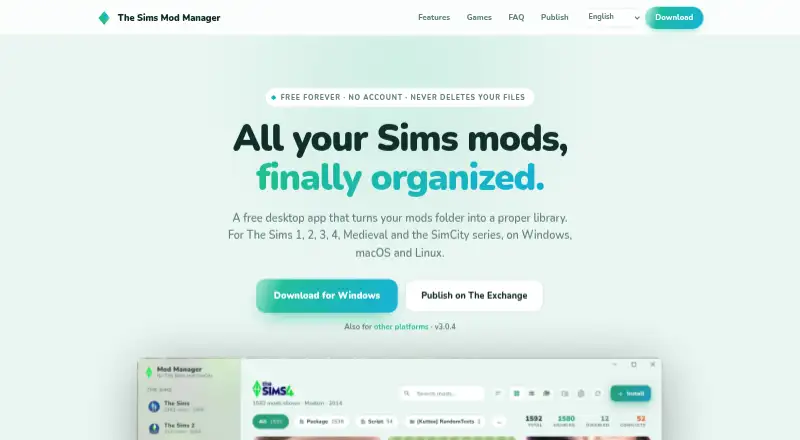
What The Sims Mod Manager is
The Sims Mod Manager is a free desktop app for organizing mods for The Sims 1, 2, 3, and 4, The Sims Medieval, and the SimCity series. It reads .package files and shows thumbnails plus contents such as CAS parts, objects, textures, and tuning. Players can drag in files or folders; ZIP, RAR, and 7z archives are unpacked, and The Sims 3 .sims3pack files are supported. Library tools include search, category filters, grid or list views, and live counts of enabled, disabled, and conflicting mods. A toggle disables mods by renaming files, while the app says it does not delete files or alter saves. The built-in Exchange supports browsing and installing listed mods, including SimCity 4 sc4pac channels with possible dependencies. The app can display save-file household and world information and place lots or Sims into the Tray or Library. Downloads support 64-bit Windows 10 or newer, macOS 10.15 or newer, and recent 64-bit Linux distributions.
Who it suits
This app suits players who manage mods across The Sims and SimCity titles on supported desktop systems. It is useful for organizing files, checking conflicts, and installing Exchange content.
What it does well
- Supports multiple Sims and SimCity series
- Displays package thumbnails and file contents
- Search, filters, views, and conflict counts
- Imports folders and common archive formats
- Free download with no account or ads
What to know first
- Windows installer is not code-signed
- Sims 4 requires custom content and script settings
- Unofficial project not affiliated with Electronic Arts or Maxis
- Desktop platforms only
Limits
The app is free to download and use with no account, ads, or pro version. The site advises Sims 4 players to enable custom content and script mods in game settings.
Plans
| Plan | Billed and limits | Price |
|---|---|---|
| Free | Free to download and use · no account · no ads · no pro version | Free |
As thesimsmodmanager.web.app lists them, read 8 Oct 2026. The maker's own page has the final word.
Getting started
- Open the project website
- Download the build for Windows, macOS, or Linux
- Install and launch the desktop app
- Drag mod files or folders into the library
- Use search, filters, or views to organize entries
- Enable custom content and script mods in The Sims 4 options
Verdict
The Sims Mod Manager offers broad game support and practical library controls without a paid plan. Windows users should expect a SmartScreen warning, and Sims 4 players must enable the relevant game options.
Questions
What does The Sims Mod Manager cost?
It is free to download and use. There is no account requirement, advertising, or pro version.
Which operating systems are supported?
Downloads are available for 64-bit Windows 10 or newer, macOS 10.15 Catalina or newer, and recent 64-bit Linux distributions.
Which games can it organize?
It supports The Sims 1, 2, 3, and 4, The Sims Medieval, and the SimCity series.
Can it install mods from an in-app source?
Yes. The built-in Exchange lets players browse and install listed mods; SimCity 4 channels include sc4pac sources.
Does disabling a mod remove it?
No. Disabling renames the file, and the app says it never deletes files or touches saves.
Is this an official Electronic Arts tool?
No. The maker describes it as an unofficial fan project not affiliated with, endorsed by, or sponsored by Electronic Arts or Maxis.
Facts from The Sims Mod Manager's own pages
- Automatic updates
- Yes · thesimsmodmanager.web.app, 22 Sept 2026
- Conflict detection
- The app flags duplicate filenames and packages that override the same resources. · thesimsmodmanager.web.app, 8 Oct 2026
- Deployment method
- copy · thesimsmodmanager.web.app, 22 Sept 2026
- Enable and disable
- Mods can be disabled with a toggle that renames the file, and the app says it never deletes files or touches saves. · thesimsmodmanager.web.app, 8 Oct 2026
- Exchange integration
- The Exchange is built into the app, where players can browse and install listed mods; its creator portal says publishing is free and each mod can be up to 500 MB. · thesimsmodmanager.web.app, 8 Oct 2026
- Free plan
- Yes · thesimsmodmanager.web.app, 22 Sept 2026
- Import formats
- Users can drag in files or folders; ZIP, RAR, and 7z archives are unpacked, and The Sims 3 .sims3pack files are supported. · thesimsmodmanager.web.app, 8 Oct 2026
- Library tools
- The app offers library search, category filters, grid or list views, and live counts of enabled, disabled, and conflicting mods. · thesimsmodmanager.web.app, 8 Oct 2026
- Mod source access
- built-in · thesimsmodmanager.web.app, 22 Sept 2026
- Notable limit
- The site advises Sims 4 users to enable custom content and script mods in the game's options. · thesimsmodmanager.web.app, 8 Oct 2026
- Package details
- It reads .package files to show thumbnails and contents such as CAS parts, objects, textures, and tuning. · thesimsmodmanager.web.app, 8 Oct 2026
- Project status
- The maker describes it as an unofficial fan project not affiliated with, endorsed by, or sponsored by Electronic Arts or Maxis. · thesimsmodmanager.web.app, 8 Oct 2026
- Purpose
- The Sims Mod Manager is a desktop app that organizes mods for The Sims 1, 2, 3, 4, The Sims Medieval, and the SimCity series. · thesimsmodmanager.web.app, 8 Oct 2026
- Save and creation tools
- The app can display save-file household and world information, and file lots and Sims into the game's Tray or Library. · thesimsmodmanager.web.app, 8 Oct 2026
- Security and trust
- The Windows installer is not code-signed and may trigger SmartScreen; the site says downloads are built and published automatically by GitHub. · thesimsmodmanager.web.app, 8 Oct 2026
- SimCity 4 catalogs
- The Exchange includes sc4pac channels from Simtropolis and SC4Evermore, and downloads can include dependencies. · thesimsmodmanager.web.app, 8 Oct 2026
- Support
- Users can report bugs or suggest features from Settings in the app, with the app version, operating system, and current game prefilled, or message the project on Tumblr. · thesimsmodmanager.web.app, 8 Oct 2026
- Supported platforms
- multi-platform · thesimsmodmanager.web.app, 22 Sept 2026
- Supported systems
- Downloads are available for 64-bit Windows 10 or newer, macOS 10.15 Catalina or newer, and recent 64-bit Linux distributions. · thesimsmodmanager.web.app, 8 Oct 2026
Where The Sims Mod Manager stands on Freedom251
- Game Mod Managers#19 of 79
- Mod managers#19 of 78