Freedom251 › Paraphrasing Tools
Tezyar Academic Paraphraser
What Tezyar Academic Paraphraser is
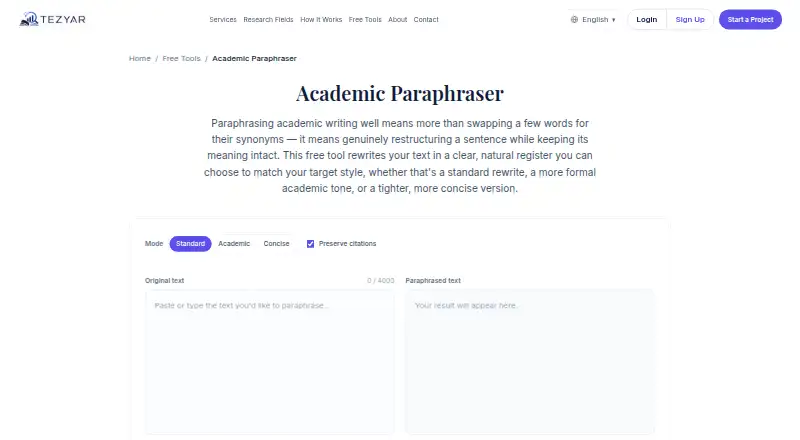
Tezyar Academic Paraphraser is a free web tool for rewriting academic passages with different wording and sentence structure while aiming to preserve meaning. Users paste or type text, select Standard, Academic, or Concise mode, and can choose whether to preserve citations. The result is shown alongside the original for review; users can copy it or generate another variation. Tezyar presents it for clarifying a paragraph from notes, adjusting a draft’s tone, shortening a passage, or comparing alternative phrasing.
Each request can contain up to 4,000 characters, so Tezyar recommends dividing longer documents into sections. The tool is free to use without sign-up. Tezyar says submitted text is sent securely to generate a result and is not stored or used to train a model. Its terms say free-tool output uses third-party AI models and may be inaccurate or miss context, so users should review and verify it. Users retain ownership of submitted material and are responsible for having the right to share it with the provider processing it. Tezyar advises users to follow institutional or publisher rules, keep responsibility for citations, and use the tool to improve phrasing rather than pass off another person’s work as original. A link to academic editors is offered for full manuscripts, thesis chapters, or journal submissions.
Who it suits
It suits students and academic writers who need to refine a passage, shift its tone, shorten it, or compare alternative phrasing. It is also useful for people who want a quick web-based rewrite without creating an account, provided they review the output and follow relevant writing rules.
What it does well
- Free to use without sign-up.
- Offers Standard, Academic, and Concise modes.
- Includes an option to preserve citations.
- Shows the paraphrase beside the original for review.
- Allows copying the result or generating another variation.
What to know first
- Requests are limited to 4,000 characters.
- Output may be inaccurate or miss context.
- There is no document upload option.
Limits
The free tool accepts up to 4,000 characters per request. Longer material should be processed in sections; document upload is not available.
Plans
| Plan | Billed and limits | Price |
|---|---|---|
| Academic Paraphraser | Free to use · Up to 4,000 characters per request · No sign-up required | Free |
As tezyar.com lists them, read 8 Oct 2026. The maker's own page has the final word.
Getting started
- Open the Academic Paraphraser webpage.
- Paste or type a passage of up to 4,000 characters.
- Choose Standard, Academic, or Concise mode.
- Set whether citations should be preserved.
- Review the result beside the original, then copy it or request another variation.
Verdict
Choose Tezyar Academic Paraphraser for free, short academic passages when you want mode and citation controls without signing up. Look elsewhere for longer documents that need direct upload, and review the result because the tool’s output can be wrong or miss context.
Questions
Is Tezyar Academic Paraphraser free?
Yes. It is free to use, and the tool catalog says Tezyar’s academic tools are available without sign-up.
How much text can I submit at once?
Each request accepts up to 4,000 characters. Tezyar recommends processing longer documents in sections.
Which paraphrasing modes are available?
Users can select Standard, Academic, or Concise mode.
Can it preserve citations?
Yes. It offers an option to preserve citations, while users remain responsible for citation practices.
Is submitted text stored or used for training?
Tezyar says submitted text is sent securely to generate a result and is not stored or used to train a model.
Does the tool support document uploads?
No. The listed document upload capability is no.
Facts from Tezyar Academic Paraphraser's own pages
- Academic integrity
- Tezyar says the tool is for improving phrasing or restating a source appropriately, not disguising someone else's work as original; users remain responsible for citations. · tezyar.com, 8 Oct 2026
- AI limitations
- Tezyar's terms state that free-tool output uses third-party AI models and may be factually wrong or miss context, so users should review and verify it. · tezyar.com, 8 Oct 2026
- Citation option
- The tool offers an option to preserve citations in the paraphrase. · tezyar.com, 8 Oct 2026
- Data handling claim
- The product page says submitted text is sent securely to generate the result and is not stored or used to train any model. · tezyar.com, 8 Oct 2026
- Intended users
- The page presents it for clarifying a paragraph from a user's notes, adjusting draft tone, shortening a passage, or comparing alternative phrasing. · tezyar.com, 8 Oct 2026
- Ownership
- Tezyar's terms say users retain ownership of material submitted through a Free Tool and are responsible for having the right to share it with the third-party AI provider processing it. · tezyar.com, 8 Oct 2026
- Purpose
- The tool rewrites academic text with different wording and sentence structure while aiming to preserve its meaning. · tezyar.com, 8 Oct 2026
- Related human support
- The page offers a link to Tezyar's academic editors for full manuscripts, thesis chapters, or journal submissions. · tezyar.com, 8 Oct 2026
- Request limit
- Each request accepts up to 4,000 characters, and the page recommends processing longer documents in sections. · tezyar.com, 8 Oct 2026
- Review guidance
- Tezyar says users should review the paraphrase and check their institution's or publisher's rules for AI-assisted writing. · tezyar.com, 8 Oct 2026
- Rewrite modes
- Users can choose Standard, Academic, or Concise mode. · tezyar.com, 8 Oct 2026
- Tool catalog
- Tezyar's tools page describes its academic tools as free to use and available without sign-up. · tezyar.com, 8 Oct 2026
- Workflow
- Users paste or type text, choose a mode and citation setting, review the result alongside the original, and can copy it or generate another variation. · tezyar.com, 8 Oct 2026
Where Tezyar Academic Paraphraser stands on Freedom251
- Paraphrasing Tools#21 of 24