Freedom251 › Email Testing Software
Testi@
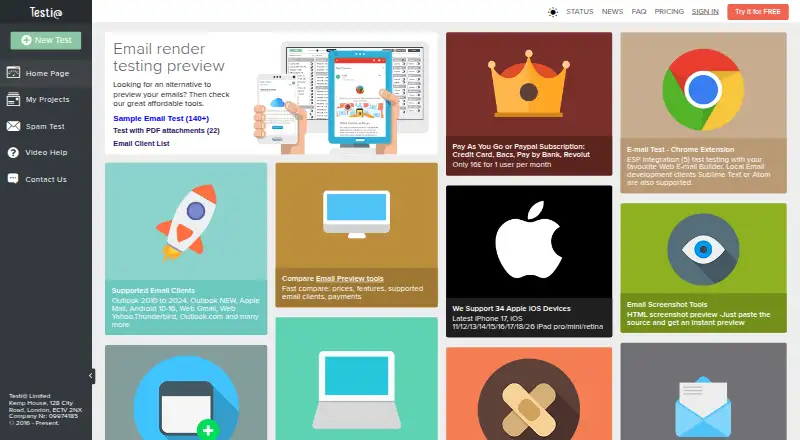
What Testi@ is
Testi@ generates screenshots to show how an email renders across clients and devices. Supported clients listed include Outlook, Apple Mail, Android, Gmail, Yahoo, and Thunderbird. Users can provide email content by pasting its source, uploading an HTML file, converting an EML file to HTML, or uploading a ZIP containing HTML. The service provides rendered HTML source to help debug previews, and a spam test can identify issues that may stop screenshots from being generated. For email service provider workflows, users can send test messages to an address in settings and check whether the email arrived and screenshots were created. A Chrome extension can test local URLs and specific email service provider pages. Testi@ is available on the web and as an extension. Its free test account includes Gmail and Yahoo in Chrome; after 24 hours, six additional previews are generated for a random project. A four-day trial is noted, and the one-user plan costs £16 a month, billed monthly. The FAQ describes password hashing and email encryption measures, while the privacy policy says personal data is processed in line with GDPR.
Who it suits
Testi@ may suit people who need to inspect email rendering across listed clients or debug previews. Its extension also supports testing local URLs and specific email service provider pages.
What it does well
- Previews email across clients and devices
- Accepts source, HTML, EML, and ZIP inputs
- Provides rendered HTML source for debugging
- Includes a spam test tool
- Offers a free test account
What to know first
- Free account previews are limited to Gmail and Yahoo in Chrome
- Extra free previews are generated for a random project
- Email height limits can cause screenshots to be cut
- API access is not available
Limits
The free test account includes Gmail and Yahoo in Chrome, with six extra previews generated for a random project after 24 hours. Screenshot output is cut after about 20,700 pixels on Apple iOS and up to 34,000 pixels on other clients.
Plans
| Plan | Billed and limits | Price |
|---|---|---|
| 1 user | per month · 1 user | £16 a month |
As testi.at lists them, read 8 Oct 2026. The maker's own page has the final word.
Getting started
- Open the Testi@ website or install its Chrome extension
- Create an account and use the free plan or four-day trial
- Paste email source or upload HTML, EML, or ZIP content
- Choose the email clients and devices to preview
- Use rendered HTML or spam testing when debugging
- Send a test email to the configured ESP address when needed
Verdict
Testi@ covers multiple ways to submit email content and review rendered screenshots, with debugging and spam-check tools. Its free account has specific client and preview limits; the listed one-user plan costs £16 a month.
Questions
What does Testi@ cost?
A free plan is available, with a four-day trial noted. The 1-user plan costs £16 a month, billed monthly.
Which platforms does Testi@ support?
It runs on the web and as a browser extension, including a Chrome extension.
Which email clients are listed?
The listed clients include Outlook, Apple Mail, Android, Gmail, Yahoo, and Thunderbird, along with other email clients.
Can Testi@ test spam and ESP delivery?
Yes. It provides a spam test and lets users send test emails to an address in settings to check arrival and screenshot generation.
Does Testi@ provide an API?
No API access is listed.
How does Testi@ describe security and privacy?
It describes bcrypt and salted server-side password hashing, AES encryption for email addresses, and GDPR-aligned personal-data processing.
Facts from Testi@'s own pages
- Browser extension
- Testi@ offers a Chrome extension for testing local URLs and specific email service provider pages. · testi.at, 8 Oct 2026
- Company
- The site identifies the operator as Testi@ Limited at Kemp House, 128 City Road, London, EC1V 2NX. · testi.at, 8 Oct 2026
- Debugging
- The service provides rendered HTML source to help users debug email previews. · testi.at, 8 Oct 2026
- Email input
- Users can paste email source, upload HTML files, convert EML files to HTML, or upload ZIP files containing HTML. · testi.at, 8 Oct 2026
- ESP integration
- Users can send test emails to an address in settings and connect to check whether the email arrived and screenshots were generated. · testi.at, 8 Oct 2026
- Founded
- 2016 · testi.at, 28 Sept 2026
- Free account limits
- The FAQ says a free test account includes Gmail and Yahoo in Chrome, with six extra previews generated for a random project after 24 hours. · testi.at, 8 Oct 2026
- Headquarters
- London, United Kingdom · testi.at, 28 Sept 2026
- Limits
- The FAQ gives approximate email height limits of 20,700 pixels for Apple iOS and up to 34,000 pixels for other clients, after which screenshots are cut. · testi.at, 8 Oct 2026
- Privacy
- The privacy policy says the company processes personal data in line with GDPR and describes technical and organizational measures to protect it. · testi.at, 8 Oct 2026
- Purpose
- Testi@ lets users preview email rendering in screenshots across email clients and devices. · testi.at, 8 Oct 2026
- Security
- The FAQ says passwords are hashed in the browser using bcrypt, server-side password hashes use salted memory-intensive hashing algorithms, and email addresses are encrypted with AES and a per-user random salt. · testi.at, 8 Oct 2026
- Spam testing
- The site offers a spam test tool for identifying issues that may prevent screenshots from being generated. · testi.at, 8 Oct 2026
- Support
- The site provides Feedback & Support and Contact Us links. · testi.at, 8 Oct 2026
- Supported clients
- The site lists Outlook, Apple Mail, Android, Gmail, Yahoo, Thunderbird, and other email clients. · testi.at, 8 Oct 2026
Where Testi@ stands on Freedom251
- Email Testing Software#18 of 28