Freedom251 › Terminal Multiplexers
Terminalz
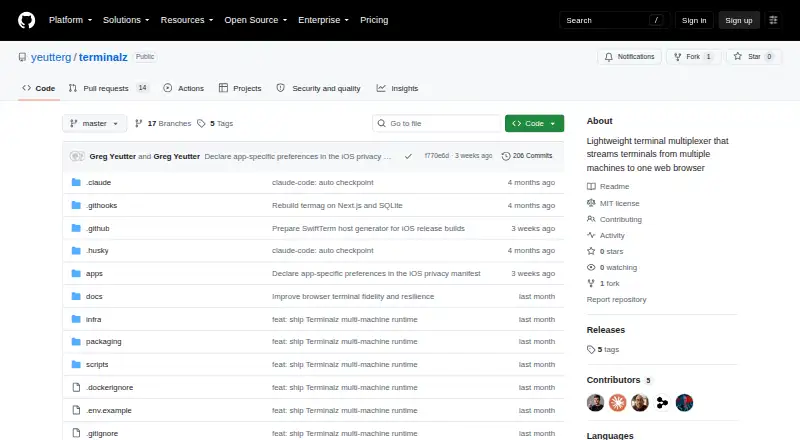
What Terminalz is
Terminalz is a free, open-source terminal multiplexer for bringing terminal sessions from multiple machines into a browser. Add any number of machines under distinct names to one web account, then move between them from a sidebar. With Herdr running, Terminalz reflects its sessions, spaces, tabs, panes, split arrangement, order, status, and icons. Without Herdr, local tmux sessions are available, and users can start sessions in directories permitted by the allowlist.
Terminal input and output travel in both directions. The most recent focus, click, or keystroke determines which client holds the writing and resize lease. The web control plane runs in Docker Compose, and the machine agent is installed with Homebrew or a GitHub release script. Machines connect to the control plane using outbound authenticated WSS, so they do not need an inbound port. The README describes running the control plane yourself. For public hostnames, it directs users to configure Google OAuth and an allowed email; trusted-network access is described for private networks.
An iPhone and iPad client built with SwiftUI provides native navigation and settings alongside the existing terminal renderer; building it requires Xcode. Terminal output and replay checkpoints stay in bounded memory rather than being persisted or sent to observability services. The project includes an MIT license.
Who it suits
Terminalz suits people who want to reach tmux or Herdr sessions across multiple machines from a browser, including users who need an iPhone or iPad client. It is aimed at people comfortable running a Docker Compose control plane and installing a local machine agent.
What it does well
- Connect any number of uniquely named machines to one web account.
- Mirrors Herdr sessions and layout, or exposes local tmux sessions.
- Supports bidirectional terminal streaming with focus-based writing and resizing.
- Agents use outbound authenticated WSS, without an inbound machine port.
- Terminal output and replay checkpoints remain bounded and memory-only.
- Free and MIT licensed.
What to know first
- The control plane must be self-hosted using Docker Compose.
- The native iPhone and iPad client requires building with Xcode.
- Phone scrollback is limited to 500 lines; desktop scrollback to 2,000.
- Public hostnames require Google OAuth configuration and an allowed email.
Limits
Phone scrollback is capped at 500 lines and desktop scrollback at 2,000 lines. The project is free; its web control plane is self-hosted.
Getting started
- Run the web control plane with Docker Compose.
- Install the native machine agent through Homebrew or the GitHub release script.
- Connect machines to the control plane over outbound authenticated WSS.
- Configure Google OAuth and an allowed email for a public hostname, or use trusted-network mode for a private network.
- Build the SwiftUI client with Xcode for iPhone or iPad access.
Verdict
Choose Terminalz if you want a free, self-hosted way to access terminal sessions from multiple machines in a browser, with tmux support and Herdr mirroring. Look elsewhere if you need more than 500 lines of phone scrollback or 2,000 lines on desktop.
Questions
How much does Terminalz cost?
Terminalz is free and open source under the MIT license.
Where can I use Terminalz?
Its listed platforms include iOS, Linux, macOS, self-hosted, and web. Access includes macOS and Linux machines, web browsers, and tmux and Herdr environments.
Does Terminalz work without Herdr?
Yes. Local tmux sessions still appear, and users can create sessions in allowlisted directories.
How do I deploy Terminalz?
The web control plane runs with Docker Compose. The native machine agent is installed through Homebrew or a GitHub release script.
What are the scrollback limits?
Phone scrollback is capped at 500 lines, and desktop scrollback at 2,000 lines.
How does public access work?
For public hostnames, the README directs users to configure Google OAuth and an allowed email. Trusted-network mode is described for private networks.
Facts from Terminalz's own pages
- Access modes
- For public hostnames, the README instructs users to configure Google OAuth and an allowed email; trusted-network mode is described for private networks. · github.com, 4 Oct 2026
- Connections
- A lightweight Rust agent connects to the web service over an outbound encrypted connection, so machines need no inbound port. · github.com, 11 Oct 2026
- Data handling
- Terminal output is not persisted or sent to observability services; output and replay checkpoints remain memory-only and bounded. · github.com, 4 Oct 2026
- Herdr integration
- When Herdr is running, Terminalz mirrors its sessions, spaces, tabs, panes, split layout, ordering, statuses, and icons. · github.com, 4 Oct 2026
- Installation
- The web control plane is distributed as a Docker Compose image, and the native agent is offered through Homebrew or GitHub Releases. · github.com, 11 Oct 2026
- Integrations
- The project documents integration with Herdr, tmux, Docker, Google OAuth, and Tailscale or WireGuard networks. · github.com, 11 Oct 2026
- License
- The repository provides the software under the MIT License, whose text grants use without charge. · github.com, 11 Oct 2026
- Limits
- Phone terminal scrollback is capped at 500 lines and desktop scrollback at 2,000 lines. · github.com, 11 Oct 2026
- Machine connections
- Users can connect any number of uniquely named machines to one web account and switch between them in a sidebar. · github.com, 4 Oct 2026
- Mobile
- A SwiftUI iPhone and iPad client provides native navigation and settings and requires building with Xcode. · github.com, 11 Oct 2026
- Mobile client
- A SwiftUI iPhone and iPad client provides native dark navigation and settings with the existing terminal renderer, and requires building with Xcode. · github.com, 4 Oct 2026
- Product
- Terminalz is a lightweight terminal multiplexer that streams terminals from multiple machines to one web browser. · github.com, 4 Oct 2026
- Purpose
- Terminalz streams terminals from multiple machines to one web browser. · github.com, 11 Oct 2026
- Release status
- The GitHub releases page states that there are no releases. · github.com, 11 Oct 2026
- Security
- Machine tokens are shown once and stored hashed in SQLite, and terminal output is not persisted or sent to observability services. · github.com, 11 Oct 2026
- Security configuration
- The project recommends OAuth for public hostnames and says trusted-network mode is only as private as the network in front of it. · github.com, 11 Oct 2026
- Self-hosting
- The README instructs users to run the web control plane themselves using Docker Compose. · github.com, 4 Oct 2026
- Session support
- Terminalz mirrors Herdr sessions and can show local tmux sessions when Herdr is not running. · github.com, 11 Oct 2026
- Support and releases
- The repository has no GitHub releases listed. · github.com, 4 Oct 2026
- Supported setup
- The web control plane runs as a Docker Compose image, while the native machine agent is installed through Homebrew or a GitHub release script. · github.com, 4 Oct 2026
- Terminal control
- Users can create, rename, and close runtime objects through typed Herdr or tmux operations; the project says it does not provide an arbitrary remote shell-command channel. · github.com, 11 Oct 2026
- Terminal streaming
- Terminalz streams terminal bytes bidirectionally, with the latest terminal focus, click, or keystroke taking the writer and resize lease. · github.com, 4 Oct 2026
- tmux support
- Without Herdr, local tmux sessions still appear and users can create sessions inside allowlisted directories. · github.com, 4 Oct 2026
Where Terminalz stands on Freedom251
- Terminal Multiplexers#19 of 29