Freedom251 › Password Managers
Team Password Manager
What Team Password Manager is
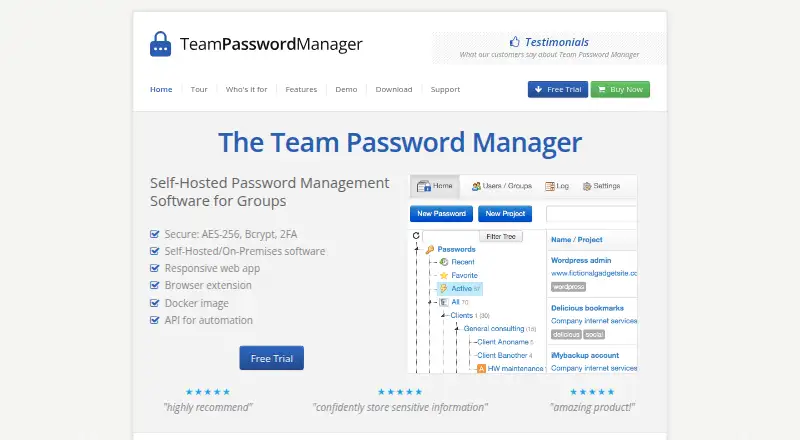
Team Password Manager is a web-based password manager for teams, with passkey support, passwordless account login, secure sharing, and business admin controls. It supports web access, self-hosted use, a Chrome extension, and an API. A free plan has no time limit. Paid options are perpetual-use licenses for 5, 10, 20, 50, or 100 named users, plus an unlimited-user license. Each paid license includes unlimited passwords and projects, with the first 12 months of support and updates included. The 5-user license costs $185, paid once; the 10-user license costs $325, paid once; the 20-user license costs $599, paid once; the 50-user license costs $1,339, paid once; the 100-user license costs $2,179, paid once; and the unlimited-user license costs $5,499, paid once. A 30-day trial is available. The maker, Team Password Manager, was founded in 2011 and is headquartered in Matadepera, near Barcelona, Catalonia, Spain.
Who it suits
It suits teams that want shared password management with business admin controls, secure sharing, and passwordless account login. Its perpetual licenses cover groups from 5 named users to unlimited users, with unlimited passwords and projects on paid plans.
What it does well
- Free plan has no time limit.
- Supports passkeys and passwordless account login.
- Includes secure sharing and business admin controls.
- Paid licenses include unlimited passwords and projects.
- Supports web, self-hosted use, a Chrome extension, and an API.
What to know first
- Paid licenses are sized for named groups, except the unlimited-user option.
- Support and updates are included for the first 12 months of paid licenses.
Limits
The free plan has no time limit. Paid licenses include the first 12 months of support and updates; each is for a specified user count except the unlimited-user license.
Plans
| Plan | Billed and limits | Price |
|---|---|---|
| 5 Users License | License for 5 named users; perpetual use; first 12 months of support and updates included. · 5 users · Unlimited passwords · Unlimited projects | $185, paid once |
| Free | No time limit | On request |
| 10 Users License | License for 10 named users; perpetual use; first 12 months of support and updates included. · 10 users · Unlimited passwords · Unlimited projects | $325, paid once |
| 20 Users License | License for 20 named users; perpetual use; first 12 months of support and updates included. · 20 users · Unlimited passwords · Unlimited projects | $599, paid once |
| 50 Users License | License for 50 named users; perpetual use; first 12 months of support and updates included. · 50 users · Unlimited passwords · Unlimited projects | $1,339, paid once |
| 100 Users License | License for 100 named users; perpetual use; first 12 months of support and updates included. · 100 users · Unlimited passwords · Unlimited projects | $2,179, paid once |
| Unlimited Users License | Perpetual use; first 12 months of support and updates included. · Unlimited users · Unlimited passwords · Unlimited projects | $5,499, paid once |
As teampasswordmanager.com lists them, read 23 Sept 2026. The maker's own page has the final word.
Getting started
- Visit the Team Password Manager website.
- Choose the free plan or review the available paid licenses.
- Use the web platform, or choose the supported self-hosted, Chrome extension, or API option.
- Consider the 30-day trial.
Verdict
Choose Team Password Manager if your team wants passkey support, secure sharing, and a perpetual license with unlimited passwords and projects. The free plan has no time limit, while paid licenses suit teams that can select from its available user counts. Consider the included support and updates period when weighing a paid license.
Questions
Is there a free plan?
Yes. The Free plan has no time limit.
How much do paid licenses cost?
The 5-user license is $185, paid once; 10 users, $325, paid once; 20 users, $599, paid once; 50 users, $1,339, paid once; 100 users, $2,179, paid once; and unlimited users, $5,499, paid once.
What is included with a paid license?
Each paid license allows perpetual use and includes unlimited passwords and projects. The first 12 months of support and updates are included.
Which platforms and access options are supported?
The listed options are web, self-hosted use, a Chrome extension, and an API.
Does it support passkeys and secure sharing?
Yes. Passkey support, passwordless account login, and secure sharing are listed.
Who makes Team Password Manager?
Team Password Manager is the maker. It was founded in 2011 and is headquartered in Matadepera, near Barcelona, Catalonia, Spain.
Facts from Team Password Manager's own pages
- Business admin controls
- Yes · teampasswordmanager.com, 16 Sept 2026
- Founded
- 2011 · teampasswordmanager.com, 28 Sept 2026
- Free plan
- Yes · teampasswordmanager.com, 16 Sept 2026
- Headquarters
- Matadepera, near Barcelona, Catalonia, Spain · teampasswordmanager.com, 28 Sept 2026
- Passkey support
- Yes · teampasswordmanager.com, 16 Sept 2026
- Passwordless account login
- Yes · teampasswordmanager.com, 16 Sept 2026
- Secure sharing
- Yes · teampasswordmanager.com, 16 Sept 2026
- Supported platforms
- web,self_hosted,chrome_extension,api · teampasswordmanager.com, 16 Sept 2026
Where Team Password Manager stands on Freedom251
- Password Managers#44 of 104
- Password Management Software#20 of 38