Freedom251 › AI Resume Builders
Teal
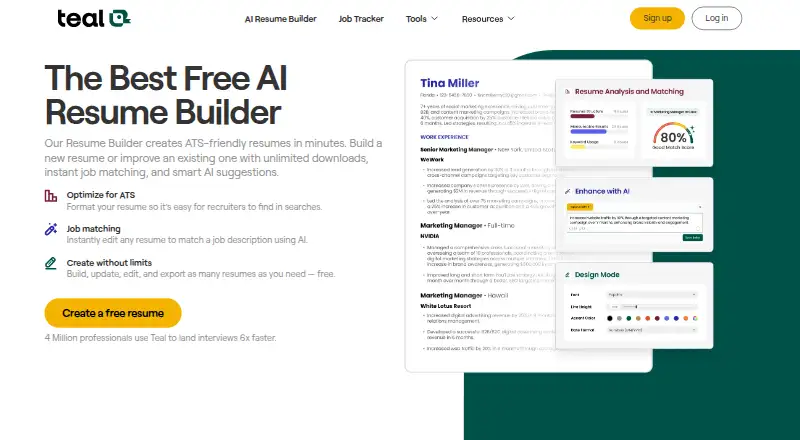
What Teal is
Teal is a career and job-search platform with an AI resume builder for tailoring applications to job descriptions. You can begin with a blank resume, upload a PDF or Word file, paste text, or import content from LinkedIn. The builder compares your resume with a job description, gives a Match Score, and suggests keywords and content changes. Its 10 ATS-friendly templates include controls for layout, fonts, spacing, colors, and section order. Free accounts can create and download unlimited resumes as PDFs, with basic analysis, the top five job-description keywords, and limited AI credits. Teal says it does not offer DOC or DOCX exports or a general free trial. Its Chrome extension can save jobs from supported boards such as Indeed, Glassdoor, and Built In, but is for desktop or laptop use with Google Chrome. Teal lists a free plan, plus paid plans at $13 a month with weekly billing, $29 a month billed monthly, and $79 a month billed quarterly.
Who it suits
Teal suits job seekers who want to tailor resumes to specific roles and compare their content with job descriptions. Its job-saving extension is for people using Google Chrome on a desktop or laptop.
What it does well
- Import resumes from LinkedIn, PDF, Word, or pasted text
- Match Score and keyword suggestions for job descriptions
- Ten ATS-friendly templates with layout controls
- Unlimited free PDF resume downloads
What to know first
- No DOC or DOCX export
- No general free trial
- Chrome extension requires a desktop or laptop
Limits
The free plan provides basic resume analysis, the top five job-description keywords, and limited AI credits. Free accounts can download PDFs, while DOC and DOCX export is not currently offered. Paid plans list unlimited keyword matching, advanced resume analysis, and unlimited AI tools.
Plans
| Plan | Billed and limits | Price |
|---|---|---|
| Free | Unlimited resume creation · 10 free resume templates · Basic resume analysis · Top 5 job-description keywords · Limited AI credits | Free |
| Teal+ Weekly | Unlimited resumes · Unlimited template access · Unlimited keyword matching · Advanced resume analysis · Unlimited AI tools | $13 a month |
| Teal+ Monthly | billed monthly · Unlimited resumes · Unlimited template access · Unlimited keyword matching · Advanced resume analysis · Unlimited AI tools | $29 a month |
| Teal+ Quarterly | Unlimited resumes · Unlimited template access · Unlimited keyword matching · Advanced resume analysis · Unlimited AI tools | $79 a month |
| Free Forever | Unlimited resumes and job tracking · 10 templates · top 5 job-description keywords · basic resume analysis · 1 email template per job stage · limited AI credits | Free |
As tealhq.com lists them, read 20 Sept 2026. The maker's own page has the final word.
Getting started
- Visit the Teal resume builder website and create a free account.
- Start from scratch, upload a PDF or Word document, paste text, or import LinkedIn content.
- Choose a template and adjust its layout, fonts, spacing, colors, or section order.
- Add a job description to receive a Match Score and keyword recommendations.
- Download the resume as a PDF, or choose a Teal+ tier whose listed features meet your needs.
- The Teal Job Search Companion extension is for Google Chrome on desktop or laptop devices and can save jobs from supported boards.
Teal combines an AI resume builder with job-description matching and job-tracking tools. It is best for applicants tailoring one career history to several openings, especially those who work in Chrome on a desktop and submit PDFs. The main drawback is that Word exports are unavailable, while the free account limits AI assistance and matching depth.
Overview
Teal lets you build from a blank page, upload a PDF or Word document, paste text, or import profile content from LinkedIn. Its workflow centers on a particular vacancy: add a job description, compare it with your resume, review a Match Score, and revise using suggested keywords and content improvements.
That connection between drafting and a target role is more useful than a standalone template editor when each application needs different emphasis. It is a poorer fit for anyone who must deliver editable DOC or DOCX files, since PDF is the only export format. Teal says career content may be used in anonymized and aggregated form to improve its AI models and services; it encrypts data in transit and at rest, performs regular security assessments, limits employee access, and uses secure cloud infrastructure.
Key features
Match a resume to a job
The Match Score, keyword suggestions, and recommended content changes give applicants a practical editing checklist. Free accounts receive basic resume analysis and the top five job-description keywords. Teal+ adds advanced analysis and unlimited keyword matching, a substantial difference for people applying to many roles or optimizing closely against each description.
Create and tailor resumes
The editor includes ATS-friendly designs with controls for layout, fonts, spacing, colors, and section order. Free users get 10 templates; paid users unlock the full template library. You can create and download unlimited PDF resumes without paying, which suits applicants maintaining multiple role-specific versions. Teal does not currently provide DOC or DOCX downloads, so the workflow remains PDF-first.
Import and save opportunities
LinkedIn profile import reduces re-entry work, while the Chrome extension saves jobs from supported boards including Indeed, Glassdoor, and Built In. The Job Search Companion is limited to Google Chrome on a desktop or laptop, excluding mobile and other browsers. Free Forever also includes unlimited job tracking and one email template per job stage.
AI assistance
Free accounts include limited credits for AI-generated achievements, cover letters, and professional summaries. Teal+ provides unlimited AI tools, making the upgrade relevant when you routinely generate or revise supporting application material rather than only formatting resumes.
Pricing
Teal's free options cost nothing. The Free plan includes unlimited resume creation, 10 templates, basic analysis, the top five job-description keywords, and limited AI credits. Free Forever adds unlimited job tracking and one email template per job stage. There is no general free trial, so the free account is the way to evaluate the core workflow.
Teal+ Weekly costs $13 a month and includes unlimited resumes, all templates, unlimited keyword matching, advanced analysis, and unlimited AI tools. Teal+ Monthly costs $29 a month, billed monthly, with the same inclusions. Teal+ Quarterly costs $79 a month and also carries the same feature set. The cheaper paid option is therefore the Weekly plan; all paid tiers remove the free plan's AI and keyword ceilings, while the free tier remains adequate for unlimited PDF resume creation.
Platforms
Teal is available on the web and as a browser extension. The job-search extension specifically requires Google Chrome and a desktop or laptop, so mobile-only users cannot use that capture workflow.
Who it's for
Choose Teal if you are actively applying across roles and want a repeatable way to compare each resume with its job description, maintain several PDF versions, and save openings from supported job boards. The free plan is particularly suitable for occasional applicants who need unlimited resume files and can work within five suggested keywords and limited AI credits.
Teal+ is aimed at high-volume searchers who need unlimited matching and AI generation. Look elsewhere if editable Word output is essential, if you work primarily on a phone, or if your browser is not Chrome.
Pros and cons
- Pro: Unlimited PDF resume creation on the free plan supports multiple targeted applications without a document quota.
- Pro: Match Scores and keyword recommendations connect resume editing directly to a vacancy.
- Pro: LinkedIn import and supported-board job saving reduce repetitive job-search administration.
- Con: Free matching is limited to the top five keywords and basic analysis, which is restrictive for broad searches.
- Con: Free AI credits run out, and DOC/DOCX export is not offered at all.
- Con: The extension works only in Chrome on desktop or laptop computers.
Alternatives
For a broader directory of tools, browse AI Resume Builders, AI Cover Letter Generators, AI Job Search Tools, or Cover Letter Software.
Kickresume is a better choice if you want Android or iOS access plus four basic resume templates and four matching cover-letter templates. Rezi suits users who prefer an extension, iOS support, and a free plan centered on one resume, one AI interview, and three PDF downloads. MyPerfectResume is worth considering for mobile apps, a free trial, and more than 40 customizable templates on its premium access plan.
Resume Genius fits applicants who need mobile apps, a free trial, and cover-letter downloads in PDF, Word, and TXT. Jobscan is an alternative for ATS-focused scanning with a free builder, ATS-friendly templates, and limited resume scans. Resume.io offers a seven-day trial and premium templates through its web app. Zety provides web-based resume and cover-letter building with TXT downloads. Novorésumé is a web option with a one-page free Basic plan and a 10-page paid tier.
Verdict
Teal is a strong choice for job seekers who want to tailor multiple PDF resumes against individual openings while keeping job tracking in the same workflow. Its free plan delivers unusually high resume volume, but choose another service if you need Word files, mobile-first access, or unrestricted AI and keyword analysis without a paid subscription.
Verdict
Teal combines resume creation and job-description matching with job-saving tools. The free plan includes unlimited PDF resumes, while AI credits are limited and paid plans are also available.
Questions
Does Teal have a free plan or trial?
Yes, it offers a free plan with unlimited resumes, 10 templates, basic analysis, the top five job-description keywords, and limited AI credits. There is no general free trial.
How much do Teal+ plans cost?
Teal+ Weekly is $13 a month, Teal+ Monthly is $29 a month, and Teal+ Quarterly is $79 a month.
Can I download my resume as a Word document?
Teal currently offers PDF downloads; DOC and DOCX export is not currently offered.
Can I import an existing resume or LinkedIn profile?
Yes. You can upload a PDF or Word document, paste text, or import content from LinkedIn.
Which platforms support Teal?
The resume builder is available on the web. The job-saving extension is for Google Chrome on desktop or laptop devices.
How does Teal handle career content?
Teal says it encrypts data in transit and at rest and restricts employee access. Its privacy policy says career content may be used in anonymized and aggregated form to improve its AI models and services.
Facts from Teal's own pages
- ATS optimization
- Yes · tealhq.com, 20 Sept 2026
- Company
- The company identifies itself as Teal Labs, Inc. and describes itself as remote-first; its About page names Dave Fano as founder. · tealhq.com, 3 Oct 2026
- Data handling
- Teal's privacy policy says career content may be used to improve its AI models and services in anonymized and aggregated form. · tealhq.com, 3 Oct 2026
- Download formats
- pdf · tealhq.com, 20 Sept 2026
- Exports
- Users can create and download unlimited resumes as PDFs for free; the help center says DOC and DOCX export is not currently offered. · help.tealhq.com, 3 Oct 2026
- Extension limitation
- The Teal Job Search Companion extension is for Google Chrome and desktop or laptop devices. · help.tealhq.com, 3 Oct 2026
- Free plan
- Yes · tealhq.com, 20 Sept 2026
- Import sources
- linkedin_document · tealhq.com, 20 Sept 2026
- Integrations
- Users can import LinkedIn profile content, and Teal's Chrome extension saves jobs from supported job boards including Indeed, Glassdoor, and Built In. · tealhq.com, 3 Oct 2026
- Intended users
- Teal describes its mission as empowering job seekers to make confident career decisions and grow in their careers. · tealhq.com, 3 Oct 2026
- Job description matching
- Yes · tealhq.com, 20 Sept 2026
- Job matching
- The builder compares a resume with a job description, provides a Match Score, and recommends keywords and content improvements. · tealhq.com, 3 Oct 2026
- Notable limits
- Teal says it has no general free trial, though free accounts include limited AI generation credits for achievements, cover letters, and professional summaries. · help.tealhq.com, 3 Oct 2026
- Privacy and security
- Teal says it encrypts data in transit and at rest, conducts regular security assessments, restricts employee access, and uses secure cloud infrastructure. · tealhq.com, 3 Oct 2026
- Purpose
- Teal is a career and job-search platform with an AI resume builder for creating and tailoring resumes to job descriptions. · tealhq.com, 3 Oct 2026
- Resume design
- The builder offers ATS-friendly templates with controls for layout, fonts, spacing, colors, and section order. · tealhq.com, 3 Oct 2026
- Resume imports
- Users can start from scratch, upload a PDF or Word document, paste text, or import content from LinkedIn. · tealhq.com, 3 Oct 2026
- Resume templates
- 10 · tealhq.com, 20 Sept 2026
- Support
- The help center directs users with further questions to [email protected]. · help.tealhq.com, 3 Oct 2026
- Target-role tailoring
- Yes · tealhq.com, 20 Sept 2026
Where Teal stands on Freedom251
- AI Resume Builders#7 of 80
- AI Job Search Tools#26 of 67
- AI Cover Letter Generators#26 of 41
- Cover Letter Software#44 of 62