Freedom251 › Audio Converter Software
TAudioConverter
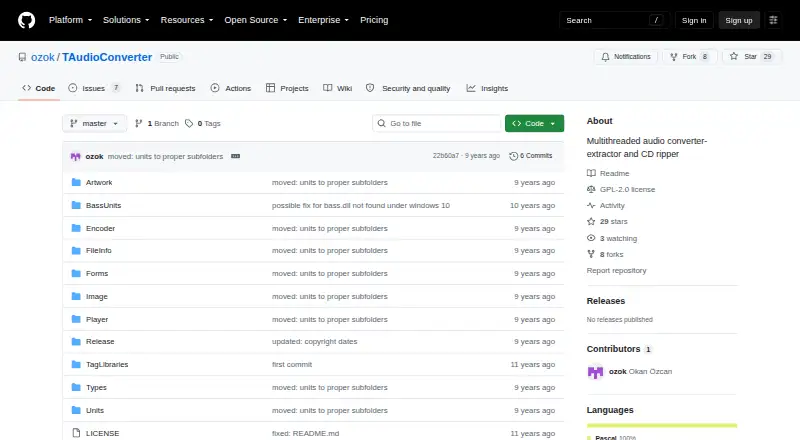
What TAudioConverter is
TAudioConverter is a free, open-source Windows application for converting audio and video files into audio formats. It can extract audio from video, rip CDs, and batch-convert files. Supported output formats include MP3, WAV, FLAC, OGG, AAC, AC3, OPUS, MPC, APE, TTA, and TAK. It can run up to 16 encoder instances at once, and includes shell integration for right-click encoding workflows.
Portable and installer versions are available for both 32-bit and 64-bit Windows. Output options include preserving folder structure or creating a custom layout. The project identifies its license as GPL-2.0 and names FFmpeg, MediaInfo, FLAC, OpusEnc, QAAC, and WavPack among the third-party tools it uses. Stable downloads are linked to FOSShub, while beta versions are linked from the repository to Bitbucket. The maintainer lists email and the Doom9 and Hydrogenaudio forums as support channels. The repository page provides no product security or compliance claims.
Who it suits
TAudioConverter suits Windows users who want a free tool for audio conversion, extraction, CD ripping, or batch processing. Its portable and installer builds cover both 32-bit and 64-bit Windows.
What it does well
- Free and open source under GPL-2.0.
- Converts batches and extracts audio from video.
- Supports a wide range of output formats.
- Runs up to 16 encoder instances.
- Offers portable and installer Windows builds.
What to know first
- Available for Windows only.
- Repository page makes no security or compliance claims.
- Uses multiple third-party tools.
Limits
The free plan allows up to 16 simultaneous encoder processes.
Plans
| Plan | Billed and limits | Price |
|---|---|---|
| Free | Free Windows audio converter; up to 16 simultaneous encoder processes | Free |
As github.com lists them, read 5 Oct 2026. The maker's own page has the final word.
Getting started
- Open the TAudioConverter project website
- Choose a portable or installer build for 32-bit or 64-bit Windows
- Download a stable build from FOSShub or a beta build through Bitbucket
- Install or launch the portable version
- Use the converter, CD ripper, or Windows shell right-click workflow
Verdict
TAudioConverter covers conversion, extraction, and CD ripping, with batch processing and several output layout options. It is limited to Windows and relies on third-party tools listed by the project.
Questions
What does TAudioConverter cost?
TAudioConverter is free, with a listed price of $0 plan.
Which systems can run it?
It is available for Windows in portable and installer builds for both 32-bit and 64-bit systems.
Is TAudioConverter open source?
Yes. The project is open source and identified under the GPL-2.0 license.
Can it convert video files?
Yes. It converts video files to audio formats and can extract their audio streams.
Does it support CD ripping?
Yes. CD ripping is listed as a supported function.
Where are downloads provided?
Stable downloads are linked to FOSShub, while beta versions are linked from the repository to Bitbucket.
Facts from TAudioConverter's own pages
- Audio extraction
- It extracts audio streams from video files. · fosshub.com, 5 Oct 2026
- CD ripping
- The project describes TAudioConverter as a CD ripper, and the download page lists CD ripping support. · github.com, 5 Oct 2026
- Dependencies
- The download page names FFmpeg, MediaInfo, FLAC, OpusEnc, QAAC, and WavPack among the third-party tools it uses. · fosshub.com, 5 Oct 2026
- Downloads
- Stable downloads are linked to FOSShub, while beta versions are linked from the repository to Bitbucket. · github.com, 5 Oct 2026
- Formats
- The download page lists MP3, WAV, FLAC, OGG, AAC, AC3, OPUS, MPC, APE, TTA, and TAK among supported output formats. · fosshub.com, 5 Oct 2026
- Integrations
- The download page lists shell integration for right-click encoding workflows. · fosshub.com, 5 Oct 2026
- License
- The GitHub repository identifies the project as GPL-2.0 licensed. · github.com, 5 Oct 2026
- Multithreading
- It can run up to 16 encoder instances to shorten encoding time. · github.com, 5 Oct 2026
- Output layout
- The download page says it can preserve folder structure or create custom output layouts. · fosshub.com, 5 Oct 2026
- Purpose
- TAudioConverter converts audio and video files to different audio formats. · github.com, 5 Oct 2026
- Security information
- The repository page opened provides no product security or compliance claims. · github.com, 5 Oct 2026
- Support
- The maintainer lists email and the Doom9 and Hydrogenaudio forums as help channels. · github.com, 5 Oct 2026
- Windows builds
- Portable and installer versions are available for 32-bit and 64-bit Windows. · github.com, 5 Oct 2026
Where TAudioConverter stands on Freedom251
- Audio Converter Software#28 of 36