Freedom251 › Digital Brush Libraries
Syntetyc Downloads
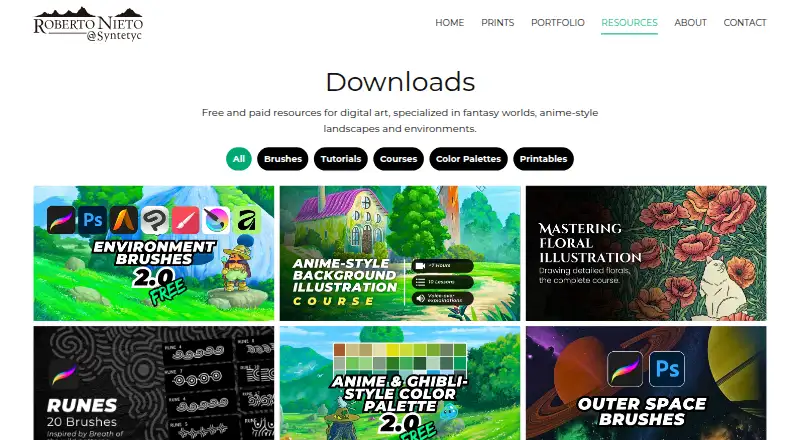
What Syntetyc Downloads is
Syntetyc Downloads is a web-based collection of digital art resources focused on fantasy worlds, anime-style landscapes, and environments. Its downloads are organized into brushes, tutorials, courses, color palettes, and printables, and the maker presents them for illustrators seeking environment art resources. Environment Brushes 2.0 is free and includes 19 brushes with native formats for Procreate, Photoshop, Art Studio Pro, Clip Studio Paint, Infinite Painter, Krita, and Affinity. The maker describes these stroke-based brushes as medium-advanced and says practice and familiarization are needed. The Anime-Style Background illustration course costs $22, paid once and contains 10 lessons on a digital landscape painting workflow, from sketching and composition through coloring, lighting, and final rendering. It includes more than five hours of 1080p HD video, downloadable PSD and Procreate project files, a brush set, and a color palette. The lessons demonstrate Photoshop and Clip Studio Paint, with techniques also applicable in other listed drawing programs.
Who it suits
Syntetyc Downloads suits illustrators seeking digital resources for fantasy environments or anime-style landscapes. The brushes and course are relevant to artists using the supported drawing apps.
What it does well
- Environment Brushes 2.0 is free.
- The brush set includes 19 brushes.
- Brushes support seven named drawing apps.
- Course includes 10 structured lessons.
- Course materials include downloadable project files and 1080p HD video.
What to know first
- Brushes are described as medium-advanced and require practice.
- The illustration course costs $22, paid once.
Limits
The free plan provides the Environment Brushes 2.0 set, which contains 19 brushes. The course is a separate purchase priced at $22, paid once.
Plans
| Plan | Billed and limits | Price |
|---|---|---|
| Environment Brushes 2.0 | 19 brushes · Native formats for Procreate, Photoshop, Art Studio Pro, Clip Studio Paint, Infinite Painter, Krita and Affinity | Free |
| Anime-Style Background illustration course | 10 lessons · 5+ hours of video · Downloadable PSD and Procreate project files | $22, paid once |
As syntetyc.com lists them, read 9 Oct 2026. The maker's own page has the final word.
Getting started
- Visit the Syntetyc Downloads website.
- Choose the free Environment Brushes 2.0 set or the paid illustration course.
- Download the selected resource.
- Open brush files in a supported app, or follow the course demonstrations in Photoshop or Clip Studio Paint.
Verdict
Syntetyc Downloads offers both free brushes and a paid landscape illustration course, with materials for several drawing apps. The maker notes that its brushes take practice to become familiar with.
Questions
Is Syntetyc Downloads free?
It offers free and paid resources. Environment Brushes 2.0 is free, while the Anime-Style Background illustration course costs $22, paid once.
Which apps support Environment Brushes 2.0?
The brushes provide native formats for Procreate, Photoshop, Art Studio Pro, Clip Studio Paint, Infinite Painter, Krita, and Affinity.
What does the illustration course include?
It has 10 lessons, more than five hours of 1080p HD video, downloadable PSD and Procreate project files, a brush set, and a color palette.
Which software does the course demonstrate?
It demonstrates Adobe Photoshop and Clip Studio Paint. Its techniques can also be used in Procreate, Krita, Affinity, or other drawing programs.
Who makes Syntetyc?
The site identifies Roberto Nieto as Syntetyc and says he has over 15 years of experience in interface design and art direction.
Facts from Syntetyc Downloads's own pages
- AI use
- The course page describes its instruction as manual digital art and says it uses zero AI generation. · syntetyc.com, 9 Oct 2026
- Brush compatibility
- Environment Brushes 2.0 provides native brush formats for Procreate, Photoshop, Art Studio Pro, Clip Studio Paint, Infinite Painter, Krita and Affinity. · syntetyc.com, 9 Oct 2026
- Brush learning curve
- The maker says Environment Brushes 2.0 are medium-advanced stroke-based brushes that require practice and familiarization. · syntetyc.com, 9 Oct 2026
- Course content
- The course has 10 structured lessons covering a digital landscape painting workflow from sketching and composition through coloring, lighting and final rendering. · syntetyc.com, 9 Oct 2026
- Course materials
- The course includes downloadable PSD and Procreate project files, a brush set, a color palette and 1080p HD video. · syntetyc.com, 9 Oct 2026
- Course software
- The course demonstrates Adobe Photoshop and Clip Studio Paint, and says its techniques can also be used in Procreate, Krita, Affinity or other drawing programs. · syntetyc.com, 9 Oct 2026
- Intended audience
- The maker describes the site as offering professional environment art and digital resources for illustrators. · syntetyc.com, 9 Oct 2026
- Maker
- The site identifies Roberto Nieto as Syntetyc and says he has over 15 years of experience in interface design and art direction. · syntetyc.com, 9 Oct 2026
- Resource categories
- Downloads are grouped into brushes, tutorials, courses, color palettes and printables. · syntetyc.com, 9 Oct 2026
- Support
- The maker accepts questions and suggestions through a contact form or at [email protected]. · syntetyc.com, 9 Oct 2026
- What it offers
- The Downloads page offers free and paid digital art resources focused on fantasy worlds, anime-style landscapes and environments. · syntetyc.com, 9 Oct 2026
Where Syntetyc Downloads stands on Freedom251
- Digital Brush Libraries#13 of 23