Swagger Editor
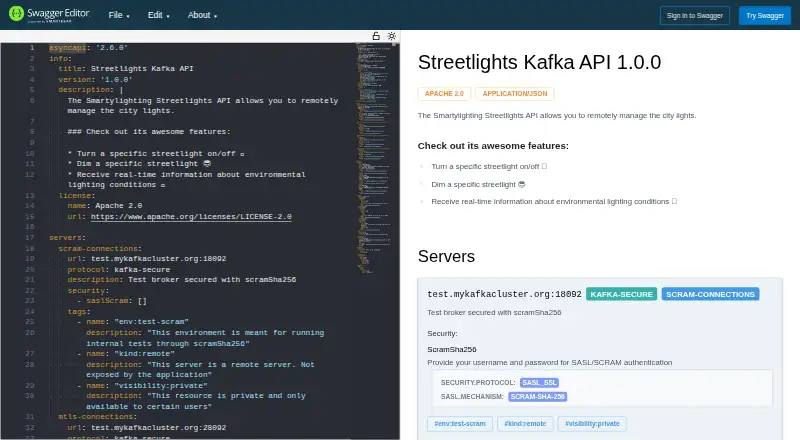
What Swagger Editor is
Swagger Editor is an open-source editor for creating and documenting API specifications. It supports Swagger 2.0, OpenAPI 3.*, and AsyncAPI 2.*. While you write, it checks syntax for OpenAPI Specification compliance and renders a visual representation that you can interact with as you define the API. Intelligent autocomplete assists with syntax, and you can adjust settings such as line spacing and themes.
The editor can generate server stubs and client libraries in popular languages. API definitions can be synchronized with GitHub, GitLab, and Bitbucket; listed gateway integrations include Amazon API Gateway, Azure API Management, and Kong. Custom webhooks can trigger workflow automation when APIs are updated. Use it in a browser or install and run it locally. The open-source editor is free. For organizations working across multiple teams, Swagger Enterprise is available on-premise or in the cloud and includes API standardization, teams and projects, and reusable domains. SmartBear describes its security program as aligned with SOC 2, ISO/IEC 27001, GDPR and CCPA, and NIST CSF, and says customer data is encrypted in transit and at rest with least-privilege access restrictions.
Who it suits
Swagger Editor suits developers and API teams who want to define, validate, visualize, and document APIs using supported specification formats. Its local and web deployment options work for individuals, while organizations coordinating multiple teams can consider Swagger Enterprise.
What it does well
- Free, open-source editor with local and web access.
- Supports Swagger 2.0, OpenAPI 3.*, and AsyncAPI 2.*.
- Validates syntax and renders API definitions visually as you write.
- Generates server stubs and client libraries in popular languages.
- Synchronizes definitions with GitHub, GitLab, and Bitbucket.
- Offers configurable themes and line spacing.
What to know first
- Swagger Enterprise is the option described for multi-team use and reusable domains.
Plans
| Plan | Billed and limits | Price |
|---|---|---|
| Swagger Editor (open source) | OpenAPI 2.0 and 3.* · AsyncAPI 2.* · local or web | Free |
| Swagger Enterprise | API standardization · teams and projects · reusable domains · on-premise or cloud | On request |
As editor.swagger.io lists them, read 1 Oct 2026. The maker's own page has the final word.
Getting started
- Open editor.swagger.io to use the web editor.
- Alternatively, install and run Swagger Editor locally.
- Write an API definition in Swagger 2.0, OpenAPI 3.*, or AsyncAPI 2.*.
- Use the editor’s validation, visualization, and autocomplete while defining the API.
- Connect definitions with GitHub, GitLab, or Bitbucket if source control synchronization is needed.
- Consider Swagger Enterprise for multi-team standardization on-premise or in the cloud.
Verdict
Choose Swagger Editor for a free way to write and validate API definitions across Swagger, OpenAPI, and AsyncAPI formats. Teams that need enterprise features such as API standardization, project coordination, or reusable domains can consider Swagger Enterprise, available on-premise or in the cloud.
Questions
Is Swagger Editor free?
Yes. The open-source Swagger Editor plan is free and supports local or web use.
Which API specification formats does it support?
It supports Swagger 2.0, OpenAPI 3.*, and AsyncAPI 2.*.
Can I run Swagger Editor locally?
Yes. It can be installed and run locally, or accessed on the web.
What integrations are available?
Swagger lists GitHub, GitLab, and Bitbucket for source-control synchronization, plus Amazon API Gateway, Azure API Management, and Kong. Custom webhooks can automate workflows when APIs are updated.
Is Swagger Editor open source?
Yes. The Swagger Editor plan is described as open source.
Facts from Swagger Editor's own pages
- API gateway integrations
- Swagger integrates with Amazon API Gateway, Azure API Management, and Kong. · swagger.io, 1 Oct 2026
- Autocomplete
- The editor provides intelligent syntax auto-completion. · swagger.io, 1 Oct 2026
- Code generation
- Swagger Editor can generate server stubs and client libraries in popular languages. · swagger.io, 1 Oct 2026
- Customization
- Users can configure the editor, including line spacing and themes. · swagger.io, 1 Oct 2026
- Deployment
- Swagger Editor can be installed and run locally or accessed on the web. · swagger.io, 1 Oct 2026
- Enterprise deployment
- Swagger Enterprise is available on-premise or in the cloud for organizations working across multiple teams. · swagger.io, 1 Oct 2026
- Maker scale
- SmartBear says it is trusted by developers, testers, and software engineers at more than 32,000 organizations. · smartbear.com, 1 Oct 2026
- Purpose
- Swagger Editor is an open-source editor for designing, describing, and documenting APIs. · swagger.io, 1 Oct 2026
- Security controls
- SmartBear states that customer data is encrypted in transit and at rest and access is restricted by least privilege. · smartbear.com, 1 Oct 2026
- Security frameworks
- SmartBear says its security program aligns with SOC 2, ISO/IEC 27001, GDPR and CCPA, and NIST CSF. · smartbear.com, 1 Oct 2026
- Source control integrations
- Swagger integrates with GitHub, GitLab, and Bitbucket to synchronize API definitions with source control. · swagger.io, 1 Oct 2026
- Specifications
- It supports Swagger 2.0, OpenAPI 3.*, and AsyncAPI 2.*. · swagger.io, 1 Oct 2026
- Validation
- The editor validates syntax for OpenAPI Specification compliance while you write. · swagger.io, 1 Oct 2026
- Visualization
- It renders API specifications visually and lets users interact with APIs while defining them. · swagger.io, 1 Oct 2026
- Webhooks
- Swagger supports custom webhooks for automating workflows when APIs are updated. · swagger.io, 1 Oct 2026
Where Swagger Editor stands on Freedom251
- API Design Tools#20 of 26
- API Development Tools#26 of 32