StudyPDF
by StudyPDF
What StudyPDF is
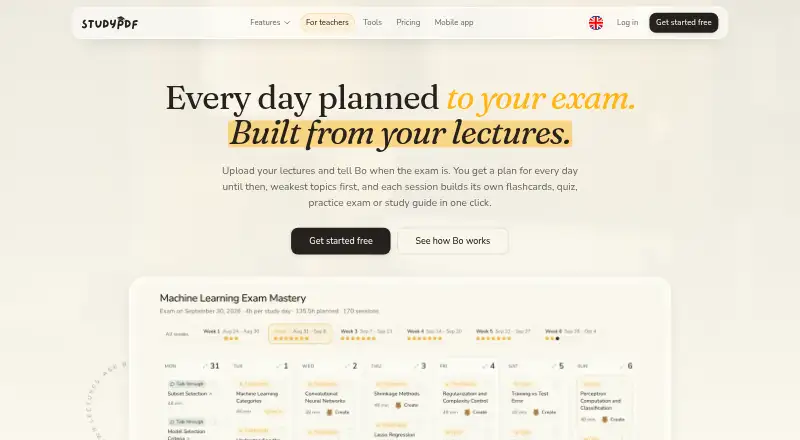
StudyPDF is a study service where its assistant, Bo, works with materials students upload. It answers questions with citations to the source material and can turn those materials into summaries, flashcards, quizzes, practice exams, study guides, cheat sheets and mind maps. The listed supported inputs include PDFs, scanned or handwritten notes, photos, YouTube videos and websites. Bo can also prepare a daily plan leading up to an exam, give priority to weaker topics and track mastery by concept to suggest what to study next. Study materials can be exported to PDF, Word or Anki. The service is available on the web and through iOS and Android apps; the app page says courses can be used offline. Its free plan costs nothing, billed Free forever, with about 4 study sets weekly, unlimited uploads up to 300 pages per file, and sharing for one course with up to 3 people. StudyPDF was founded in 2023 and is based in Bergisch Gladbach, Germany.
Who it suits
It suits students who want to turn course materials into study aids and track which concepts need more work. Teachers can share selected materials with students through a browser link, and students can save progress with free accounts.
What it does well
- Answers cite the uploaded source material.
- Creates flashcards, quizzes and practice exams.
- Builds daily plans that prioritize weak topics.
- Exports materials to PDF, Word or Anki.
- Free plan includes unlimited uploads up to 300 pages per file.
What to know first
- Free plan allows about 4 study sets a week.
- Free plan sharing is limited to one course and three people.
- Document text, page images and chats go to external AI providers for processing.
Limits
The Free plan costs nothing, billed Free forever, with about four study sets weekly, files up to 300 pages, and sharing for one course with up to three people. Pro raises these allowances to about 35 sets weekly, 400 pages per file and 10 people per course; Ultra allows about 105 sets weekly, 500 pages per file and 30 people per course.
Plans
| Plan | Billed and limits | Price |
|---|---|---|
| Free | Free forever · About 4 study sets a week · Unlimited uploads, up to 300 pages per file · Share 1 course with up to 3 people · No card required | Free |
| Pro | per month, billed yearly; page displays price as “…” · About 35 study sets a week · Unlimited uploads, up to 400 pages per file · Share every course with up to 10 people | On request |
| Ultra | per month, billed yearly; page displays price as “…” · About 105 study sets a week · Unlimited uploads, up to 500 pages per file · Share every course with up to 30 people | On request |
As studypdf.net lists them, read 11 Oct 2026. The maker's own page has the final word.
Getting started
- Visit https://studypdf.net/.
- Use the web service or download the app for iPhone, iPad or Android.
- Sign in with Google or Apple, or start with the Free plan, which requires no card.
- Upload course materials or import selected files from Google Drive.
- Use Bo to create study materials and save progress with a free account.
Verdict
StudyPDF combines source based answers, several study formats and progress tracking around a learner’s uploaded materials. Its free plan has defined weekly study and sharing allowances, while the listed Pro and Ultra prices are not provided.
Questions
What is included in the Free plan?
It provides about four study sets a week, unlimited uploads up to 300 pages per file, and sharing for one course with up to three people. No card is required.
Which devices can I use?
StudyPDF is available on the web and through iOS and Android apps. The app page says courses are available offline.
What can Bo make from uploaded materials?
It can create flashcards, quizzes, practice exams, study guides, cheat sheets, summaries and mind maps, as well as a daily study plan.
Can teachers share course materials with students?
Teachers can share selected materials by browser link, which students can open without an account. Free accounts let students save progress.
How does StudyPDF handle uploaded data?
Its privacy policy says document text, page images and chat messages go to external AI providers for processing. It says these inputs and generated materials are not used to train StudyPDF's own AI models or passed on for advertising.
Facts from StudyPDF's own pages
- AI data use
- The privacy policy says uploaded documents, questions and generated materials are not used to train StudyPDF’s own AI models or passed on for advertising. · studypdf.net, 11 Oct 2026
- Source citations
- Yes · studypdf.net, 24 Sept 2026
- Data deletion
- The privacy policy says users can delete documents, courses and their account, subject to legal retention obligations. · studypdf.net, 11 Oct 2026
- Exports
- Study materials can be exported to PDF, Word or Anki. · studypdf.net, 11 Oct 2026
- AI flashcards
- Yes · studypdf.net, 24 Sept 2026
- Founded
- 2023 · studypdf.net, 19 Oct 2026
- Free plan
- Yes · studypdf.net, 24 Sept 2026
- Integrations
- Users can sign in with Google or Apple and can connect Google Drive to import selected files. · studypdf.net, 11 Oct 2026
- Maker and headquarters
- The imprint identifies HBW Softwares UG (limited liability) and gives its address as Sigbertstraße 5, 51427 Bergisch Gladbach, Germany. · studypdf.net, 11 Oct 2026
- Mobile and offline
- The free-to-download app is listed for iPhone, iPad and Android, and the app page says courses are available offline. · studypdf.net, 11 Oct 2026
- Mobile app coverage
- ios_android · studypdf.net, 24 Sept 2026
- Progress tracking
- The service tracks mastery by concept and uses it to suggest what the user should study next. · studypdf.net, 11 Oct 2026
- AI quizzes
- Yes · studypdf.net, 24 Sept 2026
- Refunds and cancellation
- The pricing FAQ says subscriptions can be cancelled anytime and annual plans have a 14-day money-back guarantee. · studypdf.net, 11 Oct 2026
- Security and data processing
- The privacy policy says the site uses SSL/TLS, identifies its hosting and storage providers, and explains that document text, page images and chat messages are sent to external AI providers for processing. · studypdf.net, 11 Oct 2026
- Source uploads
- Yes · studypdf.net, 24 Sept 2026
- Study planning
- Bo builds a daily study plan leading up to an exam and prioritizes weak topics. · studypdf.net, 11 Oct 2026
- Study tools
- Bo can create flashcards, quizzes, practice exams, study guides, cheat sheets, summaries and mind maps from uploaded materials. · studypdf.net, 11 Oct 2026
- AI summaries
- Yes · studypdf.net, 24 Sept 2026
- Supported materials
- The mission page says users can provide PDFs, scanned and handwritten notes, photos, YouTube videos and websites. · studypdf.net, 11 Oct 2026
- Teacher sharing
- Teachers can share selected course materials through a browser link that students can open without an account; free accounts let students save progress. · studypdf.net, 11 Oct 2026
- What it does
- StudyPDF’s assistant Bo works from a student’s uploaded course materials and provides answers with citations to their sources. · studypdf.net, 11 Oct 2026
Where StudyPDF stands on Freedom251
- AI Study Tools#14 of 96