Studia AI
What Studia AI is
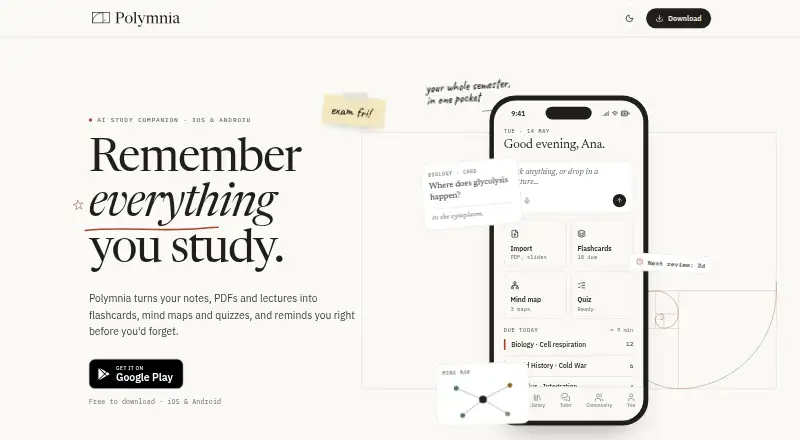
Studia AI is a study app for Android and iOS that turns lecture material into organized notes and practice activities. You can import lecture PDFs, slide decks, photos of notes, and pasted text. From those sources, it generates sectioned notes that you can read, edit, and highlight, plus flashcards, mind maps, and quizzes. Flashcards use SM-2 spaced repetition to schedule reviews and reminders. Mind maps connect concepts to their sources and show how well you know them. Quizzes can target weak topics and explain answers using your imported material. The AI Tutor answers questions from that material and cites the lecture and page used. A Community area lets you browse other students’ shared decks and import editable copies for free. Reviewing works offline, while importing material and using the tutor require an internet connection; progress syncs when you reconnect. The site says study material is used to create personal study content and answer questions, is not sold, and is visible to others only when you publish a deck to Community. The Free plan includes 500 tokens per month. Pro costs $9.99 a month or $69.99 a year, with 5,000 tokens monthly.
Who it suits
Studia AI suits students who want to turn course files, photos, and notes into structured study tools on a phone. It is useful for learners who value spaced repetition, source citations, weak-topic quizzes, and offline review.
What it does well
- Imports PDFs, slides, note photos, and pasted text
- Generates editable notes, flashcards, mind maps, and quizzes
- SM-2 scheduling supports spaced repetition reviews
- Tutor answers cite the lecture and page
- Community decks are free to import as editable copies
- Reviewing works offline with progress syncing
What to know first
- Free plan limited to 500 tokens per month
- Importing and AI Tutor require an internet connection
- Pro token allowance is 5,000 per month
- Available on Android and iOS.
Limits
The Free plan provides 500 tokens per month. Pro and Pro yearly provide 5,000 tokens per month; importing material and using the AI Tutor require an internet connection.
Plans
| Plan | Billed and limits | Price |
|---|---|---|
| Pro yearly | Billed once a year · 5,000 tokens per month | $69.99 a year |
| Free | Unlimited reviews · monthly allowance of AI imports | Free |
| Pro | Unlimited imports · mind maps · quizzes · AI Tutor · price shown in app before subscribing | On request |
| Lab | Everything in Pro · shared decks for study groups · price shown in app before subscribing | On request |
As studia-ai.com lists them, read 24 Sept 2026. The maker's own page has the final word.
Getting started
- Install Studia AI on Android or iOS
- Create or open the app account
- Import a PDF, slide deck, note photo, or pasted text
- Generate notes, flashcards, mind maps, or quizzes
- Review materials and let progress sync when online
- Choose Free, Pro, or Pro yearly if needed
Verdict
Choose Studia AI if you want one mobile app to convert course material into notes, cards, maps, quizzes, and cited tutor answers. Consider another option if you need desktop access, offline importing, or more than the plan’s monthly token allowance.
Questions
What does Studia AI cost?
The Free plan costs nothing. Pro is $9.99 a month, while Pro yearly is $69.99 a year billed once a year. Lab pricing is shown in the app before subscribing.
Is there a free plan?
Yes. Free includes 500 tokens per month.
Which devices support it?
Studia AI is available on Android and iOS.
What can I import?
You can import lecture PDFs, slide decks, photos of notes, and pasted text.
Can I study offline?
Reviewing works offline and progress syncs when online. Importing material and using the AI Tutor require a connection.
How is study material handled?
The site says material is used to create personal study content and answer questions, is not sold, and is visible to others only when you publish a deck to Community.
Facts from Studia AI's own pages
- AI notes
- The app generates sectioned notes from imported material that users can read, edit and highlight. · polymnia.app, 3 Oct 2026
- AI Tutor
- The AI Tutor answers from imported material and cites the lecture and page used. · polymnia.app, 3 Oct 2026
- Source citations
- Yes · studia-ai.com, 24 Sept 2026
- Community
- Users can browse and import other students' shared decks as editable copies for free. · polymnia.app, 3 Oct 2026
- AI flashcards
- Yes · studia-ai.com, 24 Sept 2026
- Flashcards
- Flashcards use SM-2 spaced repetition to schedule reviews. · polymnia.app, 3 Oct 2026
- Free plan
- Yes · studia-ai.com, 24 Sept 2026
- Mind maps
- Mind maps link concepts to their source and indicate how well the user knows them. · polymnia.app, 3 Oct 2026
- Mobile app coverage
- ios_android · studia-ai.com, 24 Sept 2026
- Offline use
- Reviewing works offline and progress syncs when online; importing material and using the tutor require a connection. · polymnia.app, 3 Oct 2026
- Platforms
- The app is available on the App Store for iPhone and iPad and on Google Play for Android phones and tablets. · polymnia.app, 3 Oct 2026
- Privacy
- The site says study material is used to create personal study content and answer questions, is not sold, and is visible to others only when a deck is published to Community. · polymnia.app, 3 Oct 2026
- Purpose
- Polymnia turns notes, PDFs and lectures into flashcards, mind maps and quizzes, with spaced repetition reminders. · polymnia.app, 3 Oct 2026
- AI quizzes
- Yes · studia-ai.com, 24 Sept 2026
- Quizzes
- Quizzes can be generated from weak topics with explanations drawn from the user's material. · polymnia.app, 3 Oct 2026
- Source uploads
- Yes · studia-ai.com, 24 Sept 2026
- Paid from
- 9.99 · studia-ai.com, 24 Sept 2026
- Study materials
- Users can import lecture PDFs, slide decks, photos of notes and pasted text. · polymnia.app, 3 Oct 2026
- AI summaries
- Yes · studia-ai.com, 24 Sept 2026
- Support
- The site lists [email protected] as its contact email. · polymnia.app, 3 Oct 2026
Where Studia AI stands on Freedom251
- AI Study Tools#38 of 96