Freedom251 › Audio Mixing Software
STEM
What STEM is
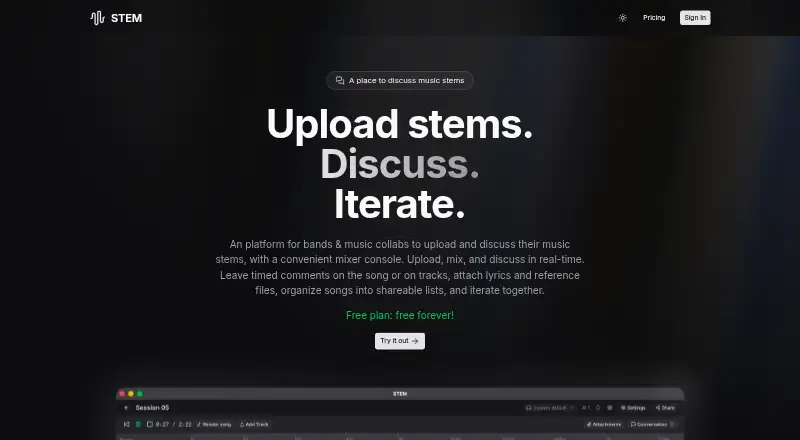
STEM is a web platform for bands and music collaborators to upload, mix, and discuss song stems. Its multi-track mixer console lets users work with uploaded stems, and invited band members can view or collaborate on projects in real time. Timed comment threads attach discussion to an individual track or the master track, helping collaborators focus feedback on particular parts of a song. Share links have customizable permissions, so users can keep songs private or share them publicly.
Users can render stems into an MP3, save mix snapshots, and export a render. Songs can be organized into playable, shareable lists for albums, EPs, setlists, or work sessions, and can include lyrics, chord charts, reference tracks, session notes, and other supporting files. STEM is meant for discussing music and making decisions together, rather than creating music like a full DAW. Some features require signing in with a Google account. The free plan costs nothing, and version history is limited. The privacy policy says uploaded audio is accessible to the user and people they explicitly share it with, and that personal data is not sold or shared with third parties.
Who it suits
STEM suits bands and music collaborators who want to review stems, exchange focused feedback, and make decisions together online. It is designed for discussion and collaboration rather than music creation in a full DAW.
What it does well
- Multi-track mixer for uploaded song stems.
- Invited collaborators can work in real time.
- Timed comments can target tracks or the master.
- Share links have customizable permissions.
- Exports MP3 renders and saves mix snapshots.
- Free plan costs nothing.
What to know first
- Version history is limited.
- Some features require a Google account.
- It is intended for discussion, not full-DAW music creation.
Limits
The free plan costs nothing, and version history is limited. Some features require a Google account.
Plans
| Plan | Billed and limits | Price |
|---|---|---|
| Free plan | — | Free |
As stem.audio lists them, read 9 Oct 2026. The maker's own page has the final word.
Getting started
- Visit https://www.stem.audio/.
- Sign in with a Google account for features that require it.
- Upload song stems to work with them in the multi-track mixer.
- Invite band members to view or collaborate on projects.
- Create a share link and set its permissions as needed.
Verdict
Choose STEM if your band or collaboration group needs a web space to share stems, discuss specific moments, and export mixes. The free plan makes it accessible without a listed charge. Look elsewhere if you need full DAW-style music creation or extensive version history.
Questions
How much does STEM cost?
Its Free plan is priced at $0.
What platforms does STEM support?
STEM is listed as a web platform.
Can collaborators comment on individual song parts?
Yes. Users can create timed comment threads on individual tracks or the master track.
Can songs be kept private?
Yes. Share links have customizable permissions, allowing songs to remain private or be shared publicly.
Does STEM create music like a full DAW?
No. It is described as a tool for discussing music and making decisions together rather than creating music like in a full DAW.
Who makes STEM?
The terms identify Antonio Brandao as the copyright holder and list [email protected] for questions.
Facts from STEM's own pages
- Account access
- Users must sign in with a Google account to use certain features. · stem.audio, 9 Oct 2026
- Attachments
- Songs can include lyrics, chord charts, reference tracks, session notes, and other supporting files. · stem.audio, 9 Oct 2026
- Collaboration
- Users can invite band members to view or collaborate on projects in real time. · stem.audio, 9 Oct 2026
- Comments
- Users can create timed comment threads on individual tracks or the master track. · stem.audio, 9 Oct 2026
- Data rights
- Users may request access, correction, deletion, or export of their data; data is retained while the account is active. · stem.audio, 9 Oct 2026
- Data storage
- The privacy policy says audio files are stored in Vercel Blob and user data in MongoDB. · stem.audio, 9 Oct 2026
- Exports
- Users can render stems into an MP3, save mix snapshots, and export the render. · stem.audio, 9 Oct 2026
- Intended use
- The maker describes STEM as a tool for discussing music and making decisions together, rather than creating music like in a full DAW. · stem.audio, 9 Oct 2026
- Lists
- Users can group songs into playable, shareable lists such as albums, EPs, setlists, or work sessions. · stem.audio, 9 Oct 2026
- Maker
- The terms identify Antonio Brandao as the copyright holder and list [email protected] for questions. · stem.audio, 9 Oct 2026
- Mixer
- Users can upload and mix song stems using a multi-track mixer console. · stem.audio, 9 Oct 2026
- Privacy
- The privacy policy says personal data is not sold or shared with third parties, and uploaded audio is accessible to the user and people they explicitly share it with. · stem.audio, 9 Oct 2026
- Purpose
- STEM is a platform for bands and music collaborators to upload, mix, and discuss music stems. · stem.audio, 9 Oct 2026
- Sharing
- Users can create share links with customizable permissions, keeping songs private or sharing them publicly. · stem.audio, 9 Oct 2026
Where STEM stands on Freedom251
- Audio Mixing Software#16 of 28
- Music Collaboration Software#26 of 28