Freedom251 › Game Playtime Trackers
Steam Game Playtime Tracker
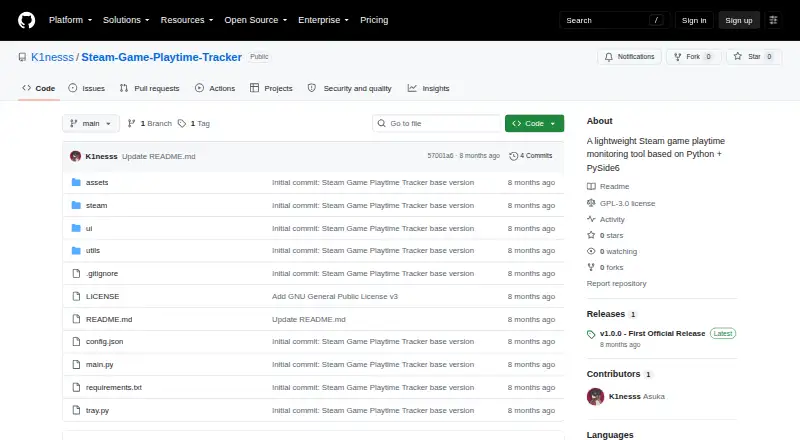
What Steam Game Playtime Tracker is
Steam Game Playtime Tracker is a Windows desktop app that automatically records time spent in Steam games. It reads game manifests from the Steam installation directory to find game names and executable files, so you do not have to add games manually. The app watches game processes in the background and saves a playtime record for each game. You can review totals for today, the current week, and all time. It can stay in the system tray, where a menu gives access to a ranking of today’s playtime.
The interface offers dark, light, blue-white, Morandi pink-gray, and silver-gray themes. Records are stored locally in data/playtime.json and remain after the program restarts. A v1.0.0 release is available as a Windows 10/11 64-bit ZIP package that runs without installation; the project also says it can be packaged as a standalone EXE without a Python environment. Running from source requires Python 3.8 or later, the listed dependencies, and a configured Steam installation path. The README advises running the EXE as Administrator because process reading and data writing need those privileges. The project is an open-source learning project for personal, non-commercial use, and commercial profit is prohibited.
Who it suits
This suits Windows users who want Steam playtime tracked automatically, with daily, weekly, and total views rather than manual game entry. It is also aimed at personal, non-commercial use, and its source-running route is for people with Python 3.8 or later and a configured Steam path.
What it does well
- Finds games from Steam manifests without manual entry.
- Tracks process activity in the background.
- Shows playtime for today, this week, and all time.
- Stores records locally across restarts.
- Offers five switchable interface themes.
What to know first
- Playtime can be inaccurate when process and manifest names differ.
- Portable Steam installations are not recognized.
- Paths containing Chinese characters may cause a crash.
- Running the EXE requires Administrator privileges.
Limits
The release notes say portable Steam installations are not recognized and paths containing Chinese characters may cause a crash. Tracking may be inaccurate when a game's process name differs from its Steam manifest entry.
Getting started
- Download the Windows 10/11 64-bit ZIP release from the project website.
- Run the EXE as Administrator.
- For a source setup, use Python 3.8 or later, install the listed dependencies, and configure the Steam installation path.
- Let the app scan Steam manifests and monitor game processes.
Verdict
Choose Steam Game Playtime Tracker if you want an automatic, local playtime log for Steam games on Windows. Look elsewhere if you need support for portable Steam installations, or if process-name mismatches could undermine your records.
Questions
How much does Steam Game Playtime Tracker cost?
It is free, with a free plan.
Which platform does it support?
It is a Windows desktop app. The v1.0.0 release is a Windows 10/11 64-bit ZIP package.
Does it require Python?
The project says it can be packaged as a standalone Windows EXE that runs without Python. Running from source requires Python 3.8 or later and the listed dependencies.
How does it store playtime?
Records are saved locally in data/playtime.json and persist after the program restarts.
Is it open source?
The project is described as an open-source learning project for personal, non-commercial use; commercial profit is prohibited.
Facts from Steam Game Playtime Tracker's own pages
- Accuracy caveat
- The README notes that playtime may be inaccurate when a game's process name differs from its Steam manifest. · github.com, 7 Oct 2026
- Accuracy limit
- Playtime may be inaccurate when a game’s process name does not match its Steam manifest entry. · github.com, 7 Oct 2026
- Automatic scanning
- It reads game manifests in the Steam installation directory and collects game names and executable files without manual entry. · github.com, 7 Oct 2026
- Data storage
- Playtime data is saved locally to data/playtime.json and persists after restarting the program. · github.com, 7 Oct 2026
- Game discovery
- It scans the Steam installation directory’s game manifests to collect game names and executable files without manual entry. · github.com, 7 Oct 2026
- Interface
- The interface includes switchable dark, light, blue-white, Morandi pink-gray, and silver-gray themes. · github.com, 7 Oct 2026
- Known limitations
- The release notes say paths containing Chinese characters may cause a crash and portable Steam installations are not recognized. · github.com, 7 Oct 2026
- License and audience
- The README describes the project as an open-source learning project for personal non-commercial use and prohibits commercial profit. · github.com, 7 Oct 2026
- Local storage
- Playtime records are saved locally to data/playtime.json and persist after the program restarts. · github.com, 7 Oct 2026
- Permissions
- The README says to run the EXE as Administrator because process reading and data writing require administrator privileges. · github.com, 7 Oct 2026
- Process monitoring
- It monitors game processes starting and stopping in the background to record playtime per game. · github.com, 7 Oct 2026
- Purpose
- It is a lightweight tool for monitoring and tracking Steam game playtime. · github.com, 7 Oct 2026
- Requirements
- Running from source requires Python 3.8 or later and a configured Steam installation path. · github.com, 7 Oct 2026
- Source requirements
- Running from source requires Python 3.8 or later and installation of the listed dependencies. · github.com, 7 Oct 2026
- Statistics
- Playtime can be viewed for today, this week, and in total. · github.com, 7 Oct 2026
- System tray
- The app can stay in the system tray, where its menu provides access to today’s playtime ranking. · github.com, 7 Oct 2026
- Tracking
- It monitors game processes in the background and records playtime for each game. · github.com, 7 Oct 2026
- Windows distribution
- The project says it can be packaged as a standalone Windows EXE that runs without a Python environment. · github.com, 7 Oct 2026
- Windows release
- The v1.0.0 release provides a Windows 10/11 64-bit ZIP package that runs without installation. · github.com, 7 Oct 2026
Where Steam Game Playtime Tracker stands on Freedom251
- Game Playtime Trackers#14 of 20