Freedom251 › Sports Website Builders
Stack Team App
What Stack Team App is
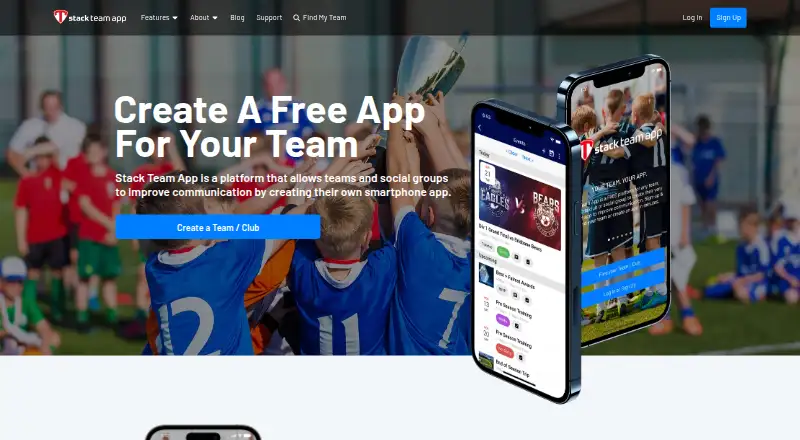
Stack Team App gives teams, clubs, and organisations a customised app for communicating, coordinating, and engaging members. Admins can publish news, updates, and alerts, and create events with RSVP tracking. Members can use instant messaging and group chats, and share photos, documents, and other media. Admins use access groups to determine which members receive particular information. The website dashboard supports membership management, access groups, content, feature settings, admin permissions, and app configuration. Some advanced administration tools, including CSV imports and downloads for members, schedules, or reports, are available only through that dashboard. Teams can use the Store to sell items and collect payments or registrations; transaction fees apply to payments processed through it. The app is available on Android, iOS, and the web. Its free plan has no setup fees or ongoing usage costs. The service is funded by in-app and website advertising, and teams or members can optionally pay to remove ads. Support includes a knowledge base, help videos, and a support ticket option.
Who it suits
Stack Team App suits clubs, teams, and organisations that need member communications, event coordination, and access controls. Admins who use CSV imports or download schedules and reports will need the website dashboard.
What it does well
- Free plan has no setup fees or ongoing usage costs.
- Events include RSVP tracking.
- Access groups control which members receive information.
- Support includes a knowledge base and help videos.
What to know first
- Transaction fees apply to Store payments.
- Some advanced admin tools are website-dashboard only.
- The service is funded by advertising.
Limits
The free plan is free to create and use, with no setup fees or ongoing usage costs. Store payments incur transaction fees, and the Remove Ads subscription is listed for 12 months with auto-renewal; its price is not included here.
Plans
| Plan | Billed and limits | Price |
|---|---|---|
| Free | Free to create and use · No setup fees · No ongoing usage costs | Free |
| Remove Ads | Removes ads from the app · 12-month auto-renewable subscription | On request |
As teamapp.com lists them, read 4 Oct 2026. The maker's own page has the final word.
Getting started
- Visit the Team App website.
- Choose the free plan to create and use the service.
- Use the Android or iOS app, or access Team App on the web.
- Manage membership, groups and app configuration through the website dashboard.
- Use the Store for sales or registrations, noting that transaction fees apply.
- Optionally pay for the 12-month auto-renewable subscription to remove ads.
Verdict
Stack Team App combines member messaging, event management, and a Store in a customised team app. Its free plan has no ongoing usage costs, but Store transaction fees and ads are important considerations.
Questions
Is Stack Team App free?
Yes. Its Free plan costs nothing and has no setup fees or ongoing usage costs.
Which platforms can I use it on?
Stack Team App is available on Android, iOS and the web.
Can it manage events and rosters?
Admins can create events and track RSVPs. Roster management, availability tracking and event scheduling are listed capabilities.
Can teams collect payments?
The Store lets teams sell items and collect payments and registrations. Transaction fees apply to payments processed through it.
How can a team remove ads?
Teams or members can optionally pay to remove ads. The listed Remove Ads plan is a 12-month auto-renewable subscription.
What support does Stack Team App provide?
Support options include a knowledge base, help videos and support tickets.
Facts from Stack Team App's own pages
- Access controls
- Admins can manage access groups to control which members receive particular information. · support.teamapp.com, 4 Oct 2026
- Communication
- Members can use instant messaging and group chats, and share photos, documents and media. · support.teamapp.com, 4 Oct 2026
- Events
- Admins can create and manage events with RSVP tracking. · support.teamapp.com, 4 Oct 2026
- Funding and ads
- The maker says the service is funded by in-app and website advertising, and teams or members can optionally pay to remove ads. · support.teamapp.com, 4 Oct 2026
- Headquarters
- Alphington, Victoria, Australia · teamapp.com, 28 Sept 2026
- Integrations
- An older Team App flyer lists Facebook and Twitter integration among its features. · file-assets.teamapp.com, 4 Oct 2026
- News and alerts
- Admins can send news, updates and alerts to members. · support.teamapp.com, 4 Oct 2026
- Platforms
- The maker’s FAQ says members can use Team App on Apple iPhone and iPad devices and most Google Android devices; it also describes a website version. · teamapp.com, 4 Oct 2026
- Purpose
- Team App lets teams, clubs and organisations communicate, coordinate and engage members through a customised app. · support.teamapp.com, 4 Oct 2026
- Security and privacy
- The maker says the platform has security and privacy settings that let teams control who joins and what information members may see. · teamapp.com, 4 Oct 2026
- Store and payments
- The Store feature lets teams sell items and collect payments and registrations, and transaction fees apply to payments processed through it. · support.teamapp.com, 4 Oct 2026
- Support
- Team App provides a knowledge base, help videos and a support ticket option. · support.teamapp.com, 4 Oct 2026
- Web dashboard
- The website dashboard supports membership management, access groups, content, feature settings, admin permissions and app configuration. · support.teamapp.com, 4 Oct 2026
- Web-only admin tools
- Some advanced tools, including CSV imports and downloads for members, schedules or reports, are only available through the website dashboard. · support.teamapp.com, 4 Oct 2026
Where Stack Team App stands on Freedom251
- Sports Website Builders#17 of 40
- Sports Team Management Software#20 of 37