Freedom251 › Code Signing Software
sslTrus Remote Code Signing Service
Visit sslTrus Remote Code Signing Service Alternatives Pricing
What sslTrus Remote Code Signing Service is
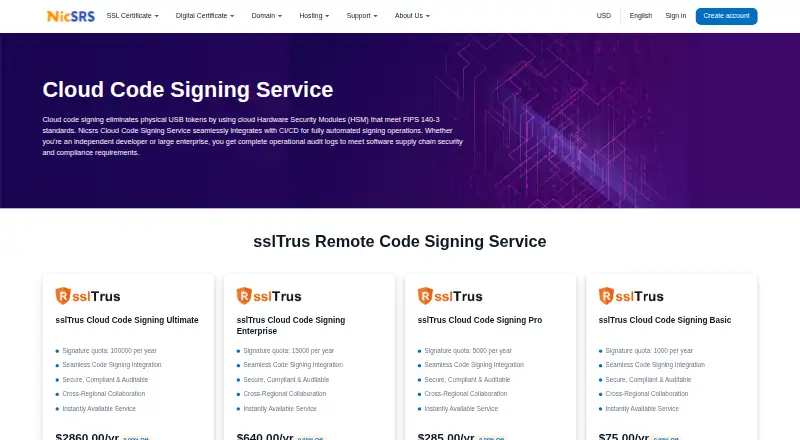
sslTrus Remote Code Signing Service provides remote cloud signing for software applications. It generates private keys inside FIPS 140-3-compliant cloud HSMs and keeps them there; keys are never exported. The FAQ describes a source-code-zero-upload design, and signing transmission is end-to-end encrypted. The service records each signature in tamper-proof logs and provides software supply chain audit records. Supported targets include Windows Authenticode formats such as EXE, DLL, OCX, MSI, CAB, and kernel drivers, along with Java JARs, macOS applications, Office macro or VBA files, Firefox XPI extensions, Adobe AIR applications, and Silverlight XAP files. Compatible CI/CD environments named by the provider include Microsoft Azure, GitHub Actions, Jenkins, CircleCI, and GitLab; listed build tools include Apache Ant, Gradle, and Maven. After certificate issuance, users install lightweight signing tools on a server or computer, while critical encryption occurs in the cloud HSM. Plans start at $75/yr for 1,000 signatures per year, with higher annual limits available. A successful signing call counts as one use regardless of file size; failed signatures are not charged.
Who it suits
It suits software teams that need remote signing across supported application formats, build tools, or CI/CD environments. Shared policies and audit standards support teams working across regions.
What it does well
- Private keys stay in compliant cloud HSMs
- Failed signatures are not charged
- Supports several CI/CD environments
- Shared policies for cross-region teams
What to know first
- Plans have annual signature limits
- Renewal before expiration is advised
- Signing tools must be installed after certificate issuance
Limits
The Basic plan costs $75 a year and includes 1,000 signatures. Pro, Enterprise, and Ultimate raise the annual allowance to 5,000, 15,000, and 100,000 signatures; each successful signing call counts once regardless of file size.
Plans
| Plan | Billed and limits | Price |
|---|---|---|
| sslTrus Cloud Code Signing Pro | $285.00/yr · 5000 signatures per year | $285 a year |
| sslTrus Cloud Code Signing Ultimate | $2860.00/yr · 100000 signatures per year | $2,860 a year |
| sslTrus Cloud Code Signing Enterprise | $640.00/yr · 15000 signatures per year | $640 a year |
| sslTrus Cloud Code Signing Basic | $75.00/yr · 1000 signatures per year | $75 a year |
As nicsrs.com lists them, read 7 Oct 2026. The maker's own page has the final word.
Getting started
- Open the sslTrus cloud code-signing website
- Choose an annual Cloud Code Signing plan
- Obtain certificate issuance
- Download the lightweight signing tools
- Install the tools on a server or computer
- Connect a listed CI/CD environment or build tool
Verdict
sslTrus offers cloud-based signing with HSM-held keys, audit records, and compatibility across a broad range of formats and tools. Teams should match their annual signature volume to a plan and plan for local signing-tool installation.
Questions
How much does sslTrus Cloud Code Signing cost?
Plans start at $75 a year for Basic. Pro is $285 a year, Enterprise $640 a year, and Ultimate $2,860 a year.
Is there a free plan?
No. The service is paid, with annual plans starting at 75.00 USD.
Where are private keys kept?
Keys are generated and stored in FIPS 140-3-compliant cloud HSMs and are never exported.
Which CI/CD systems are supported?
Listed environments are Microsoft Azure, GitHub Actions, Jenkins, CircleCI, and GitLab.
What files can it sign?
Supported targets include Windows Authenticode formats, Java JARs, macOS applications, Office macro or VBA files, Firefox XPI extensions, Adobe AIR applications, and Silverlight XAP files.
Are failed signing attempts charged?
No. Only successful signing calls count as uses, with one use counted regardless of file size.
Facts from sslTrus Remote Code Signing Service's own pages
- Audit logs
- The service provides tamper-proof records for every signature and complete software supply chain audit logs. · nicsrs.com, 7 Oct 2026
- Build tools
- Listed compatible tools include Apache Ant, Gradle, and Maven. · nicsrs.com, 7 Oct 2026
- CI/CD integrations
- Listed compatible environments include Microsoft Azure, GitHub Actions, Jenkins, CircleCI, and GitLab. · nicsrs.com, 7 Oct 2026
- Deployment
- After certificate issuance, users download lightweight signing tools for installation on a server or computer; critical encryption occurs in the cloud HSM. · nicsrs.com, 7 Oct 2026
- Private keys
- Private keys are generated and stored in FIPS 140-3-compliant cloud HSMs and are never exported. · nicsrs.com, 7 Oct 2026
- Purpose
- The service provides remote cloud code signing for software applications. · nicsrs.com, 7 Oct 2026
- Renewal and top-ups
- Customers are advised to renew before expiration, and can purchase top-up packs when signature counts run out. · nicsrs.com, 7 Oct 2026
- Signing formats
- The page lists signing support for Windows formats such as EXE, DLL, OCX, MSI, CAB, and kernel drivers, as well as Java JARs, macOS applications, Office macro or VBA files, Firefox XPI files, Adobe AIR applications, and Silverlight XAP files. · nicsrs.com, 7 Oct 2026
- Source code
- The FAQ describes a source-code-zero-upload architecture to protect intellectual property. · nicsrs.com, 7 Oct 2026
- Support
- NicSRS lists pre-sale consultation, online support, and a ticket system among its support channels. · nicsrs.com, 7 Oct 2026
- Teams
- The service supports cross-region use of code-signing certificates with shared policies and audit standards for distributed teams. · nicsrs.com, 7 Oct 2026
- Transmission
- The FAQ states that signing transmission is end-to-end encrypted. · nicsrs.com, 7 Oct 2026
- Usage counting
- Each successful signing call counts as one use regardless of file size, and failed signatures are not charged. · nicsrs.com, 7 Oct 2026
Where sslTrus Remote Code Signing Service stands on Freedom251
- Code Signing Software#25 of 28