Freedom251 › Software Packaging Tools
Squirrel.Windows
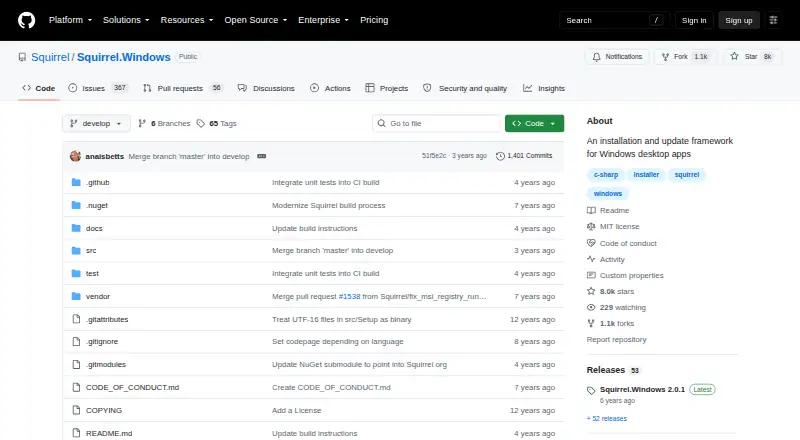
What Squirrel.Windows is
Squirrel.Windows is a free, MIT-licensed framework for installing and updating Windows desktop applications. It works with C# and other languages, including native C++ programs, and uses NuGet packages to build installation and update packages. Output formats include Setup.exe, Setup.msi, full and delta .nupkg files, and RELEASES files. Delta packages can reduce update sizes, while separate channels can support Dev, Beta, and Release versions. Documentation covers distribution through Microsoft IIS, Amazon S3, and GitHub. The project describes wizard-free installation to a local user account without UAC dialogs or reboots, plus updates that can apply while an app is running. Developers can control custom installation and update actions, add code signing, and integrate UpdateManager into a C# Windows Forms application. Command-line packaging, silent installation, automatic updates, and CI/CD integration are supported.
Who it suits
It suits developers distributing Windows desktop software who need packaging, installation, and update workflows. Its scope is limited to Windows applications.
What it does well
- MIT open-source license
- Supports C#, native C++, and other languages
- Delta packages can reduce update size
- Silent installation and automatic updates
- Command-line and CI/CD integration
What to know first
- Windows-only platform
- No graphical cross-platform distribution support listed
- Updates and installs require developer configuration
- NuGet-based packaging may not fit non-Windows apps
Limits
The project targets Windows desktop apps. The listed plan is free and open source under the MIT license.
Plans
| Plan | Billed and limits | Price |
|---|---|---|
| Open source | Windows desktop apps · MIT license | Free |
As github.com lists them, read 9 Oct 2026. The maker's own page has the final word.
Getting started
- Open the project at https://github.com/Squirrel/Squirrel.Windows.
- Review the getting-started guide for integrating Squirrel.Windows and UpdateManager into a C# Windows Forms app.
- Package the application with NuGet.
- Choose the documented package outputs and distribution route that fit your workflow.
- Configure update channels or custom installation and update actions as needed.
- Review the code-signing documentation for Setup.exe and the application.
Verdict
Squirrel.Windows covers packaging and updating for Windows desktop applications with several output formats and distribution options. It is most relevant when Windows-only delivery and developer-controlled update behavior are priorities.
Questions
How much does Squirrel.Windows cost?
The Open source plan is free.
Which operating system does it support?
Its target platform is Windows.
What types of applications can it manage?
It can manage desktop applications written in C# or other languages, including native C++ applications.
What package outputs does it provide?
The listed outputs are Setup.exe, Setup.msi, full .nupkg, delta .nupkg, and RELEASES.
What is its license?
The repository identifies the project license as MIT.
Where can applications be distributed?
The documentation covers distribution with Microsoft IIS, Amazon S3, and GitHub.
Facts from Squirrel.Windows's own pages
- Code signing
- The documentation includes a topic on adding code signing to Setup.exe and the application. · github.com, 9 Oct 2026
- Custom actions
- The project goals describe developer control over custom actions and events during installation and updating. · github.com, 9 Oct 2026
- Delta updates
- The project describes support for delta packages to reduce update package size. · github.com, 9 Oct 2026
- Developer integration
- The getting started guide demonstrates integrating Squirrel.Windows and its UpdateManager into a basic C# Windows Forms application. · github.com, 9 Oct 2026
- Distribution integrations
- The documentation covers distributing applications with Microsoft IIS, Amazon S3, and GitHub. · github.com, 9 Oct 2026
- Install behavior
- The project goals describe wizard-free installs to the local user account without UAC dialogs or reboots. · github.com, 9 Oct 2026
- License
- The repository identifies the project license as MIT. · github.com, 9 Oct 2026
- Packaging
- Squirrel uses NuGet packages to create installation and update packages. · github.com, 9 Oct 2026
- Purpose
- Squirrel.Windows is an installation and update framework for Windows desktop apps. · github.com, 9 Oct 2026
- Supported apps
- It can manage desktop applications written in C# or other languages, including native C++ applications. · github.com, 9 Oct 2026
- Update behavior
- The project goals say updates should be applicable while the app is running without forcing users to stop their work or reboot. · github.com, 9 Oct 2026
- Update channels
- The project describes support for multiple update channels, such as Dev, Beta, and Release. · github.com, 9 Oct 2026
Where Squirrel.Windows stands on Freedom251
- Software Packaging Tools#22 of 29