Freedom251 › Video Annotation Software
Sports Motion Pro
What Sports Motion Pro is
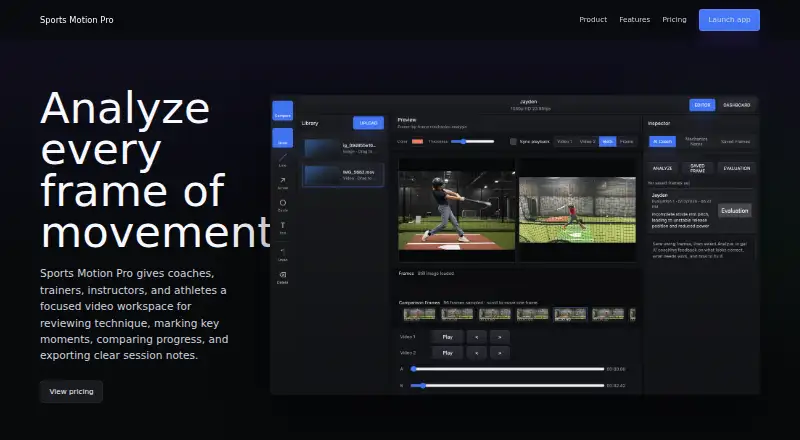
Sports Motion Pro is a web workspace for reviewing sports technique and tracking progress with training videos and still images. Coaches and athletes can upload session media, pause a clip, move through it frame by frame, and capture moments for review. Mark a frame with lines, arrows, circles, freehand drawings, or text, then organize saved frames by athlete, date, notes, and timestamp.
Compare mode displays two clips side by side, with independent or synchronized playback. After a review, session reports can export concise notes and saved image sets. The app also offers AI feedback on saved swing frames, covering what looks correct, what needs work, and how to address it. An account provides a private workspace for videos, saved frames, and AI coach notes, with projects, settings, and billing for a private coach account; the app says saved frames and athlete analysis remain private in Supabase.
The Free plan includes single-video analysis, five uploads, and basic saved frames. Pro Coach costs $6 a month and adds Compare mode, unlimited uploads, reports, image sets, and exports. The billing area calls the free workspace a 10 Day Free Trial.
Who it suits
Sports Motion Pro suits coaches, trainers, instructors, academies, clubs, and performance staff who review technique with video or still images. Athletes can also use it to save moments, compare clips, and get AI feedback on swing frames.
What it does well
- Reviews uploaded training videos and still images.
- Frame-by-frame controls help capture key moments.
- Frames support drawing and text annotations.
- Compare mode offers side-by-side clip playback.
- Reports can export notes and saved image sets.
- AI feedback addresses saved swing frames.
What to know first
- Free plan is limited to five uploads.
- Free plan supports single-video analysis only.
- Compare mode and exports require Pro Coach.
Limits
The Free plan includes single-video analysis, five uploads, and basic saved frames. Pro Coach is listed at $6 a month and adds Compare mode, unlimited uploads, reports, image sets, and exports. The billing area labels the free workspace a 10 Day Free Trial.
Plans
| Plan | Billed and limits | Price |
|---|---|---|
| Free | Single-video analysis · five uploads · basic saved frames | Free |
| Pro Coach | $6/mo · Compare mode · unlimited uploads · reports · image sets · exports | $6 a month |
| Pro Coach | $70/yr · Compare mode · unlimited uploads · reports · image sets · exports | $70 a year |
As sportsmotionpro.com lists them, read 9 Oct 2026. The maker's own page has the final word.
Getting started
- Open the Sports Motion Pro website in a web browser.
- Choose the Free plan or Pro Coach plan.
- Create an account for a private coach workspace.
- Upload a training video or still image to begin a review.
Verdict
Choose Sports Motion Pro if you need a web workspace for marking and organizing sports footage, comparing clips, or preparing session exports. Look elsewhere if you need multi-clip comparison or exports without moving beyond the Free plan.
Questions
What does Sports Motion Pro cost?
The Free plan costs nothing. Pro Coach costs $6 a month, billed $6/mo.
Is there a free plan or trial?
Yes. The Free plan includes single-video analysis, five uploads, and basic saved frames. The billing area labels the free workspace a 10 Day Free Trial.
Which platforms does it support?
Sports Motion Pro is available on the web.
What can I annotate?
Frames can be marked with lines, arrows, circles, freehand drawings, and text notes.
Can it compare clips or export reports?
Compare mode reviews two clips side by side with independent or synced playback. Session reports can export concise notes and saved image sets; these features are listed for Pro Coach.
Who makes Sports Motion Pro?
The listed audience includes coaches, trainers, instructors, academies, clubs, performance staff, and athletes.
Facts from Sports Motion Pro's own pages
- Account privacy
- The app says creating an account keeps saved frames and athlete analysis private in Supabase. · sportsmotionpro.com, 9 Oct 2026
- Account workspace
- The app describes videos, saved frames, and AI coach notes as part of a private workspace, with projects, settings, and billing for a private coach account. · sportsmotionpro.com, 9 Oct 2026
- AI coaching
- The app says users can analyze saved swing frames to get AI coaching feedback on what looks correct, what needs work, and how to fix it. · sportsmotionpro.com, 9 Oct 2026
- Annotations
- Frames can be marked with lines, arrows, circles, freehand drawings, and text notes. · sportsmotionpro.com, 9 Oct 2026
- Audience
- The homepage lists coaches, trainers, instructors, academies, clubs, performance staff, and athletes as intended users. · sportsmotionpro.com, 9 Oct 2026
- Comparison
- Compare mode reviews two clips side by side with independent or synced playback. · sportsmotionpro.com, 9 Oct 2026
- Frame review
- Users can pause, step through a clip frame by frame, and capture key moments. · sportsmotionpro.com, 9 Oct 2026
- Media
- Users can upload training videos or still images from a session. · sportsmotionpro.com, 9 Oct 2026
- Purpose
- Provides coaches, trainers, instructors, and athletes a video workspace for reviewing technique, marking key moments, comparing progress, and exporting session notes. · sportsmotionpro.com, 9 Oct 2026
- Reports and exports
- Session reports can export concise notes and saved image sets after a review. · sportsmotionpro.com, 9 Oct 2026
- Saved frames
- Captured moments can be organized by athlete, date, notes, and timestamp. · sportsmotionpro.com, 9 Oct 2026
- Trial
- The billing area labels the free workspace as a 10 Day Free Trial. · sportsmotionpro.com, 9 Oct 2026
Where Sports Motion Pro stands on Freedom251
- Video Annotation Software#16 of 34