Freedom251 › Dyslexia Learning Apps
SPIRE Up
What SPIRE Up is
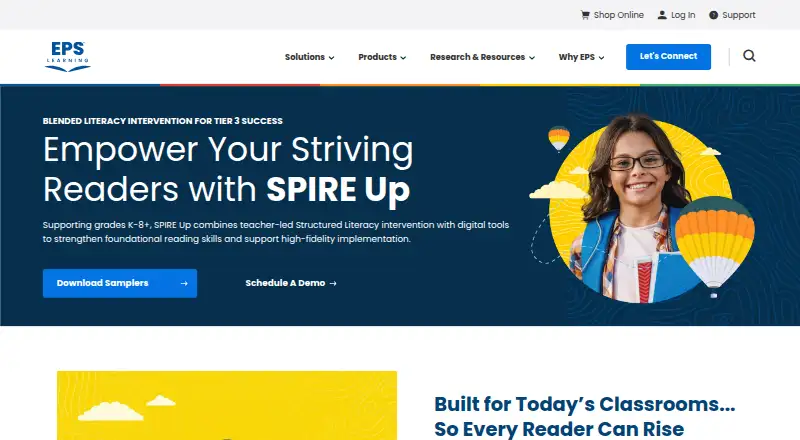
SPIRE Up is a blended print and digital literacy intervention for striving readers in grades K–8+. Its Structured Literacy and Orton-Gillingham approach focuses on foundational reading skills, including decoding, through 64 target concepts and 192 lessons. Lessons move from teacher-led instruction to guided practice and then online independent practice. The program is designed for Tier 3 and special education use with one student or a small group. Materials include print and digital Teacher’s Guides and Student Books, letter and word cards, magnetic letter tiles, trays, boards, and EPS Connect access. In EPS Connect, students can practise online while teachers use real-time data dashboards to adjust pacing, group students, and provide scaffolds or reteaching. EPS Learning describes a flexible schedule of three to five sessions each week, lasting 30–45 minutes. Year 1 implementation support includes readiness planning, initial training, materials delivery, coaching, refinement, data review, and instructional rounds. EPS Learning says the program meets ESSA Level 3 standards for promising evidence of effectiveness. SPIRE Up is available on web and iOS. It supports the latest two versions of major browsers; students can use iPads with Safari, while teachers and administrators need a non-iPad device. Pricing is available by contacting an EPS representative.
Who it suits
SPIRE Up suits educators serving striving readers in grades K–8+ who need foundational reading instruction, particularly in Tier 3 or special education settings. Its materials and pacing are designed for individual students or small groups, with digital data to guide instructional adjustments.
What it does well
- Combines print materials with online independent practice.
- Covers 64 target concepts across 192 lessons.
- Includes phonics, spelling, and decoding practice.
- Dashboards provide real-time data for instructional decisions.
- Year 1 support includes training, coaching, and data review.
What to know first
- Pricing is available only by contacting an EPS representative.
- Teachers and administrators must use a non-iPad device.
- Schools must allow specified firewall domains for the program to work.
Limits
Pricing is available by request. The listed schedule is three to five sessions per week, with sessions lasting 30–45 minutes.
Plans
| Plan | Billed and limits | Price |
|---|---|---|
| SPIRE Up | Pricing and quotes available by contacting an EPS representative; product page does not list a price | On request |
As epslearning.com lists them, read 8 Oct 2026. The maker's own page has the final word.
Getting started
- Visit the SPIRE Up product page.
- Contact an EPS representative for pricing and a quote.
- Arrange readiness planning and initial training as part of Year 1 support.
- Use a supported web browser or iOS device; teachers and administrators need a non-iPad device.
- Have the school allow the firewall domains listed in the technical requirements.
Verdict
Choose SPIRE Up if you need structured literacy intervention for an individual striving reader or a small group, with print materials, digital practice, and teacher data dashboards. Schools should account for the non-iPad requirement for teachers and administrators and request a quote from EPS Learning.
Questions
How much does SPIRE Up cost?
The product page does not list a price. Pricing and quotes are available by contacting an EPS representative.
What platforms does SPIRE Up support?
SPIRE Up is available on web and iOS. The latest two versions of major browsers are supported, and students can use iPads with Safari.
Can teachers use an iPad?
Teachers and administrators must use a non-iPad device.
What reading skills does it cover?
Its Structured Literacy and Orton-Gillingham approach addresses foundational reading skills, including decoding. Phonics, spelling, and decoding practice are included.
What materials are included?
Materials include print and digital Teacher’s Guides and Student Books, letter and word cards, magnetic letter tiles, trays, boards, and EPS Connect access.
What implementation support is provided?
Year 1 support includes readiness planning, initial training, materials delivery, coaching, refinement, data review, and instructional rounds.
Facts from SPIRE Up's own pages
- Assessment and reporting
- EPS Connect provides digital practice and data dashboards with real-time data teachers can use to adjust pacing, group students, and provide scaffolds or reteaching. · epslearning.com, 8 Oct 2026
- Audience
- SPIRE Up is designed for Tier 3 and special education use with one student or a small group. · epslearning.com, 8 Oct 2026
- Content
- The program covers 64 target concepts and includes 192 lessons. · epslearning.com, 8 Oct 2026
- Device support
- The technical requirements page says the latest two versions of major browsers are supported, iPads are supported for student use with Safari, and teachers and administrators must use a non-iPad device. · support.epslearning.com, 8 Oct 2026
- Evidence
- EPS Learning says SPIRE Up meets ESSA Level 3 standards for promising evidence of effectiveness. · epslearning.com, 8 Oct 2026
- Headquarters
- Bethesda, Maryland, United States · epslearning.com, 28 Sept 2026
- Implementation support
- Year 1 support includes readiness planning, initial training, materials delivery, coaching, refinement, data review, and instructional rounds. · epslearning.com, 8 Oct 2026
- Instruction
- Its lessons use a gradual release model with teacher-led instruction, guided practice, and online independent practice. · epslearning.com, 8 Oct 2026
- Integrations
- EPS Learning support documentation describes rostering SPIRE Up through Clever and ClassLink. · support.epslearning.com, 8 Oct 2026
- Limits and scheduling
- The maker describes flexible pacing of 3–5 sessions per week, with sessions of 30–45 minutes, and does not publish a price on the product page. · epslearning.com, 8 Oct 2026
- Materials
- Included materials are a print and digital Teacher’s Guide, Student Books, letter and word cards, magnetic letter tiles, trays and boards, and EPS Connect access. · epslearning.com, 8 Oct 2026
- Purpose
- SPIRE Up is a blended print and digital literacy intervention for striving readers in grades K–8+. · epslearning.com, 8 Oct 2026
- Reading approach
- The program is grounded in Structured Literacy and Orton-Gillingham and focuses on foundational reading skills, including decoding. · epslearning.com, 8 Oct 2026
- Security and privacy
- The technical requirements page lists firewall domains that schools must allow for SPIRE Up to work; it does not state a security certification or compliance standard. · support.epslearning.com, 8 Oct 2026
Where SPIRE Up stands on Freedom251
- Dyslexia Learning Apps#23 of 23