
Spello
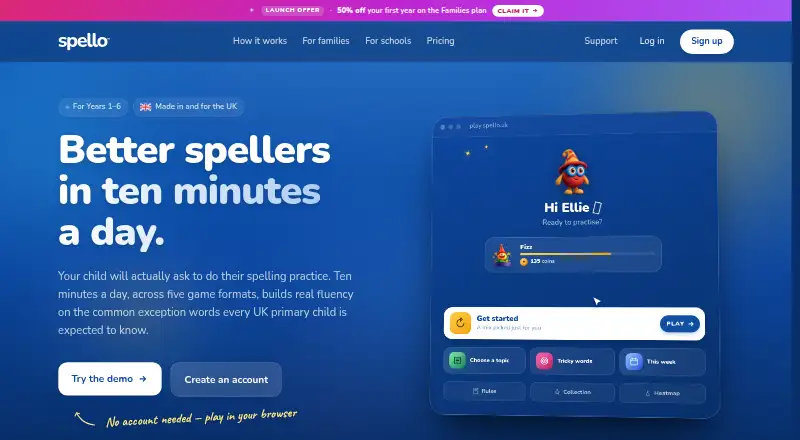
What Spello is
Spello is a browser-based spelling and typing practice product for UK primary pupils in Years 1–6. Its default practice follows the DfE statutory common exception words for those year groups. Spello assesses each child’s level and adjusts the words and difficulty as they practise. A modified SM-2 spaced-repetition engine brings tricky words back for review and removes them after mastery. Children can practise with five formats: listen then type, multiple choice, flash cards, arranging letters, and guessing letters. Words and sentences are read aloud, and typing words in context builds keyboard confidence alongside spelling. Parents and teachers can optionally assign topic lists, spelling-pattern lists, or weekly class words. The Families plan covers up to four children, with unlimited practice and a daily cap per child of 10–60 minutes. It costs £10 for the first year only, then £20/year. Schools costs £200 per year and adds a central class and teacher dashboard, teacher-set lists, whole-school analytics, and bulk CSV import. Schools can import pupil records and create personalised parent letters and QR-code login slips. Spello supports modern browsers on tablets and laptops, including iPads, Chromebooks, Windows and Mac laptops, and Android tablets through Chrome. The product is based in London, England, United Kingdom.
Who it suits
Spello suits families with primary pupils in Years 1–6 who want adaptive spelling and typing practice aligned with the DfE statutory common exception words. Its Schools plan is designed for schools that need teacher and class management, school-wide analytics, and pupil import tools.
What it does well
- Practice adapts to a child’s level and difficulty
- Five spelling and typing practice formats
- Words and sentences are read aloud
- Optional topic, spelling-pattern, and weekly class lists
- Schools plan includes analytics and bulk CSV import
What to know first
- No free plan; the Families plan starts at £10 for the first year
- Families covers up to four children per account
- Families practice has a daily cap of 10–60 minutes per child
Limits
Families covers up to four children and has a daily practice cap per child of 10–60 minutes. Its listed price is £10 for the first year only, then £20/year. Schools costs £200 per year.
Plans
| Plan | Billed and limits | Price |
|---|---|---|
| Families | £10 for first year; then £20/year · Up to 4 children · unlimited practice · daily cap 10–60 minutes per child · all 16 Collectables | £10 a year |
| Schools | £200/year, billed annually · Unlimited children and teachers · class/teacher dashboard · teacher-set lists · bulk CSV upload | £200 a year |
As spello.uk lists them, read 15 Oct 2026. The maker's own page has the final word.
Getting started
- Visit spello.uk in a modern browser on a supported tablet or laptop.
- Start the seven-day trial.
- Choose Families for up to four children, or Schools for school tools.
- For Schools, import pupil records from CSV if needed.
- Assign the default word practice or optional word lists.
Verdict
Choose Spello for adaptive spelling practice and typing activities for UK primary pupils in Years 1–6. Families can start with a seven-day trial, while schools needing central class tools and whole-school analytics can choose the Schools plan. Families needing more than four children per account are asked to contact Spello.
Questions
Does Spello have a free plan?
No. Spello has a seven-day trial. The Families plan is £10 for the first year only, then £20/year.
How much does Spello cost for schools?
The Schools plan costs £200 per year, billed annually.
Which devices can run Spello?
Spello supports modern browsers on tablets and laptops, including iPads, Chromebooks, Windows and Mac laptops, and Android tablets through Chrome.
How many children does the Families plan cover?
It covers up to four children per account. Families needing more are asked to contact Spello.
What school tools are included?
Schools adds a central class and teacher dashboard, teacher-set lists, whole-school analytics, and bulk CSV import. Schools can also import pupil records and generate personalised parent letters and QR-code login slips.
Who makes Spello and where is it based?
The listed headquarters are in London, England, United Kingdom. The maker is not identified in the facts.
Facts from Spello's own pages
- Adaptive difficulty
- The system moves difficulty up or down according to observed performance. · spello.uk, 15 Oct 2026
- Adaptive placement
- An initial assessment estimates a child’s working-at year and starts practice at a suitable level. · spello.uk, 15 Oct 2026
- Adaptive practice
- Spello assesses a child's level and adjusts the words and difficulty as they practise. · spello.uk, 3 Oct 2026
- AI option
- AI-assisted guidance is optional, uses anonymised performance data and can be disabled; the product remains functional without it. · spello.uk, 15 Oct 2026
- API and extensibility
- The public product and support pages expose no API, SDK, integration or self-hosting documentation. · spello.uk, 15 Oct 2026
- App design claims
- The App Store description says the app has no advertising, third-party tracking, social features, chat or open internet access. · apps.apple.com, 15 Oct 2026
- App privacy disclosure
- Apple’s listing says gameplay content and a user ID may be linked to the user, while crash diagnostics may be collected without linkage. · apps.apple.com, 15 Oct 2026
- App Store listing
- Spello Play is listed as a free Education app from Viaduct Industries Limited for iPhone and iPad, with a 6.7 MB download. · apps.apple.com, 15 Oct 2026
- Audio and typing
- Words and sentences are read aloud, and children type words in context to build keyboard confidence alongside spelling. · spello.uk, 3 Oct 2026
- Audio support
- Words and example sentences are read aloud so children hear pronunciation in context. · spello.uk, 15 Oct 2026
- Availability limitation
- Spello does not guarantee uninterrupted availability and reserves the ability to suspend service for maintenance or operational reasons. · spello.uk, 15 Oct 2026
- Browser support
- Supported browsers are Safari 16.4 or newer and the latest two versions of Chrome, Edge or Firefox; Internet Explorer is unsupported. · spello.uk, 15 Oct 2026
- Child-data minimisation
- Child accounts use a name, birth month and year, username and performance data; the service says it does not collect child email addresses, full birth dates or photos. · spello.uk, 15 Oct 2026
- Curriculum
- Its default practice covers the DfE statutory common exception words for Years 1–6. · spello.uk, 3 Oct 2026
- Curriculum words
- Its default content is the UK Department for Education statutory common-exception word list for Years 1–6. · spello.uk, 15 Oct 2026
- Daily limits
- Families can set each child’s daily allowance to 10, 20, 30 or 60 minutes, or remove the limit. · spello.uk, 15 Oct 2026
- Device support
- The service supports iPads, Chromebooks, Windows and Mac laptops, Android tablets through Chrome and phones. · spello.uk, 15 Oct 2026
- Family limit
- The Families plan covers up to four children per account; families needing more are asked to contact Spello. · spello.uk, 3 Oct 2026
- Founded
- Viaduct describes itself as a UK product studio operating since 2024. · viaduct.io, 15 Oct 2026
- Funding/ownership
- Viaduct says it has no investors and no planned exit timeline. · viaduct.io, 15 Oct 2026
- Game formats
- Practice uses five formats: listen then type, multiple choice, flash cards, letter arranging, and letter guessing. · spello.uk, 3 Oct 2026
- Headquarters
- The registered office is 3rd Floor, 86–90 Paul Street, London, EC2A 4NE. · spello.uk, 15 Oct 2026
- Licence
- The terms assign ownership or licensed rights in the software, audio, images and other content to Viaduct and prohibit copying, reverse engineering and scraping. · spello.uk, 15 Oct 2026
- Limit: accessibility disclosure
- Apple reports that the developer has not yet declared supported accessibility features. · apps.apple.com, 15 Oct 2026
Where Spello stands on Freedom251
- Spelling Apps#16 of 25