Freedom251 › Virtual Camera Software
SparkoCam
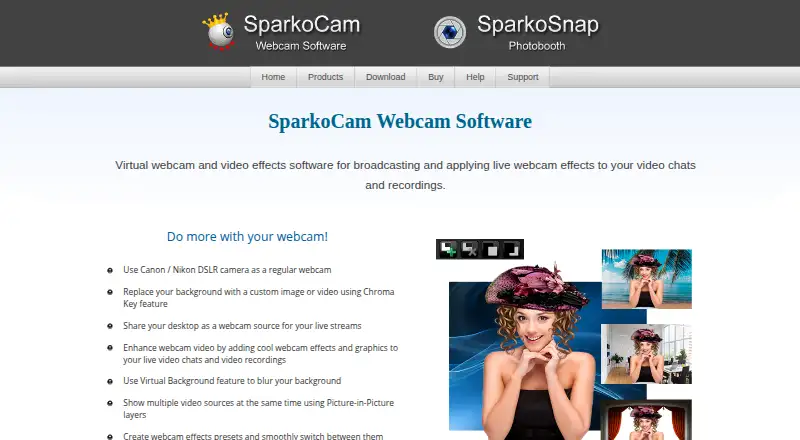
What SparkoCam is
SparkoCam is Windows software that turns webcams, Canon or Nikon DSLR cameras, a desktop, and imported videos or photos into sources for video chats, broadcasts, and recordings. The maker says it connects with Google Meet, Microsoft Teams, Zoom, and other video chat applications, and supports desktop gameplay streaming to services such as YouTube and Twitch. Background tools include green-screen replacement plus blur or replacement without a green screen. SparkoCam records webcam, desktop, Canon, and Nikon video, including picture-in-picture from several webcams with microphone audio recorded at the same time. Effects include custom presets, color correction, overlays, face-tracked accessories, animated objects, and anaglyph 3D. Supported Canon and Nikon cameras connect by USB without a capture card, and settings such as aperture, shutter speed, ISO, and white balance can be controlled. Windows 8, 10, and 11 are supported; Mac is not. A free trial is available, with paid licenses from $39.95, paid once.
Who it suits
SparkoCam suits Windows users who need virtual-camera sources, live effects, recording, or desktop streaming. It also fits users with supported Canon or Nikon cameras who want USB connection and camera controls.
What it does well
- Supports webcams, DSLRs, desktops, and imported media
- Works with Google Meet, Teams, Zoom, and other chat apps
- Background replacement can work without a green screen
- Records picture-in-picture from several webcams
- Controls supported Canon and Nikon camera settings
What to know first
- Windows only; Mac is not supported
- No free plan
- Some Nikon D3000-series cameras are unsupported
- License allows one activation on listed standard plans
Plans
| Plan | Billed and limits | Price |
|---|---|---|
| SparkoCam for Canon — Multi-User License | Lifetime license for current version; free upgrades for one year · Up to 5 activations · Canon support, excludes Nikon support | $129.95, paid once |
| SparkoCam for Nikon — Multi-User License | Lifetime license for current version; free upgrades for one year · Up to 5 activations · Nikon support, excludes Canon support | $129.95, paid once |
| SparkoCam Pro — Ultimate License | Lifetime license; all future upgrades included · 1 activation · Canon/Nikon support | $139.95, paid once |
| SparkoCam Pro — Multi-User License | Lifetime license for current version; free upgrades for one year · Up to 5 activations · Canon/Nikon support | $179.95, paid once |
| SparkoCam — Standard License | Lifetime license for current version; free upgrades for one year · 1 activation · Canon/Nikon camera video is watermarked | $39.95, paid once |
| SparkoCam for Nikon — Standard License | Lifetime license for current version; free upgrades for one year · 1 activation · Nikon support, excludes Canon support | $49.95, paid once |
| SparkoCam for Canon — Standard License | Lifetime license for current version; free upgrades for one year · 1 activation · Canon support, excludes Nikon support | $49.95, paid once |
| SparkoCam Pro — Standard License | Lifetime license for current version; free upgrades for one year · 1 activation · Canon/Nikon support | $69.95, paid once |
The first 8 of 10 plans, as sparkosoft.com lists them, read 9 Oct 2026. The maker's own page has the final word. Every plan
Verdict
SparkoCam combines varied video sources, conferencing connections, background tools, effects, and recording in a Windows application. Check camera compatibility and the license terms before choosing a plan.
Facts from SparkoCam's own pages
- Background tools
- It offers green screen background replacement and virtual background blur or replacement, including replacement without a green screen. · sparkosoft.com, 9 Oct 2026
- Camera connection
- The maker says supported Canon and Nikon DSLR cameras connect over USB without a capture card. · sparkosoft.com, 9 Oct 2026
- Camera control
- For supported Canon and Nikon cameras, SparkoCam provides control over settings including aperture, shutter speed, ISO, and white balance. · sparkosoft.com, 9 Oct 2026
- Camera limitation
- The maker lists Nikon D3000, D3100, D3200, D3300, D3400, and D3500 as unsupported. · sparkosoft.com, 9 Oct 2026
- Conferencing integrations
- The maker says SparkoCam connects to Google Meet, Microsoft Teams, Zoom, and other video chat applications. · sparkosoft.com, 9 Oct 2026
- Product
- SparkoCam is virtual webcam and video effects software for broadcasting and applying live effects to video chats and recordings. · sparkosoft.com, 9 Oct 2026
- Recording
- It can record webcam, desktop, Canon, and Nikon video, with picture-in-picture recording from several webcams and simultaneous microphone recording. · sparkosoft.com, 9 Oct 2026
- Streaming platforms
- The maker describes desktop streaming for gameplay to platforms such as YouTube or Twitch. · sparkosoft.com, 9 Oct 2026
- Support
- The maker offers support by email at [email protected] and through a contact form. · sparkosoft.com, 9 Oct 2026
- Supported system
- The license page states that SparkoCam supports Windows only and that Mac is not supported. · sparkosoft.com, 9 Oct 2026
- Trial and refund terms
- The purchase page recommends using a trial version and allows a refund request within 30 days only if the license key has not been used to activate the software. · sparkosoft.com, 9 Oct 2026
- Video effects
- Features include custom presets, color correction, overlays, face accessories with face tracking, animated objects, and anaglyph 3D effects. · sparkosoft.com, 9 Oct 2026
- Video sources
- It can stream from USB webcams, Canon or Nikon DSLR cameras, a desktop, and imported videos or photos. · sparkosoft.com, 9 Oct 2026
Where SparkoCam stands on Freedom251
- Virtual Camera Software#30 of 34
- Webcam Software#37 of 41