Freedom251 › Soundboard Software
Soundplant
What Soundplant is
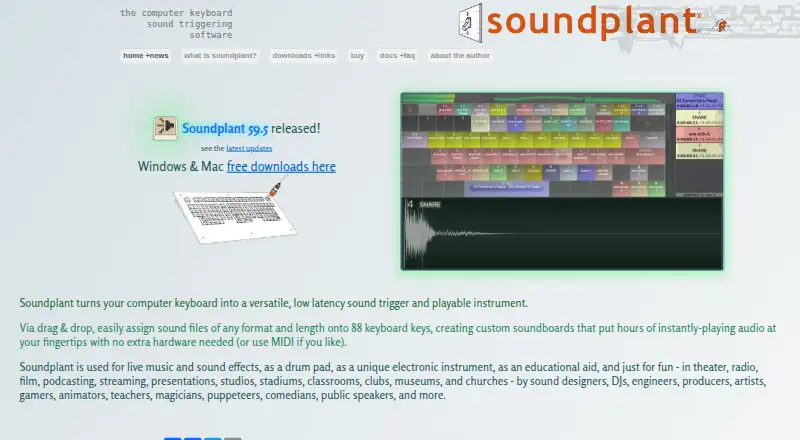
Soundplant turns a computer keyboard into a multitrack sample trigger and playable musical instrument. Users can drag sound files onto its 88 keys or trigger them with MIDI. It supports playlists, recording, unlimited sound polyphony, and per-key real-time effects such as volume, panning, EQ, pitch, reverb, and distortion. The desktop app runs on Windows and macOS, with MIDI input and output-device selection, including ASIO on Windows. The free version is for noncommercial use and includes 25 launches of paid features; afterward, a reminder screen appears every five launches. Free use is limited to 16-bit uncompressed WAV files. Paid features add other audio formats, recording, background key input, MIDI, multiple instances, output-device selection, and sample rates above 48 kHz. The Single User License costs $69, paid once, covers one person using Windows and Mac, and permits installation on multiple computers for that user. It lasts for the version purchased and includes two years of free upgrades. The standalone app works offline, requires no account, and collects no user data.
Who it suits
Soundplant suits performers and educators using sound effects or samples in settings such as live music, theater, radio, film, podcasting, streaming, presentations, studios, or classrooms. It is also designed for users who want keyboard-based triggering on a desktop computer.
What it does well
- Assign sounds to 88 keyboard keys.
- Supports playlists and unlimited sound polyphony.
- Per-key effects include EQ, reverb, and distortion.
- Standalone app works offline without an account.
- One license covers the same user on multiple computers.
What to know first
- Free use is for noncommercial purposes.
- Free version is limited to 16-bit uncompressed WAV.
- Free version shows a reminder every five launches after trial features.
- No browser app is listed.
Limits
The free version is noncommercial, limited to 16-bit uncompressed WAV audio, and provides 25 launches of paid features. After those launches, a reminder screen appears every five launches; paid features add formats, recording, background key input, MIDI, multiple instances, output-device selection, and sample rates above 48 kHz.
Plans
| Plan | Billed and limits | Price |
|---|---|---|
| Single User License | One-time purchase; license lasts forever for the version purchased and includes 2 years of free upgrades. · 1 person · Windows and Mac · Install on multiple computers for that same user | $69, paid once |
As soundplant.org lists them, read 3 Oct 2026. The maker's own page has the final word.
Getting started
- Open the Soundplant website
- Download the Windows or macOS desktop app
- Run the free version for noncommercial use or purchase a Single User License
- Drag sound files onto keyboard keys
- Connect MIDI input or choose an output device if needed
- Configure playlists, recording, and per-key effects
Verdict
Soundplant offers keyboard-based sample triggering with per-key effects and MIDI support on Windows and macOS. The free version has format and use limits; paid licensing is a one-time purchase for one user.
Questions
What does Soundplant cost?
A Single User License costs $69, paid once. It lasts for the purchased version and includes two years of free upgrades.
Is there a free version?
Yes. The free version is for noncommercial use and includes 25 launches of paid features, followed by a reminder every five launches.
Which systems does Soundplant support?
It supports Windows 10 or later in 64-bit form and macOS 10.14 or later.
Can one license be installed on multiple computers?
Yes. The license is for one person and that user can install it on multiple Windows and Mac computers.
Does Soundplant require an account or internet connection?
The standalone application works without an internet connection, requires no account, has no ads, and collects no user data.
What does the paid version add?
Paid features add compressed and video-file audio formats, recording, background key input, MIDI, multiple instances, output-device selection, and sample rates above 48 kHz.
Facts from Soundplant's own pages
- Audio features
- It supports playlists, recording, unlimited sound polyphony, and per-key real-time effects including volume, panning, EQ, pitch, reverb, and distortion. · soundplant.org, 3 Oct 2026
- Free version
- The free version is available for noncommercial use and includes a 25-launch trial of paid features; after that it has a nag screen every five launches. · soundplant.org, 3 Oct 2026
- Headquarters
- Caldwell, New Jersey, USA · soundplant.org, 28 Sept 2026
- Integrations
- Soundplant supports MIDI input and output-device selection, including ASIO on Windows; the maker also documents virtual audio routing with tools such as BlackHole and VB-CABLE. · soundplant.org, 3 Oct 2026
- Key assignment
- Users can drag and drop sound files onto 88 keyboard keys, or trigger sounds using MIDI. · soundplant.org, 3 Oct 2026
- License terms
- A license is per user rather than per computer, and a single user can use the same license on multiple Windows and Mac computers. · soundplant.org, 3 Oct 2026
- Paid feature limits
- The free version is limited to WAV, 16-bit uncompressed audio; paid features add compressed and video-file audio formats, recording, background key input, MIDI, multiple instances, output-device selection, and sample rates above 48 kHz. · soundplant.org, 3 Oct 2026
- Privacy
- The standalone application collects no user data, works without an internet connection, has no ads, and requires no account; purchase processing requests transaction information. · soundplant.org, 3 Oct 2026
- Refunds
- Refunds are limited to purchase mistakes such as typos, quantity errors, or buying the wrong version; the maker recommends trying the free download before purchase. · soundplant.org, 3 Oct 2026
- Support
- The maker provides technical support, bug reports, and feature requests by email at [email protected]. · soundplant.org, 3 Oct 2026
- System requirements
- The maker lists Windows 10 or later, 64-bit, and macOS 10.14 or later as minimum supported systems. · soundplant.org, 3 Oct 2026
- What it does
- Soundplant turns a computer keyboard into a low-latency multitrack sample trigger and playable musical instrument. · soundplant.org, 3 Oct 2026
- Who it is for
- The maker describes use in live music and sound effects, theater, radio, film, podcasting, streaming, presentations, studios, classrooms, and other performance or education settings. · soundplant.org, 3 Oct 2026
Where Soundplant stands on Freedom251
- Soundboard Software#18 of 26