Freedom251 › Network Traffic Analysis Software
SolarWinds NetFlow Traffic Analyzer
Visit SolarWinds NetFlow Traffic Analyzer Alternatives Pricing
What SolarWinds NetFlow Traffic Analyzer is
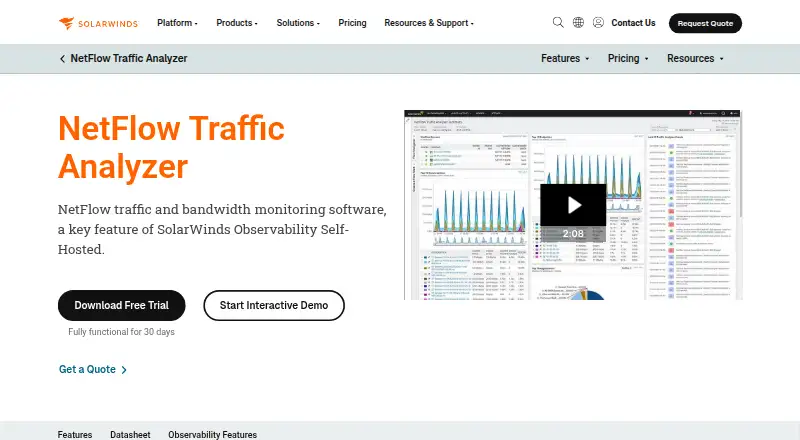
SolarWinds NetFlow Traffic Analyzer monitors traffic patterns and bandwidth use across hybrid and distributed networks. It lets network teams inspect traffic by application, protocol, endpoint, conversation, and IP address group, and identify top talkers, bandwidth-heavy applications, and endpoints. Color-coded graphs, charts, and filters help narrow those views. Drill-down analysis and historical flow data can help isolate high-bandwidth use and investigate unexpected traffic. The analyzer collects Cisco NetFlow v5 and v9, NBAR2, Juniper J-Flow, sFlow, IPFIX, and Huawei NetStream. Flow Navigator supports personalized traffic views and reports, including automatic weekly report delivery. For collection, network devices need to export compatible flow data to the NTA collector. Those devices and their exporting interfaces must also be monitored through SolarWinds Network Performance Monitor. NTA listens for flow data on UDP port 2055 by default, with additional ports configurable. It is described as a key feature of SolarWinds Observability Self-Hosted, which runs behind the firewall. SolarWinds offers a fully functional 30-day free trial. The product is paid, with a custom quote available from Sales; its features are also available as part of SolarWinds Observability Self-Hosted. SolarWinds is headquartered in Austin, Texas, and lists technical support, documentation, training, and a user community of over 200,000 registered members.
Who it suits
It suits network teams that need visibility into bandwidth use, traffic sources, and flow-level detail across hybrid or distributed networks. It is most relevant where devices export supported flow data and are monitored through SolarWinds Network Performance Monitor.
What it does well
- Breaks traffic down by application, protocol, endpoint, and conversation.
- Analyzes several flow formats, including NetFlow, sFlow, and IPFIX.
- Historical flow data helps investigate unexpected traffic.
- Flow Navigator supports scheduled weekly report delivery.
- Offers a fully functional 30-day free trial.
What to know first
- There is no free plan.
- Pricing requires a custom quote from Sales.
- Compatible flow data must be exported to the collector.
- Devices and exporting interfaces must be monitored through SolarWinds Network Performance Monitor.
Limits
There is no free plan. The listed trial lasts 30 days; pricing for the NetFlow Traffic Analyzer plan is available through a custom quote from Sales.
Plans
| Plan | Billed and limits | Price |
|---|---|---|
| NetFlow Traffic Analyzer | Custom quote from Sales · Features also available as part of SolarWinds Observability Self-Hosted | On request |
As solarwinds.com lists them, read 7 Oct 2026. The maker's own page has the final word.
Getting started
- Open the NetFlow Traffic Analyzer website and request pricing from Sales if needed.
- Start the fully functional 30-day free trial.
- Ensure network devices export compatible flow data to the NTA collector.
- Monitor those devices and exporting interfaces through SolarWinds Network Performance Monitor.
- Send flow data to UDP port 2055 by default, or configure additional collection ports.
Verdict
Consider NetFlow Traffic Analyzer if your network team needs detailed flow analysis, bandwidth monitoring, and scheduled traffic reporting. Look elsewhere if you need a free plan or cannot meet its flow-export and Network Performance Monitor prerequisites.
Questions
Does NetFlow Traffic Analyzer have a free plan?
No. A fully functional 30-day free trial is offered.
How much does the product cost?
The plan is billed by custom quote from Sales; no fixed price is listed.
What flow protocols does it analyze?
It collects and analyzes Cisco NetFlow v5 and v9, NBAR2, Juniper J-Flow, sFlow, IPFIX, and Huawei NetStream.
What is required for flow collection?
Devices must export compatible flow data to the collector, and the devices and exporting interfaces must be monitored through SolarWinds Network Performance Monitor.
What is the default collector port?
NTA listens on UDP port 2055 by default. Additional collection ports can be configured.
Is it available as part of another product?
Its features are also available as part of SolarWinds Observability Self-Hosted, which runs behind the firewall.
Facts from SolarWinds NetFlow Traffic Analyzer's own pages
- Collector port
- NTA listens for flow data on UDP port 2055 by default, with additional collection ports configurable. · solarwinds.com, 7 Oct 2026
- Congestion troubleshooting
- Drill-down views and historical flow data help isolate high-bandwidth usage and investigate unexpected traffic. · solarwinds.com, 7 Oct 2026
- Deployment
- The product is described as a key feature of SolarWinds Observability Self-Hosted, which runs behind the firewall. · solarwinds.com, 7 Oct 2026
- Flow protocols
- It collects and analyzes Cisco NetFlow v5 and v9, NBAR2, Juniper J-Flow, sFlow, IPFIX, and Huawei NetStream. · solarwinds.com, 7 Oct 2026
- Founded
- 1999 · solarwinds.com, 28 Sept 2026
- Headquarters
- Austin, Texas, United States · solarwinds.com, 28 Sept 2026
- Prerequisites
- Network devices must export compatible flow data to the NTA collector, and devices and exporting interfaces must be monitored through SolarWinds Network Performance Monitor. · solarwinds.com, 7 Oct 2026
- Purpose
- NetFlow Traffic Analyzer monitors network traffic patterns and bandwidth usage across hybrid and distributed networks. · solarwinds.com, 7 Oct 2026
- Reports
- Flow Navigator creates personalized traffic views and reports and can schedule automatic weekly report delivery. · solarwinds.com, 7 Oct 2026
- Security context
- SolarWinds says its self-hosted observability product is designed to help meet security and compliance needs from behind the firewall. · solarwinds.com, 7 Oct 2026
- Support
- SolarWinds lists technical support, documentation, training, and a user community of over 200,000 registered members. · solarwinds.com, 7 Oct 2026
- Top consumers
- It identifies top talkers, bandwidth-heavy applications, and endpoints, with color-coded graphs, charts, and filters. · solarwinds.com, 7 Oct 2026
- Traffic drill-down
- It lets users inspect network traffic by application, protocol, endpoint, conversation, and IP address group. · solarwinds.com, 7 Oct 2026
- Trial
- The product page offers a fully functional 30-day free trial. · solarwinds.com, 7 Oct 2026
Where SolarWinds NetFlow Traffic Analyzer stands on Freedom251
- Network Traffic Analysis Software#19 of 26