Freedom251 › Presentation Template Libraries
SlidesAcademy
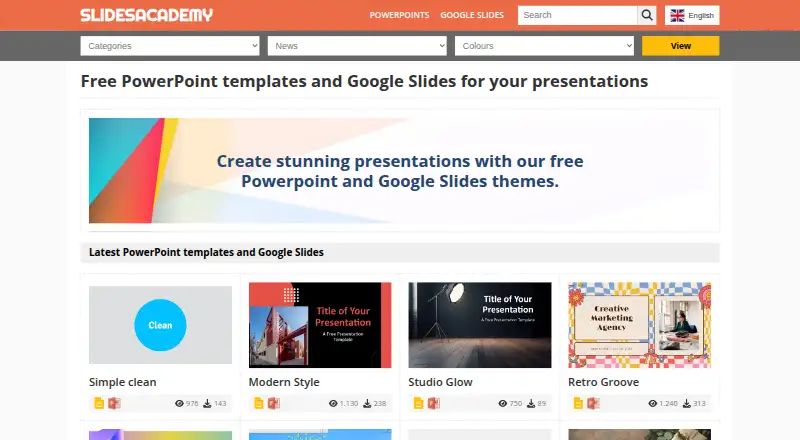
What SlidesAcademy is
SlidesAcademy is a web library of presentation templates for Google Slides and PowerPoint. Its catalog includes themes, backgrounds, graphics, diagrams, text, tables, timelines, planning resources, and metaphors. The listed count is 3,712 templates; the site also describes its library as having over 1,000. Most themes and graphics are editable, and editable diagrams and graphics are optimized for light and dark backgrounds. In Google Slides, selecting a template opens a copy to Google Drive, where you can edit slides or add and remove them. When it hosts a PowerPoint file, SlidesAcademy provides an editable .pptx download; otherwise, its instructions point to the original source. The Open Book template page says an account is not needed for that template and notes support considerations for PowerPoint and Apple Keynote alongside Google Slides. It also advises checking terms, as restrictions may apply. The Free templates plan is listed as free. Use is limited to personal purposes; commercial use is not allowed.
Who it suits
It suits people seeking editable presentation materials for Google Slides or PowerPoint. The listed license is for personal use, not commercial use.
What it does well
- Free plan listed as free
- 3,712 templates listed
- Google Slides and PowerPoint formats
- Most themes and graphics are editable
- Slides can be edited, added, or deleted in Google Slides
What to know first
- Commercial use is not allowed
- Some usage restrictions may apply
- PowerPoint download depends on file availability
Limits
The Free templates plan is limited to personal use and does not allow commercial use. The Open Book template page says usage restrictions may apply.
Plans
| Plan | Billed and limits | Price |
|---|---|---|
| Free templates | Free PowerPoint and Google Slides templates; some usage restrictions may apply | Free |
As slidesacademy.com lists them, read 7 Oct 2026. The maker's own page has the final word.
Getting started
- Open https://slidesacademy.com/en/ in a web browser.
- Choose a template for Google Slides or PowerPoint.
- For Google Slides, open the copy flow to Google Drive.
- Edit, add, or delete slides in Google Slides.
- For PowerPoint, download the editable .pptx when SlidesAcademy hosts the file; otherwise follow its direction to the original source.
- Read the template terms of use before using it.
Verdict
SlidesAcademy offers a broad set of presentation materials for personal use, with Google Slides and PowerPoint formats. Check the terms and whether the specific PowerPoint file is hosted before relying on a template.
Questions
How much does SlidesAcademy cost?
The Free templates plan costs nothing.
Can I use SlidesAcademy templates commercially?
No. The listed license scope is personal, and commercial use is not allowed.
Which presentation platforms are supported?
Templates are offered for Google Slides and PowerPoint. The Open Book page says it is designed for Google Slides with PowerPoint and Apple Keynote support in mind.
How do Google Slides templates work?
Choosing a template opens a copy flow to Google Drive, where you can edit, add, or delete slides.
Can I download a PowerPoint file?
When SlidesAcademy hosts the PowerPoint file, its instructions say it downloads as an editable .pptx. If it does not host the file, users are directed to the original source.
Do I need an account?
The Open Book template page says no login or account creation is required for that template.
Facts from SlidesAcademy's own pages
- Account requirement
- The Open Book template page says no login or account creation is required for that template. · slidesacademy.com, 7 Oct 2026
- Company information
- The opened About page identifies the site as SlidesAcademy but gives no further company details. · slidesacademy.com, 7 Oct 2026
- Customization
- The site says most graphics and themes are editable and customizable, and that editable graphics and diagrams are optimized for light and dark backgrounds. · slidesacademy.com, 7 Oct 2026
- External sources
- If SlidesAcademy does not host a PowerPoint file, its instructions say it directs users to the original source. · slidesacademy.com, 7 Oct 2026
- Formats
- Templates are offered for Google Slides and PowerPoint. · slidesacademy.com, 7 Oct 2026
- Google Slides workflow
- Using a template in Google Slides opens it for copying to the user's Google Drive, where slides can be edited, added, or deleted. · slidesacademy.com, 7 Oct 2026
- Headquarters
- Sant Feliu de Llobregat, Barcelona, Spain · slidesacademy.com, 28 Sept 2026
- Library size
- The site says its library includes over 1,000 presentation templates. · slidesacademy.com, 7 Oct 2026
- Mobile use
- The Open Book template page says it is designed for Google Slides with PowerPoint and Apple Keynote support in mind. · slidesacademy.com, 7 Oct 2026
- PowerPoint workflow
- The download instructions say a PowerPoint template downloads as an editable .pptx file when SlidesAcademy has the file. · slidesacademy.com, 7 Oct 2026
- Product
- SlidesAcademy is a library of free PowerPoint templates and Google Slides themes. · slidesacademy.com, 7 Oct 2026
- Template types
- The library includes themes, backgrounds, graphics, diagrams, text, tables, timelines, planning resources, and metaphors. · slidesacademy.com, 7 Oct 2026
- Trust and security
- The opened Privacy Policy page displays its title but provides no readable policy text in the page content retrieved. · slidesacademy.com, 7 Oct 2026
- Usage terms
- The Open Book page advises users to read the terms of use because restrictions may apply. · slidesacademy.com, 7 Oct 2026
Where SlidesAcademy stands on Freedom251
- Presentation Template Libraries#26 of 34